Planet DigiPres
Archiving Web Content? Take the 2013 NDSA Survey!
The following is a guest post by Abbie Grotke, Library of Congress Web Archiving Team Lead and NDSA Content Working Group Co-Chair.
 Not that kind of web! Spider Web by user .curt on Flickr
Are you or your employer involved in archiving web content? If so, you may be interested in the National Digital Stewardship Alliance’s (NDSA) 2nd biannual survey of U.S. organizations that are actively involved or planning to archive web content. In Fall 2011, the NDSA Content Working Group conducted its first survey of U.S. organizations who were doing or about to start web archiving. We blogged about the results of the survey here on the Signal, and published a report in 2012.
On the two-year anniversary of the original, the NDSA is releasing an updated survey to continue to track the evolution of web archiving programs in the U.S. Our goal in conducting these surveys are to better understand the U.S. web archiving landscape: similarities and differences in programmatic approaches, types of content being archived, tools and services being used, access modes being provided, and emerging best practices and challenges. As more institutions tackle web archiving, this type of information gathering and reporting not only raises awareness in the types of activities underway, but helps those preserving web content make the case for archiving back at their home institutions.
For those of you who took the previous survey, you’ll notice some key differences for the 2013 survey: more streamlined answers based on the free-text responses from the last survey, and an increased focus on policy.
As before, the aggregate responses will be reported to NDSA members and summary results will be shared publicly via this blog and elsewhere.
Any U.S. organization currently engaged in web archiving or in the process of planning a web archive is invited to take the survey – click on this link to get started. If you’d like to preview the survey before answering, we have a PDF of the questions available.
The survey will close on November 30, 2013.
I’d like to take a moment to thank some of my NDSA colleagues who stepped up during the government shutdown to help finalize and prepare the survey while the Library of Congress was closed — particularly Nicholas Taylor at Stanford University Libraries, Jefferson Bailey at METRO, Cathy Hartman from University of North Texas Libraries (and my co-chair on the Content Working Group), Kristine Hanna at the Internet Archive, and Edward McCain at the Reynolds Journalism Institute/University of Missouri Libraries. Thanks to these folks, we are able to get this survey launched today!
Charles Stross on Microsoft Word
Not many people are brilliant writers and also have the technical knowledge to comment on file formats intelligently. When it does happen, it’s worth reading. So I recommend to you Why Microsoft Word Must Die by Charles Stross.
I’ve been on a digital preservation panel with Stross, and he can talk as expertly on the subject as I can. When it comes to Word, he knows a lot more about the format than I do, and he can demolish it more eloquently than I could even if I had the same level of knowledge.
Tagged: Microsoft, software


Preserving.exe Report: Toward a National Strategy for Preserving Software
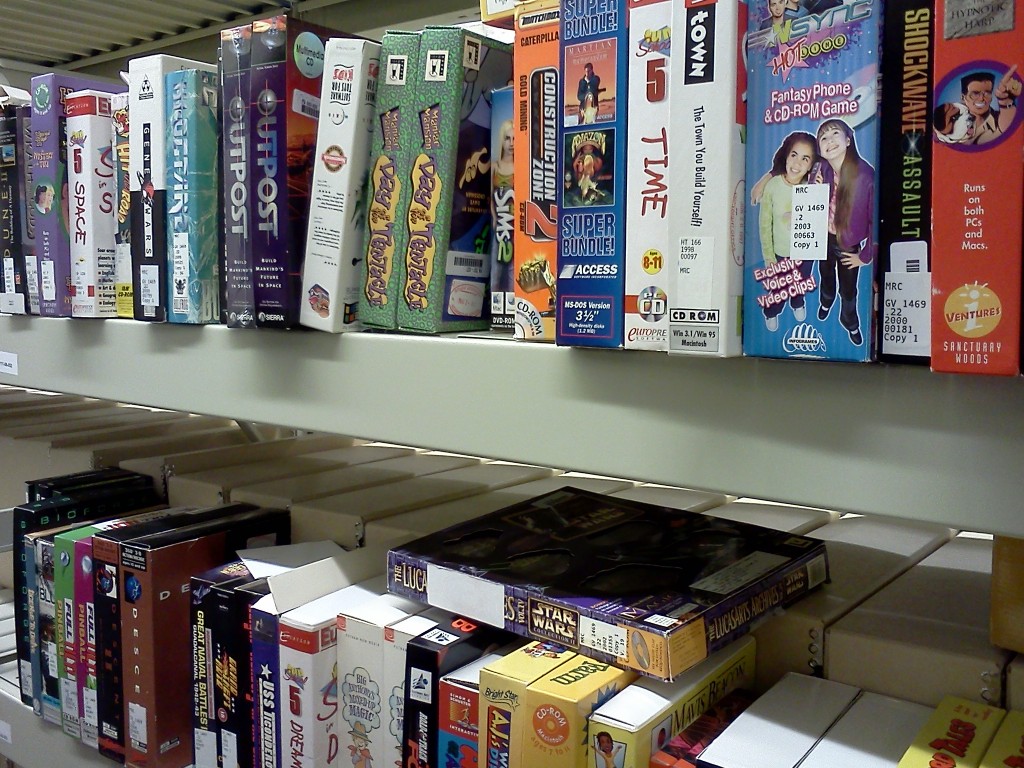
Shelved Software at the Library of Congress National Audio-Visual Conservation Center
Our world increasingly runs on software. From operating streetlights and financial markets, to producing music and film, to conducting research and scholarship in the sciences and the humanities, software shapes and structures our lives.
Software is simultaneously a baseline infrastructure and a mode of creative expression. It is both the key to accessing and making sense of digital objects and an increasingly important historical artifact in its own right. When historians write the social, political, economic and cultural history of the 21st century they will need to consult the software of the times.
I am thrilled to announce the release of a new National Digital Information Infrastructure and Preservation Program report, Preserving.exe: Toward a National Strategy for Preserving Software, including perspectives from individuals working to ensure long term access to software.
Software Preservation SummitOn May 20-21 2013, NDIIPP hosted “Preserving.exe: Toward a National Strategy for Preserving software,” a summit focused on meeting the challenge of collecting and preserving software. The event brought together software creators, representatives from source code repositories, curators and archivists working on collecting and preserving software and scholars studying software and source code as cultural, historical and scientific artifacts.
Curatorial, Scholarly, and Scientific PerspectivesThis report is intended to highlight the issues and concerns raised at the summit and identify key next steps for ensuring long-term access to software. To best represent the distinct perspectives involved in the summit this report is not an aggregate overview. Instead, the report includes three perspective pieces; a curatorial perspective, a perspective from a humanities scholar and the perspective of two scientists working to ensure access to scientific source code.
- Henry Lowood, Curator for History of Science & Technology Collections at Stanford University Libraries, describes three lures of software preservation in exploring issues around description, metadata creation, access and delivery mechanisms for software collections.
- Matthew Kirschenbaum, Associate Professor in the Department of English at the University of Maryland and Associate Director of the Maryland Institute for Technology in the Humanities, articulates the value of the record of software to a range of constituencies and offers a call to action to develop a national software registry modeled on the national film registry.
- Alice Allen, primary editor of the Astrophysics Source Code Library and Peter Teuben, University of Maryland Astronomy Department, offer a commentary on how the summit has helped them think in a longer time frame about the value of astrophysics source codes.
For further context, the report includes two interviews that were shared as pre-reading with participants in the summit. The interview with Doug White explains the process and design of the National Institute for Standards and Technology’s National Software Reference Library. The NSRL is both a path-breaking model for other software preservation projects and already a key player in the kinds of partnerships that are making software preservation happen. The interview with Michael Mansfield, an associate curator of film and media arts at the Smithsonian American Art Museum, explores how issues in software preservation manifest in the curation of artwork.
The term “toward” in the title is importantThis report is not a national strategy. It is an attempt to advance the national conversation about collecting and preserving software. Far from providing a final word, the goal of this collection of perspectives is to broaden and deepen the dialog on software preservation with the wider community of cultural heritage organizations. As preserving and providing access to software becomes an increasingly larger part of the work of libraries, archives and museums, it is critical that organizations recognize and meet the distinct needs of their local users.
In bringing together, hosting, and reporting-out on events like this it is our hope that we can promote a collaborative approach to building a distributed national software collection.
So go ahead and read the report today!
Software Museums (Archive)
During and around the iPRES a couple of discussions sprung up around the topic of proper software archiving and it was part of the DP challenges workshop discussions. With services emerging around emulation as e.g. developed in the bwFLA project (see e.g. the blog post on EaaS demo or Digital Art curation) proper measures need to be taken to make them sustainable from the software side. There are hardware museums around; similar might be desirable too.
Research data, business processes, digital art and generic digital artefacts can often not be viewed or handled simply by themselves, instead they require a specific software and hardware environment to be accessed or executed properly. Software is a necessary mediator for humans to deal with and understand digital objects of any kind. In particular, artefacts based on any one of the many complex and domain specific formats are often best handled by the matching them with the application they were created with. Software can be seen as the ground truth for any file format. It is the software that creates files that truly defines how those files are formatted.
To make old software environments available on an automatable and scalable basis (for example, via Emulation-as-a-Service) proper enterprise-scale software archiving is required. At first look the task appears to be huge because of the large amount of software that has been produced in the past. Nevertheless, much of the software that has been created is standard software, and more or less used all over the world; and there are a lot of low hanging fruit to pick off that would be highly beneficial to preserve and make avaialble. If components of software can be uniquely described, deduplication should also reduce the overall workload significantly. For at least a significant proportion of the software to be covered, licensing might complicate the whole issue a fair amount as different software licensing variants were deployed in different domains and different parts of the world, and current copyright and patent law differs in different jurisdictions in how it applies to older software.
Types of SoftwareInstitutions and users have to decide which software needs to preserved, how and by whom. The answers to these questions will depend on the intended use cases. In simpler cases all that may be needed to render preserved artefacts in emulated original environments could be a few standard office or business environments with standard software. Complex use cases may require very special non-standard, custom-made software components from non-standard sources, like use cases involving development systems or use cases involving the preservation of complex business processes.
Software components required to reproduce original environments for certain (complex) digital objects can be classified in several ways. Firstly, there are the standard software packages like operating systems and off-the-shelf applications sold in (significant) numbers to customers. And secondly there can be different releases and various localized versions (the user interaction part of a software application is often translated to different languages such as in Microsoft Windows or Adobe products) but otherwise the copies are often exactly the same. In general it does not really matter if it is a French, English, or German Word Perfect version being used to interact with a document. But for the user dealing with it or an automated process like the process used for migration-through-emulation the different labeling of menu entries and error messages matters.
The concept of versions is somewhat different for Open Source or Shareware-like software. Often there are many more “releases” available than with commercial software as the software usually gets updated regularly and does not necessarily have a distinct release cycle. Also, different to commercial software, the open source packages feature full localization, as they did not need to distinguish different markets.
In many domains custom made software and user programming plays a significant role. This can be scripts or applications written by scientists to run their analysis on gathered data, run specific computations, or extend existing standard software packages. Or it could be software tools written for governmental offices or companies to produce certain forms or implement and configure certain business processes. Such software needs to be taken care of and stored alongside the preserved base-files of an object in order to ensure they can be accessed and interacted with in the future. The same applies for complex setups of standard components with lots of very specific configurations.
If such standard software is required, it would make sense to be able to assign each instance a unique identifier. This would help to de-duplicate efforts to store copies. Even if a memory institution or commercial service maintains its own copy, it does not necessarily need to replicate the actual bits if other copies are already available somewhere. It may simply be able to manage it’s own licenses and use the bits/software copies provided by a central service. Additionally, it would simplify efforts to reproduce environments in an efficient way.
Some ideas about how to identify and describe software have already been discussed for the upcoming PREMIS 3.0 standard, in particular for the section regarding environments. Suitable persistent identifiers would definitely be helpful for tagging software. Something like ISBNs or the ISSNs that describe books and other media (or DOIs that are becoming ubiquitous for digital artefacts). These tags would be useful for tool registries like TOTEM as well or coudl match to PREMIS PUIDs. There could be three layers of IDing that could become relevant:
- On the most abstract layer a software instance is described as a complete package, e.g. Windows 3.11 US Edition, Adobe Page Maker Version X or Command & Conquer II containing all the relevant installation media, license keys etc. The ID of such a package could be the official product code or derived from it. However when using such an approach it might be difficult to distinguish between hidden updates, for example, during the software archiving experiment at Archives New Zealand we acquired and identified two different package sets of Word Perfect 6.0. So a more nuanced approach may be required.
- At the layer of the different media (relevant only if it is not just one downloaded installation package) each floppy disk or each optical medium (or USB media) could be distinguished. E.g. Windows 3.11 as well as applications like Word Perfect came with specific disks for just the printer drivers, and the CD (1 or 2) in the Command & Conquer game differentiated which adversary in the game you were assigned to.
- At the individual file layer executables, libraries, helper files like font-sets etc. could be distinguished. The number of items in this set is the largest. An approach centered on running a collection of digital signatures of known, traceable software applications is followed e.g. by the NSRL (National Software Reference Library) and may be the most appropriate option for these types of applications.
Usually it is not trivial to map the installed files in an environment to files on the installation medium, as the files typically get packed (compressed in ‘archive’ files) on the medium and a some files get created from scratch during the installation procedure.
Depending on the actual goal, the focus of the IDs will be different. To actually derive what kind of application or operating system is installed on a machine, file level identifiers will be needed. To just reproduce a particular original environment (for e.g. emulation) package level identifiers are more relevant. In some cases it may be useful to address a single carrier, e.g. to automate installation processes of standard environments consisting of an operating system and a couple of applications.
For the description of software and environments it might be useful to investigate what can be learned from commercial software installation handling and lifecycle management. Large institutions and companies have well-defined workflows to create software environments for certain purposes and their approaches may be directly applicable to the long term preservation use case(s).
What should be archived, who are the stakeholders and users and how can the archive be supported?
A model for nearly full-archiving of a domain is the Computer Games Museum in Berlin which receives every piece of computer game which requires an USK, which is the German abbreviation for the Entertainment Software Self-Regulation Body, an organisation which has been voluntarily established by the computer games industry to classify computer games, classification. The collection is supplemented by donations of a wide range of software (operating systems, popular non-gaming applications) and hardware items (computers, gaming consoles, controllers). Thus, the museum has acquired a nearly complete collection of the domain. An upcoming problem is the rising number of browser and online games which never get a representation on a physical medium. Another unresolved issue is the maintenance of the collection. At the moment the museum does not even have enough funds for bitstream preservation and proper cataloguing the collection.
Archiving (of standard software) already takes place, for example, at the Computer History Museum, the Australian National Library, the National Archives of New Zealand or the Internet Archive to mention a few. Unfortunately, the activities are not coordinated. Both the mostly “dark archives” of memory institutions and the online sites for deprecated software of questionable origin are not sufficient for a sustainable strategy. Nevertheless, landmark institutions like national libraries and archives could be a good place to archive software in a general way. Nevertheless, the archived software is only of any use if it is properly described with standard metadata. Ideally, the software repositories would provide APIs to communicate with a central software archive and attach services to it. The service levels could differ from just offering metadata information to offering access to complete software packages. As an addition to the basic services museums could offer interactive access to selected original environments, as there is a significant difference between having a software package just bit-stream preserved and have it available to explore and test it for a particular purpose interactively. Often, specific, implicit knowledge is required to get some software item up and running. So keeping instances running permanently would have a great benefit. Archiving institutions like museums could try to build online communities around platforms and software packages. Live ‘’exhibition” of software helps community exchange and can attract users with knowledge who would be otherwise difficult to find.
Software museums can help to reduce duplicated effort to archive and describe standard software. It can at least help that not every archive needs to store multiple copies of standard software but simply can refer to other repositories. Software museums or archives could become brokers for (obsolete) software licenses. They could serve as a place to donate software (from public, private entities), firmware and platform documentation. Such institutions could simplify the proceedings for a software company to take care of their digital legacy. A one-stop institution might be much more attractive to software vendors and archival institutions than the possible alternative of having multiple parties negotiating license terms of legacy packages with multiple stakeholders (Software companies might have a positive attitude towards such a platform or lawmakers could be persuaded to push it a bit). Software escrow services (discussed e.g. within the TIMBUS EU project) can complement these activities. A museum can operate in different modes like in a non-for-profit branch for public presentation, community building, education etc. and commercial branch to lend/lease out software to actually reproduce environments in emulators for commercial customers.
The situation could be totally different for research institutions and users of custom made software. Such packages do not necessarily make sense in a (public) repository. In such cases the question of, how the licensing will be handled arises. If obsolete, they could be handed over to the archive managing the research primary data.
Another issue is the handling of software versions. Products are updated until announced end-of-live. Would it be necessary to keep every intermediate version or concentrate on general milestones. An operating system like ”Windows XP” (32bit) was officially available in several flavors (like ”Home” or ”Professional”) from 2001 till 2014. In many cases a ”fuzzy matching” would be acceptable as a certain software package runs properly in all versions. Other software might require a very specific version to function properly. This needs to be addressable (and could be matched to the appropriate PRONOM environment identifiers). Plus, there are a couple of preservation challenges in the software lifecylce.
There are a number of questions which arise when creating or running a software archive or museum:
- On which level should a software archive be run: Institutional (e.g. for larger (national) research institutions, state or federal or global level or should a federated approach be favoured)?
- Does it make sense (at all) to run a centralized software archive in a relevant size, assuming that for modern, complex scientific environments, the software components are much too individual? What kind of software would be useful in such an archive? Which versions should be kept?
- Would it be possible to establish a PRONOM-like identifier system (agreed upon and shared among the relevant memory institutions)? Or use the DOI system to provide access to the base objects?
- How, through which APIs should software and/or metadata be offered (or ingested)?
- How should the software archive adapt to the ever changing form of installation media from tapes, floppies to optical media of different types to solely network based installations?
- Would it be possible to run the software archive as a backend, where locally ingested software is stored in the end?
- Is the advantage gain of centralizing knowledge and storage of standard software components big enough to outweigh the efforts required to run such an archive?
- Do proper software license and handling models exist for such an archive, like donation of licenses, taking over abandoned packages, escrow services? Would it be possible to bridge the diverse interests of diverse users of a diverse range of software and software producers?
- Would there be advantages in running such an archive as/in a non-profit organisation?/What business model would make most sense for such an organisation?
BlogForever platform released
The BlogForever platform is one of the major results of the BlogForever project. It is a simple weblog digital archiving platform to preserve weblogs and ensure their authenticity, integrity, completeness, usability, and long term accessibility as a valuable cultural, social, and intellectual resource.
This release consists of the BlogForever repository and two blog spiders, a free version based on .NET and an OSS version based on python.
BlogForever Repository Component source code
http://invenio-software.org/repo/blogforever/, deployment instructions (PDF)
BlogForever Free Spider binaries
Spider, SpiderBackendApp, SpiderWebApp, (RAR files), deployment instructions (PDF)
BlogForever OSS Spider source code
bfspider.tar.bzip2 (82MB), README
Measuring Bigfoot
My previous blog Assessing file format risks: searching for Bigfoot? resulted in some interesting feedback from a number of people. There was a particularly elaborate response from Ross Spencer, and I originally wanted to reply to that directly using the comment fields. However, my reply turned out to be a bit more lengthy than I meant to, so I decided to turn it into a separate blog entry.
Numbers first?Ross overall point is that we need the numbers first; he makes a plea for collecting more format-related data, and adding numbers to these. Although these data do not directly translate into risks, Ross argues that it might be able to use these data to address format risks at a later stage. This may look like a sensible approach at first glance, but on closer inspection there’s a pretty fundamental problem, which I’ll try to explain below. To avoid any confusion here, I will be speaking of “format risk” here in the sense used by Graf & Gordea, which follows from the idea of “institutional obsolescence” (which is probably worth a blog post by itself, but I won’t go into this here).
The risk modelGraf & Gordea define institutional obsolescence in terms of “the additional effort required to render a file beyond the capability of a regular PC setup in particular institution”. Let’s call this effort E. Now the aim is to arrive at an index that has some predictive power of E. Let’s call this index RE. For the sake of the argument it doesn’t matter how RE is defined precisely, but it’s reasonable to assume it will be proportional to E (i.e. as the effort to render a file increases, so does the risk):
RE ∝ E
The next step is to find a way to estimate RE (the dependent variable) as a function of a set of potential predictor variables:
RE = f(S, P, C, … )
where S = software count, P = popularity, C = complexity, and so on. To establish the predictor function we have two possibilities:
- use a statistical approach (e.g. multiple regression or something more sophisticated);
- use a conceptual model that is based on prior knowledge of how the predictor variables affect RE.
The first case (statistical approach) is only feasible if we have actual data on E. For the second case we also need observations on E, if only to be able to say anything about the model’s ability to predict RE (verification).
No observed data on E!Either way, the problem here is that there’s an almost complete lack of any data on E. Although we may have a handful of isolated ‘war stories’, these don’t even come close to the amount of data that would be needed to support any risk model, no matter whether it is purely statistical or based on an underlying conceptual model1. So how are we going to model a quantity for which we do not have any observed data in the first place? Or am I overlooking something here?
Looking at Ross’s suggestions for collecting more data, all of the examples he provides fall into the potential (!) predictor variables category. For instance, prompted by my observation on compression in PDF, Ross suggests to start analysing large collections of PDFs to establish patterns on the occurrence of various types compression (and other features), and attach numbers to them. Ross acknowledges that such numbers by themselves don’t tell you if PDF is “riskier” than another format, but he argues that:
once we’ve got them [the numbers], subject matter experts and maybe some of those mathematical types with far greater statistics capability than my own might be able to work with us to do something just a little bit clever with them.
Aside from the fact that it’s debatable whether, in practical terms, the use of compression is really a risk (is there any evidence to back up this claim?), there’s a more fundamental issue here. Bearing in mind that, ultimately, the thing we’re really interested in here is E, how could collecting more data on potential predictor variables of E ever help here in the near absence of any actual data on E? No amount of clever maths or statistics can compensate for that! Meanwhile, ongoing work on the prediction of E mainly seems to be focused on the collection, aggregation and analysis of potential predictor variables (which is also illustrated by Ross’s suggestions), even though the purpose of these efforts remains largely unclear.
Within this context I was quite intrigued by the grant proposal mentioned by Andrea Goethals which, from the description, looks like an actual (and quite possibly the first) attempt at the systematic collection of data on E (although like Andy Jackson said here I’m also wondering whether this may be too ambitious).
Obsolescence-related risks versus format instance risksOn a final note, Ross makes the following remark about the role of tools:
[W]ith tools such as Jpylyzer we have such powerful ways of measuring formats – and more and more should appear over time.
This is true to some extent, but a tool like jpylyzer only provides information on format instances (i.e. features of individual files); it doesn’t say anything about preservation risks of the JP2 format in general. The same applies to tools that are are able to detect features in individual PDF files that are risky from a long-term preservation point of view. Such risks affect file instances of current formats, and this is an area that is covered by the OPF File Format Risk Registry that is being developed within SCAPE (it only covers a limited number of formats). They are largely unrelated to (institutional) format obsolescence, which is the domain that is being addressed by FFMA. This distinction is important, because both types of risks need to be tackled in fundamentally different ways, using different tools, methods and data. Also, by not being clear about which risks are being addressed, we may end up not using our data in the best possible way. For example, Ross’s suggestion on compression in PDF entails (if I’m understanding him correctly) the analysis of large volumes of PDFs in order to gather statistics on the use of different compression types. Since such statistics say little about individual file instances, a more practically useful approach might be to profile individual files instances for ‘risky’ features.
-
On a side note even conceptual models often need to be fine-tuned against observed data, which can make them pretty similar to statistically-derived models. ↩
Open-source Database Preservation Toolkit released!
Published Preservation Policies
One of the activities in the European project SCAPE is to create a catalogue of policy elements. At the last iPRES conference we explained our work and you can read about it . During our activities we started collecting existing, published policies and we have now put the current set on a wiki http://wiki.opf-labs.org/display/SP/Published+Preservation+Policies Looking at the results of your colleagues might help to create or finalize your own preservation policies. As I said during my presentation at iPRES 2013, there are far more organizations dealing with digital preservation than published preservation policies on the internet – at least based on what we found!
If your organization has a digital preservation policy and you want to see yours in this list as well, please send an email to [email protected] and it will be added.
Tools come and go, effort must be ongoing
In a comment on a JHOVE bug, I said offhandedly that it’s approaching the end of its life. This caused a certain amount of concern in Twitter discussions. Andy said that software tools are one of the best ways to “preserve specific, reproducible knowledge about processes.” I don’t think dropping support of a rather dated tool is a big concern, though, as long as the code doesn’t vanish.
A software application is good for a certain number of years before it needs to be either left as legacy code or completely rewritten. Throwing out code and starting over takes a lot of effort, but it can result in much better code. I started on JHOVE in 2003 as a contractor to the Harvard University Libraries. After a few years it became clear that some of the design decisions weren’t ideal. Its all-or-nothing approach and its tendency to give up after the first error have long been obvious problems. The PDF module is a kludge built on a crock, and that’s without even talking about its profiles. The TIFF module, on the other hand, has a fair amount of elegance.
JHOVE2 was supposed to be the successor to JHOVE. Its creators learned from JHOVE and produced a better design. What they didn’t have was enough time and money to cover all the formats that JHOVE covered. I’ve continued to work on JHOVE because I know it inside and out. Someone else could pick up the work, but it might make more sense for a newcomer to the code to join the JHOVE2 effort instead. However, Maurice noted on Twitter that there hasn’t been much activity lately on JHOVE2 issues.
Both JHOVE and JHOVE2 were funded under grants. When the grant money ended, progress slowed down. The one-time grant model is the wrong way to fund preservation software. It’s an ongoing effort; new formats arise and old ones change, and there are always bugs to fix. What I’d like to see happen is for major libraries in the US to create an ongoing consortium for preservation work, similar to the Planets project in Europe. Or better yet, a consortium bringing together libraries all over the world. It wouldn’t take a lot from any individual institution. Its job would be to maintain information, preservation tools, test suites, and so on, on an ongoing basis. Instead of rushing to create a tool and then leaving it to freelancers like (formerly) me to maintain, it would support maintenance of tools for as long as it made sense and creation of new ones when it’s appropriate.
My voice isn’t enough to call anything like this into existence, but I can hope.
Tagged: JHOVE, preservation, software


DPOE Train the Trainer, Alaska Edition
The following is a guest post by Jeanette Altman, a Digital Projects Professional at the University of Alaska Fairbanks.
For many Alaskans, it’s not uncommon to be just slightly out of step with the rest of America. Things that might be easily obtainable Outside (that’s the Lower 48 to you) come at a premium here. Free shipping? Not to Alaska!
So when some of us here at the University of Alaska Fairbanks’ Elmer E. Rasmuson Library first got wind of the Library of Congress’ Digital Preservation Outreach and Education program’s Train the Trainer workshops, we asked, “When are you expanding to include Alaska?” After receiving the disappointing but altogether unsurprising news that there were no such plans, George Coulbourne, Executive Program Officer at the Library of Congress, offered us an opportunity for a collaborative partnership. One year later, Train the Trainer, Alaska Edition, was born.
Now in its third year, DPOE seeks to foster national outreach and education about digital preservation, using a Train the Trainer model to reach as many people as possible. Participants are trained in DPOE’s baseline curriculum, and then given the tools they need to build their own teaching network after they return to their communities.

Participants in the Aug. 27-29 DPOE Alaska Train the Trainer Workshop. Photo Credit: Catherine Williams
The August 27-29 workshop in Fairbanks, Alaska, was hosted by the University of Alaska Fairbanks’ Elmer E. Rasmuson Library, and made possible by the generosity of the Alaska State Library and the Institute of Museum and Library Services. Participants throughout the state of Alaska were flown in to Fairbanks for the three-day training. Twenty-four participants now join the growing network of 87 “topical trainers” across the United States, and are the first in the state of Alaska.
Rasmuson Library opened the application process to Alaska residents in May of 2013. Participants were flown in from various regions of Alaska such as Kotzebue, Igiugig, and Skagway, and represented a myriad of organizations including the National Park Service, Alaskan tribal libraries, cultural foundations, and various museums and libraries.
“I so enjoyed participating in the workshop, and feel invigorated by all that I learned over the three day event,” said Angie Schmidt, a workshop participant and film archivist with the Alaska Film Archives. “Being able to interact and form contacts with leaders from the Library of Congress and other institutions, as well as colleagues from around the state was especially valuable. The framework provided for initiating and carrying through on digital preservation projects will be so beneficial to us all in coming months and years.”
On the first day of the training, six groups were formed to focus on each of the DPOE modules: Identify, Select, Store, Protect, Manage and Provide. The diversity of the participant population was a valuable addition overall, as each group brought aspects of their cultural heritage and experience to their presentations. The workshop provided time for networking and sharing of resources and experience, which has already led to further collaboration between Rasmuson Library and other state organizations. We hope that we can use this event as a starting point to find the right partners and funders to build out a digital preservation community in Alaska, including more Train the Trainer sessions, technical skills training, and investments in infrastructure.
“Alaska now has their first group of trained digital preservation practitioners,” Coulbourne noted in the event’s closing. “You all have the unique potential to collaborate across the state and use your newly acquired skills to enhance your communities’ efforts to preserve and make available the rich cultural heritage and treasures held by the Native Alaskan people.”
Robin Dale of LYRASIS, Mary Molinaro of the University of Kentucky and Jacob Nadal of the Brooklyn Historical Society continued their tradition of serving as lead or “anchor” instructors. Their generosity, their organizations’ commitment, and the Library of Congress focus on this national effort allowed the DPOE Train the Trainer Program to be offered to attendees from remote areas of Alaska who otherwise may not have been able to attend this critical skill building program in digital stewardship.
It was obvious to me that one of DPOE’s most valuable attributes is cost-effectiveness. The cultural heritage community needs quality training at a low cost. Digital preservation is a critical skill set, but training current staff is often too expensive for smaller institutions or states such as ours where accessibility to in-person training is very challenging if not impossible during certain times of the year. This program has helped the Rasmuson Library staff to work with the state’s professional and Native Alaskan organizations to preserve our rich history, folklore, and traditions in digital form. I hope the community formed at this training event will raise the level of digital preservation practice, forge new partnerships, and bring more Alaskans and their valuable collections, up to speed with digital stewardship.
Assessing file format risks: searching for Bigfoot?
Last week someone pointed my attention to a recent iPres paper by Roman Graf and Sergiu Gordea titled “A Risk Analysis of File Formats for Preservation Planning“. The authors propose a methodology for assessing preservation risks for file formats using information in publicly available information sources. In short, their approach involves two stages:
- Collect and aggregate information on file formats from data sources such as PRONOM, Freebase and DBPedia
- Use this information to compute scores for a number of pre-defined risk factors (e.g. the number of software applications that support the format, the format’s complexity, its popularity, and so on). A weighted average of these individual scores then gives an overall risk score.
This has resulted in the “File Format Metadata Aggregator” (FFMA), which is an expert system aimed at establishing a “well structured knowledge base with defined rules and scored metrics that is intended to provide decision making support for preservation experts“.
The paper caught my attention for two reasons: first, a number of years ago some colleagues at the KB developed a method for evaluating file formats that is based on a similar way of looking at preservation risks. Second, just a few weeks ago I found out that the University of North Carolina is also working on a method for assessing “File Format Endangerment” which seems to be following a similar approach. Now let me start by saying that I’m extremely uneasy about assessing preservation risks in this way. To a large extent this is based on experiences with the KB-developed method, which is similar to the assessment method behind FFMA. I will use the remainder of this blog post to explain my reservations.
Criteria are largely theoreticalFFMA implicitly assumes that it is possible to assess format-specific preservation risks by evaluating formats against a list of pre-defined criteria. In this regard it is similar to (and builds on) the logic behind, to name but two examples, Library of Congress’ Sustainability Factors and UK National Archives’ format selection criteria. However, these criteria are largely based on theoretical considerations, without being backed up by any empirical data. As a result, their predictive value is largely unknown.
Appropriateness of measuresEven if we agree that criteria such as software support and the existence of migration paths to some alternative format are important, how exactly do we measure this? It is pretty straightforward to simply count the number of supporting software products or migration paths, but this says nothing about their quality or suitability for a specific task. For example, PDF is supported by a plethora of software tools, yet it is well known that few of them support every feature of the format (possibly even none, with the exception of Adobe’s implementation). Here’s another example: quite a few (open-source) software tools support the JP2 format, but for this many of them (including ImageMagick and GraphicsMagick) rely on JasPer, a JPEG 2000 library that is notorious for its poor performance and stability. So even if a format is supported by lots of tools, this will be of little use if the quality of those tool are poor.
Risk model and weighting of scoresJust as the employed criteria are largely theoretical, so is the computation of the risk scores, the weights that are assigned to each risk factor, and they way the individual scores are aggregated into an overall score. The latter is computed as the weighted sum of all individual scores, which means that a poor score on, for example, Software Count can be compensated by a high score on other factors. This doesn’t strike me as very realistic, and it is also at odds with e.g. David Rosenthal’s view of formats with open source renderers being immune from format obsolescence.
Accuracy of underlying dataA cursory look at the web service implementation of FFMA revealed some results that make me wonder about the data that are used for the risk assessment. According to FFMA:
- PNG, JPG and GIF are uncompressed formats (they’re not!);
- PDF is not a compressed format (in reality text in PDF nearly always uses Flate compression, whereas a whole array of compression methods may be used for images);
- JP2 is not supported by any software (Software Count=0!), it doesn’t have a MIME type, it is frequently used, and it is supported by web browsers (all wrong, although arguably some browser support exists if you account for external plugins);
- JPX is not a compressed format and it is less complex than JP2 (in reality it is an extension of JP2 with added complexity).
To some extent this may also explain the peculiar ranking of formats in Figure 6 of the paper, which marks down PDF and MS Word (!) as formats with a lower risk than TIFF (GIF has the overall lowest score).
What risks?It is important that the concept of ‘preservation risk’ as addressed by FFMA is closely related to (and has its origins in) the idea of formats becoming obsolete over time. This idea is controversial, and the authors do acknowledge this by defining preservation risks in terms of the “additional effort required to render a file beyond the capability of a regular PC setup in [a] particular institution“. However, in its current form FFMA only provides generalized information about formats, without addressing specific risks within formats. A good example of this is PDF, which may contain various features that are problematic for long-term preservation. Also note how PDF is marked as a low-risk format, despite the fact that it can be a container for JP2 which is considered high-risk. So doesn’t that imply that a PDF that contains JPEG 2000 compressed images is at a higher risk?
Encyclopedia replacing expertise?A possible response to the objections above would be to refine FFMA: adjust the criteria, modify the way the individual risk scores are computed, tweak the weights, change the way the overall score is computed from the individual scores, and improve the underlying data. Even though I’m sure this could lead to some improvement, I’m eerily reminded here of this recent rant blog post by Andy Jackson, in which he shares his concerns about the archival community’s preoccupation with format, software, and hardware registries. Apart from the question whether the existing registries are actually helpful in solving real-world problems, Jackson suggests that “maybe we don’t know what information we need“, and that “maybe we don’t even know who or what we are building registries for“. He also wonders if we are “trying to replace imagination and expertise with an encyclopedia“. I think these comments apply equally well to the recurring attempts at reducing format-specific preservation risks to numerical risk factors, scores and indices. This approach simply doesn’t do justice to the subtleties of practical digital preservation. Worse still, I see a potential danger of non-experts taking the results from such expert systems at face value, which can easily lead to ill-judged decisions. Here’s an example.
KB exampleAbout five years some colleagues at the KB developed a “quantifiable file format risk assessment method”, which is described in this report. This method was applied to decide which still image format was the best candidate to replace the then-current format for digitisation masters. The outcome of this was used to justify a change from uncompressed TIFF to JP2. It was only much later that we found out about a host of practical and standard-related problems with the format, some of which are discussed here and here. None of these problems were accounted for by the earlier risk assessment method (and I have a hard time seeing how they ever could be)! The risk factor approach of GGMA is covering similar ground, and this adds to my scepticism about addressing preservation risks in this manner.
Final thoughtsTaking into account the problems mentioned in this blog post, I have a hard time seeing how scoring models such as the one used by FFMA would help in solving practical digital preservation issues. It also makes me wonder why this idea keeps on being revisited over and over again. Similar to the format registry situation, is this perhaps another manifestation of the “trying to replace imagination and expertise with an encyclopedia phenomenon? What exactly is the point of classifying or ranking formats according to perceived preservation “risks” if these “risks” are largely based on theoretical considerations, and are so general that they say next to nothing about individual file (format) instances? Isn’t this all a bit like searching for Bigfoot? Wouldn’t the time and effort involved in these activities be better spent on trying to solve, document and publish concrete format-related problems and their solutions? Some examples can be found here (accessing old Powerpoint 4 files), here (recovering the contents of an old Commodore Amiga hard disk), here (BBC Micro Data Recovery), or even here (problems with contemporary formats)?
I think there could also be a valuable role here for some of the FFMA-related work in all this: the aggregation component of FFMA looks really useful for the automatic discovery of, for example, software applications that are able to read a specific format, and this could be could be hugely helpful in solving real-world preservation problems.
Preservation Topics: Preservation RisksFormat RegistryLet’s benchmark our Hadoop clusters (join in!)
Introduction
For our evaluations within SCAPE it would be useful to have the ability to quantitatively measure the abilities of the Hadoop clusters available to us, to allow results from each cluster to be compared.
Fortunately as part of the standard Hadoop distribution there are some examples included that can be run as tests. Intel has produced a benchmarking suite – HiBench – that uses those included Hadoop examples to produce a set of results.
There are various aspects of performance that can be assessed. The main ones being:
- CPU loaded workflows (e.g. file format migration) where the workflow speed is limited by the CPU processing available
- I/O loaded workflows (e.g. identification/characterisation) where the workflow speed is limited by the I/O bandwidth available
For the testing of our cluster I used HiBench 2.2.1. I made some notes about getting it to run that should be useful (see below). Apart from the one change described below in the notes, there was no need to edit or change the code.
In SCAPE testbeds we are running various workflows on various clusters. However, individual workflows tend to be run on only one cluster. Running a standard benchmark on each Hadoop installation may allow us to better compare and extrapolate results from the different testbed workflows.
Notes – These are only required to be done on the node where HiBench is run from.
- JAVA_HOME is needed by some tests – I set this using “export JAVA_HOME=/usr/lib/jvm/j2sdk1.6-oracle/”.
- For the kmeans test I changed the HADOOP_CLASSPATH line in “kmeans/bin/prepare.sh” to “export HADOOP_CLASSPATH=`mahout classpath | tail -1`” as it was unable to run without that change; mahout already being in the path.
- The nutchindexing and bayes tests required a dictionary to be installed on the node that HiBench was started from – I installed the “wbritish-insane” package.
Caveats
Some tests use less map/reduce slots than are available and therefore are not that useful for comparison as we want to max out the cluster. For example, the kmeans tests only used 5 map slots.
Results
I have created a page on the SCAPE wiki where I have put the results from our cluster: “Benchmarking Hadoop installations”. I invite and encourage you to run the same tests above and add them to the wiki page. Running the tests was much quicker than I thought it might be – it took less than a morning to setup and execute.
To get a better understanding of which benchmarks are more/less appropriate I propose we first get some metrics from all the HiBench tests across different clusters. In future we may choose to refine or change the tests to be run but this is just a start of a process to better understand how our Hadoop clusters perform. It’s only through you participating that we will get useful results, so please join in!
Preservation Topics: SCAPEJHOVE 1.11
JHOVE 1.11 is now available at
Thanks to Maurice de Rooij for helping to debug the Windows batch files.
Tagged: JHOVE, preservation, software


SCAPE Software Needs You
One of the Open Planets Foundation’s main roles in the SCAPE project is to provide stewardship for, and ensure longevity of the SCAPE software outputs.
The SCAPE project is committed to producing open source software that is available to the wider community on GitHub, with clear licence terms and appropriate documentation, at an early stage in development.
While the above steps are important and helpful in encouraging other developers to download a project’s source code, compile it, and try the software, this isn’t an everyday activity for the less geeky members of the digital preservation community. Software in this state is also unlikely to meet with the approval of an institution’s IT Operations / Support section.
What’s really required for software longevity is an active community of users who:
Use the software for real world activities in their day to day work.
Report bugs and request enhancements on the project’s issue tracker.
Contribute to community software documentation.
So how do we bridge the gap between our current developer-ready software, and software that non-geeks find easy to install and use?
Over October there will be a sustained effort to package, document and publish SCAPE software for download by anybody who wants to try it. If that sounds like you then read on.
Where can I find the SCAPE software?
We have compiled a list of tools that have been developed or extended as part of the SCAPE Project: http://www.scape-project.eu/tools. Currently our software is on the OPF’s GitHub page, though if you’re not comfortable with source code this might not prove very helpful. To help you make sense of what’s on the GitHub page the OPF have created a project health check page, which distills the information a little and provides helpful links to the projects’ README and LICENSE files. This page is still a work in progress, so if there’s some information you’d like to see on it you can raise an issue on GitHub.
How do I know that the software builds?
All SCAPE software should have a Continuous Integration build that runs on the Travis-CI site, this means that the software is built every time somebody checks in a change to the source code in GitHub. If the build fails the developer is informed, and corrects the problem as soon as possible. Every project listed on the project health check site has one of these graphics:


indicating the result of the most recent attempt to build the project on Travis, or informs you that a Travis build couldn’t be found. Click on the image and you’ll be taken to the project’s Travis page if you’re interested in the gory details.
On top of these CI builds, the OPF runs a Jenkins server that performs nightly builds of the software. The aim of these builds is to analyse the code quality using Sonar, an open code QA platform.
So how do I download and use SCAPE software?
Which brings us round to October, where we’ll be fitting the final piece of the puzzle. The real aim of the nightly builds is to build installable packages to be downloaded by you. These packages will be debian apt packages, installable on debian based linux distributions including ubuntu, mint, and of course debian itself.
We’ll be creating stable release packages for download from the OPF’s Bintray page, and overnight “snapshot” builds of the current project at a to be decided location. Keep an eye @openplanets and @scapeproject for news and download links over the coming month.
But I use Windows, Mac OS, or another linux packaging system.
Fear not, all is not lost. We’ve chosen debian based linux distros first because:
it simplifies licensing issues for build machines and virtual test and demonstration environments.
debian based distros are among the most widely used linux distributions.
Hadoop, the engine that runs SCAPE’s scalable platform, has historically not played well with Windows, although this is no longer such a problem.
Some of the software will run on other platforms easily, Jpylyzer is available for Windows. Others may require a little more work, but if there’s interest and it’s practical we’ll do our best. We’re trying to establish a community of users, not exclude people.
So that’s why SCAPE software needs you, hopefully as much as you need SCAPE software.
Preservation Topics: PackagingSCAPEContent Matters: An Interview with Edward McCain of the Reynolds Journalism Institute.
For this installment of the Content Matters interview series of the National Digital Stewardship Alliance Content Working Group I interviewed Edward McCain, digital curator of journalism at the Donald W. Reynolds Journalism Institute and University of Missouri Libraries. Missouri University Libraries joined the NDSA this past summer.

Edward McCain. Photo by Jennifer Nelson/RJI.
Ashenfelder: What is RJI’s relationship to the Missouri University School of Journalism?
McCain: RJI is a sort of sister organization of the University of Missouri School of Journalism. We work closely with the faculty and staff there. The J-School produces the journalists of the future and RJI is a think tank that works to insure and help direct the future of journalism.
Ashenfelder: You said that one of the motivations for RJI joining the NDSA was the Columbia Missourian’s loss of 15 years of digital newspaper archives in a server crash. Can you tell us about that event and why this content is so important to preserve?
McCain: The Columbia Missourian is a daily newspaper operated by the University of Missouri School of Journalism that has served this mid-Missouri community since 1908.
According to 2006 and 2008 reports by Victoria McCargar, a 2002 Missourian server crash wiped out fifteen years of text and seven years of photos. The archive was contained in an obsolete software package that effectively prevented cost-effective retrieval. The content that was lost represents a kind of “memory hole,” albeit not the intentional variety described in Orwell’s “1984.”
The disappearance of 15 years of news, birth announcements, obituaries and feature stories about the happenings in any community represents a loss of cultural heritage and identity. It also has an effect on the news ecosystem, since reporters often depend on the “morgue”- newspaper parlance for their library-to add background and context to their stories.
In other parts of the information food chain, radio and television newscasts often rely on newspapers as the basis for their efforts. This, in turn, can have an effect on the democratic process, since the election process benefits from an accurate record of the candidates’ words and actions. All this lends credence to Washington Post Editor Phil Graham’s statement that journalism is “a first rough draft of history.”
Ashenfelder: You began your career as a photojournalist. How did you get into library science?
McCain: I earned my Bachelor of Journalism degree here at Mizzou and worked in the field for over 30 years, operating my own business for the past twenty. One of McCain Photography’s profit centers has been and continues to be the sale of stock photography, which is based on my image archive.
I eventually found myself reading about controlled vocabularies, databases, metadata and other library science concepts in my spare time. I enjoyed the challenge of structuring information in a way that adds value to content. One day I called the University of Arizona’s School of Information Resources and Library Science program, and was connected to Dr. Peter Botticelli. I asked him a lot of questions. That phone conversation, plus the fact that the SIRLS Masters degree could be combined with the Digital Information Management (DigIn) certificate program, helped me decide to take the leap back into academia.
Ashenfelder: And then you came back to Missouri and joined RJI. What do you bring to RJI as its new digital curator?
McCain: From my perspective, the most important qualities I bring are imagination, the spirit of entrepreneurship and an ability to get things done. All human endeavors begin with a dream, the ability to visualize new possibilities. I’ve been a successful businessman, but more important is what I’ve learned over the years: the only failure is not owning your mistakes and learning from them so you can do better next time. To me, accomplishing things is often about having clear priorities and not caring who gets the credit; keeping egos (including my own) out of the way.
Those qualities, combined with my knowledge and experience as a journalist, photographer, software developer, businessman and library scientist all come into play in my new position. I’m still a bit amazed that MU Libraries and the Reynolds Journalism Institute created what I consider the perfect position for my skill set and interests at just the right time. And that as a result, I found my dream job.
Ashenfelder: The system you want to create will be able to archive the work of journalists from the newspaper, radio and TV. Can you broadly describe some of the requirements for such a system? What will it need to do in order to serve all of its stakeholders?
McCain: To be clear, we’re still in the embryonic phase of the software development process and we have a lot of research to do in terms of functional and technical requirements. It does seem likely that the framework will have to be modular, extensible and generally able to play well with others.
Obviously, the system will need to accommodate a wide range of file formats and packages during and across the processes needed during the life cycle of digital objects. I believe that we should be able to combine and build on existing open-source platforms to achieve this and more.
From early conversations with the three local media stakeholders, I imagine that that they are going to be focused on search functionality and speed. That means that they want to find relevant content quickly and access and integrate it into their workflow seamlessly.
We are going to spend quite a bit of time optimizing search and workflow issues but once we have a handle on those issues, there will be opportunities for collaboration within and between all three media outlets that will improve their efficiency and enhance the experience for their respective audiences.
Ashenfelder: One of your first tasks is to create a plan for such a system. What research are you doing as you develop that plan?
McCain: The problems surrounding preservation of and access to digital news archives stem from a combination of frequently changing factors. I’m employing an approach adapted from the Build Initiative, which has successfully produced change in the area of education.
The Build Initiative framework is based on change theory and focuses on five broad interconnected elements: context, components, connections, infrastructure and scale. Having this kind of framework allows me to keep the big picture in mind when making decisions.
For example, one of our components provides a new business model for digital news archives. In order to successfully support this service, we need to work in the infrastructure area to create the open-source software required to implement the new model. As in most real-life systems, there are many interconnections between these components. The key is to identify segments where positive outcomes in one realm can spread synergistically into others and continue to build on those successes.
Ashenfelder: You said you would like to share RJI’s system with other people, especially smaller towns and smaller institutions, so their history won’t be lost. Can you please tell us more about that?
McCain: Journalism is struggling to find sustainable and profitable business models. Print advertising revenue is less than half of what it was in 2006 and the number of newspaper journalists has declined by 27 percent since peaking in 1989. This is particularly true in smaller towns and rural areas. Once those businesses close their doors, there is an increased likelihood that its archives, especially those in digital formats, will be lost forever. That’s why I feel it imperative to address issues relating to current and future business models involving news archives.
By creating open-source software, we hope to offer these struggling enterprises new possibilities for generating revenues from their archives. For example, we can assist these organizations in setting up cooperative efforts that allow multiple archives to reside on a single server. That would keep costs low and participants would benefit from a larger pool of content, which is generally more attractive to potential customers, ranging from research services to individual users.
In addition, for those enterprises that don’t want to deal with setting up their own server or establish a co-op, we would like to leverage the efficiencies of the Missouri University IT system to provide our system as a service at an affordable cost.
Since humans tend to save what they value, we will prioritize our programs to support private enterprise’s ability to profit from their archives. Once those archives are seen as valuable assets, they will be preserved and accessed. But in cases where that outcome isn’t realized, part of our initiative involves working as an intermediary between news archive owners and cultural heritage institutions to facilitate the safe transfer of resources to an appropriate location.
Ashenfelder: There are potential opportunities for RJI to collaborate with other institutions, such as the Missouri Press Association and the State Historical Society of Missouri.
McCain: Interestingly, the State Historical Society of Missouri was established by the Missouri Press Association in 1898 and subsequently assumed by the state. They are both significant players in newspaper preservation and access.
I spoke to the MPA board a few weeks ago and found definite interest in working with RJI and the J-School to advance the cause of news archive preservation and access. I spoke with several publishers who expressed a willingness to experiment with our software and other services at an appropriate time in the process. SHS has been participating in the National Digital Newspaper Program since 2008 and has valuable experience in working with those and other analog and digital news collections.
Ashenfelder: Much of news content comes from businesses and the private sector. How do you intend to interest profit-oriented companies in RJI’s archive and repository?
McCain: My position is charged with preservation of and access to news archives, whether public or private. While the NDNP continues to do amazing things, there is a gargantuan amount of archival content in the private sector that we probably can’t address with public funding alone. This is one reason why, in its landmark 2010 report “Sustainable Economics for a Digital Planet: Ensuring Long-Term Access to Digital Information (PDF),” the Blue Ribbon Task Force on Sustainable Digital Preservation and Access stated the need to “provide financial incentives for private owners to preserve on behalf of the public.”
In light of current funding models for archives in the U.S., it makes perfect sense to work with people in the private sector to demonstrate the potential value of their archive and to assist them in realizing it. If news executives see archives as a profit center instead of a burden, my hope is that those resources will stay viable until they enter the public domain and can be accessed and preserved by other means.
News organizations are businesses and if decision-makers don’t see value in keeping their archives, they have little incentive to preserve them-or even donate them-given current laws that don’t incentivize such transfers to cultural heritage institutions. We plan to address those and other issues in the future by launching efforts in the Context component of our initiative.
Ashenfelder: Can you tell us more about the digital news summit that you are planning at RJI next spring?
McCain: In the spring of 2011, RJI, MU Libraries and Mizzou Advantage hosted the first Newspaper Archive Summit. My colleague Dorothy Carner, Head of Journalism Libraries, was instrumental in bringing together publishers, digital archivists, journalists, librarians, news vendors and entrepreneurs to begin a conversation about how best to approach the challenges with which we are currently presented.
Dorothy and I see the next part of that ongoing conversation as a kind of “break out” group focused on dialoging with decision-makers and their influencers in order to better understand their perspectives on access and preservation of archives. Undoubtedly, a large part of the next conversation will involve finding better ways to generate profits from archival resources.
In light of his recent purchase of The Washington Post, we’ve extended an invitation to Jeff Bezos, CEO of Amazon, to speak at the summit next April. I’m not sure he will attend but I think he’s a logical choice as a speaker for the following reasons.
1) It’s no accident that Mr. Bezos started Amazon by selling books, which is another word for content. By establishing relationships with book buyers, Amazon was able to access uniquely useful information about individual tastes and interests that could then be used to customize its marketing of all kinds of other merchandise.
2) Bezos used the Internet to develop a long-tail merchandising platform that could exploit low overhead in order to profit from even rarely ordered items. Most brick and mortar stores can only carry an inventory of high-volume merchandise because their overhead makes selling unpopular items prohibitively expensive. Combine these two effects and – voilà! Amazon becomes the world’s largest online retailer.
I invite you to take a moment to imagine you were Jeff Bezos and had just purchased a business with a lot of potentially valuable content cleverly disguised as a news archive. What would you do with it?
——————————————————————————————-
What kind of content matters to you? If you or your institution would like to share your story of long-term access to a particular digital resource, please email [email protected] and in the subject line put “Attention: Content Working Group.”
Society of American Archivists Awards ANADP conference paper with the 2013 Preservation Publication Award
The following is a guest post from Michael Mastrangelo, a Program Support Assistant in the Office of Strategic Initiatives at the Library of Congress.
 During the Society of American Archivists Annual Conference in New Orleans in August, the NDIIPP-supported initiative Aligning National Approaches to Digital Preservation (ANADP), received the prestigious Preservation Publication Award for 2013. ANADP is a 327-page collection of peer-reviewed essays that establishes 47 goals and strategies to merge the efforts of national digital preservation efforts of nations throughout the European Union and the United States.
The Preservation Publication Award goes to outstanding preservation works, nominated by peers and reviewed by an SAA committee. SAA awarded this paper because it, “…broadens and deepens its impact by reflecting on the ANADP presentations,” and “…highlights the need for strategic international collaborations.” ANADP is written for information professionals from librarians to administrators, so it will have a broad impact on the whole information field, sparking cross-industry collaboration in addition to cross-border collaboration.
 The honor goes to ANADP’s volume editor Nancy McGovern, the Head of Curation and Preservation Services at the MIT Libraries, series editor Katherine Skinner, the Executive Director of the Educopia Institute, and the section co-authors including representatives of the publications main sponsor, The Library of Congress, as well as experts from the Joint Information Systems Committee, Open Planets Foundation and other national and international organizations.
The ANADP conference was conceived from brainstorming sessions between the Educopia Institute, the Library of Congress, the University of North Texas, Auburn University, the MetaArchive Cooperative and the National Library of Estonia. In 2011, 125 delegates from 20 countries met in Tallinn, Estonia where they shared their national digital preservation practices. Delegates divided the work to create an overarching plan for furthering international collaboration by authoring a number of separate “alignments” across organizations, legal regimes, technical issues, economic approaches, standards and education.
The technical alignment panel discussed infrastructure like LOCKSS (Lots of Copies Keep Stuff Safe), while the organizational panel covered cost-efficiencies and vendor relations. The standards panel noted that many standards are just impractical or overly detailed making them inaccessible to smaller institutions. The copyright/legal panel mentioned the complicated laws on orphan works across jurisdictions, noting that conflicting copyright laws complicate preservation even across Europe’s fluid borders.
On the final day, the education panel stressed internships for bridging theory and practice, and George Coulbourne of the Digital Preservation Outreach and Education initiative suggested corporate partnerships to fund hands-on post-graduate development. Finally, the economics panel tackled the difficult question of shrinking budgets and identified successful funding models in projects like congressionally-funded NDIIPP, and JISC, a public charity with non-profit arms.
ANADP II is planned for November 18-20, 2013 in Barcelona. International digital stewardship leaders will reconvene to track progress toward collaboration and develop specific preservation actions for each collaborator to implement.
“I hope that we’ll delegate specific tasks to all the representatives to get the ball rolling on the action items in ANADP I,” said Mary Molinaro, the Associate Dean for Library Technologies at the University of Kentucky and a member of the DPOE Steering Committee. “We created an exciting plan for international collaboration with that first publication, now we just need to execute it.”
Digital Preservation at the National Book Festival 2013
This past weekend I got to do one of my favorite things of the year: work at the NDIIPP Digital Preservation booth at the 2013 National Book Festival.

Vintage media at the digital preservation booth. Photo credit: Leslie Johnston
Why is it one of my favorite things to do each year? Because I get to hear from real people about what their personal digital preservation issues are, and what they hope the Library can do to help them.
People have asked what we are doing at a BOOK festival. The Library has a pavilion where it demonstrates its own programs, and we have been privileged to be included the past several years. We set up a table full of vintage media, from floppy discs to CDs, paper tape to punch cards, and even vintage computers. People inevitably stop by out of curiosity: “I remember those!” We listen to parents telling their incredulous children that they used to store data on those weird looking floppies. We display all the media and hardware not just to draw people in, but to make a point: all media will eventually become obsolete, as will the hardware needed to read it. We all need to actively manage our personal digital collections and migrate them over time to new media environments.
We also provide handouts and bookmarks with links to the personal digital archiving guidance online at the NDIIPP web site.
And we answer a LOT of questions. Some have general questions about the Library and its services. Some hope that the Library provides digitization services to help them migrate files off older analog or digital media (sorry, we cannot do that). But most want to tell us about their pain: 10s or 100s of thousands of slides to digitize. 8mm home movies they want to migrate to digital. Email services that shut down access to vital personal communications and records.
Some times they share their successes: a book containing digitized images from a relative’s trip to China decades ago. A project to digitize materials at a school library. Online searches that came up with digitized books and records at cultural heritage organizations that helped them document their family history. We share in the joy of their successes, commiserate on their challenges, and provide guidance wherever we can. The questions we get help us decide what new guidance documents to develop.
Some years there are definite themes. One year we were asked dozens of questions about slide digitization. Another year it was video tape-to-digital conversion. Last year there were quite a few questions about email export and migration. This year I would not say I heard any one theme, but a lot of general concern. And we received a lot of appreciation that we were there to answer questions. And that appreciation makes it all worthwhile.
Interview with a SCAPEr – Rui Castro
 Who are you?
I’m Rui Castro. I work at KEEP SOLUTIONS since 2010 where I have the roles of Director of Infrastructures, project manager and researcher. Before joining KEEP SOLUTIONS, I was part of the team who developed RODA, the digital preservation repository used by the Portuguese National Archives.
Tell us a bit about your role in SCAPE and what SCAPE work you are involved in right now?My role in SCAPE is primarily focused on Preservation Action Components and Repository Integration.
In Action Components, I’ve worked in the identification, evaluation and selection of large-scale action tools & services to be adapted to the SCAPE platform. I’ve contributed to the definition of a preservation tool specification with the purpose of creating a standard interface for all preservation tools and a simplified mechanism for packaging and redistributing those tools to the wider community of preservation practitioners. I have also contributed to the definition of a preservation component specification with the purpose of creating standard preservation components that can be automatically searched for, composed into executable preservation plans and deployed on SCAPE-like execution platforms.
Currently my work is focused on repository integrations where I have the task of implementing the SCAPE repository interfaces into RODA, an open-source digital repository supported and maintained by KEEP SOLUTIONS. These interfaces when implemented will enable the repository to use the SCAPE preservation environment to perform preservation planning, watch and large-scale preservation actions.
Why is your organisation involved in SCAPE?KEEP SOLUTIONS is a company that provides advanced services for managing and preserving digital information. One of the vectors that drive us is continuous innovation in the area of digital preservation. In the SCAPE project, KEEP SOLUTIONS is contributing with expertise in digital preservation, especially migration technologies, and with practical knowledge on the development of large-scale digital repository systems. KEEP SOLUTIONS is also acquiring new skills in digital preservation, especially in preservation planning, watch and service parallelisation, we are enhancing digital preservation products and services we currently support, such as RODA, and enhancing relationships with world leader digital preservation researchers and institutions. KEEP SOLUTIONS’ participation in the project will enhance our expertise in digital preservation and that will result in better products and services for our current and future clients.
What are the biggest challenges in SCAPE as you see it?SCAPE is a big project, from the number of people and institutions involved to the number of digital preservation aspects covered. I think the biggest challenge will be the integration of all parts into a single coherent system. From a technical point of view the integration between content repositories, automated planning & watch and the executable platform is a huge challenge.
What do you think will be the most valuable outcome of SCAPE?I see two very interesting aspects emerging from SCAPE.
One is the integration of automated planning & watch into digital preservation repositories. Planning is an essential part of digital preservation and it involves human level activities (like policy and decision making) and machine activities (like evaluation of alternative strategies, characterisation and migration of contents). Being able to make the bridge between these two realms and provide content holders the tools to take informed decisions about what to do with their data is a great achievement.
The other is the definition of a system architecture for large-scale processing, applied to the specific domain of digital preservation, that is able of executing preservation actions like characterisation, migration and quality-assurance over huge amounts of data in a “short” time.
Contact information:
Email: [email protected]
Webpage: http://www.keep.pt/
Preservation Topics: SCAPE AttachmentSize
 rcastro.jpg15.08 KB
NDSR Digital Content Immersion Workshop
The following is a guest post by Lyssette Vazquez-Rodriguez, Program Support Assistant & Valeria Pina, Communications Assistant
This is the second part of a three part series of posts about the 2013-2014 NDSR class, read the first part here.

The Residents in front of the U.S. Capitol. Photo credit: Ali Fazal.
As part of the nine-month National Digital Stewardship Residency program, the residents recently completed their two – week digital content immersion workshop. Topics discussed included an overview of the digital landscape, how to identify and select potential digital content, and the levels of protection required for digital content, among others.
Mary Molinaro, Associate Dean for Library Technologies at the University of Kentucky Libraries, offered the workshop covering the overview of the digital landscape and the selection and review of digital content. In her workshop, she reviewed the process of identifying and selecting content that needs to be preserved to create an inventory. As part of the workshop, the residents were able to research and compare tools used for a variety of purposes in the digital stewardship and preservation lifecycle.
The workshop “Assess and Describe Digital Collections” was well received by the residents. Carlos Martinez, Information Technology Data Specialist at the Library of Congress, was a topical instructor in this workshop. He explained how it is crucial for digital stewards to be aware of the main characteristics of files and formats that need to be addressed when preservation initiatives are discussed and implemented. During the workshop, the residents were asked to explain how they would approach tackling metadata management issues and primary issues in building and maintaining a digital preservation infrastructure.
When asked to evaluate the workshops, the residents agreed that they were impressed with the engaging approach to digital preservation’s more abstract disciplines such as computer science. Having just finished their graduate degrees, they had the opportunity to refresh theory learned in library school. They agreed on the importance of learning how to use digital preservation tools on test data to complement the theory learned in graduate school.
Now that the immersion workshop is over, the residents will go to their host institutions and start working on their projects. In the next few weeks, we will bring you an update on the progress of their projects. Good luck to the NDSR inaugural class!
Digital Preservation War Stories
I’ve started to publish some of my notes on digital preservation. It’s mostly a collection of ‘war stories’ and summaries of some of the little experiments I’ve carried out over the years, but never had time to write up properly. The idea of publishing these stories is inspired in part by XFNSTN, but also by my experience co-coordinating the AQuA workshops and from observing the success of the SPRUCEdp project.
In short, I think we need to share more war stories, not just the occasional full research paper, but also the small stuff, and the failures. Maybe I can start the ball rolling by sharing mine. I’d really like to know if anyone else out there is interested in sharing theirs.
There’s a couple of bigger items on there that I think might be of particular interest:
- A long-winded data migration story about accessing data from BBC Master floppy disks.
- A description of how bitwise analysis can be used to better understand formats and the tools that act upon them, somewhat related to an OPF blog post by Jay Gattuso earlier this year.
Feedback welcome, as ever.