


Feed aggregator
SPRUCE Mashup: Batch File Identification using Apache Tika
My last post discussed the benefits of collabaration, centred around a SCAPE hackathon. I argued that, in general, it was the collaborative, collocated nature of the developers working together that made demo development quicker; more people staring at the same problem results in multiple and varied viewpoints, ideas, and solutions. Developers can easily and quickly learn from one another, sharing information in an ad-hoc manner, and avoid reinventing the wheel. This communication is important and needs to be encouraged, but it needs to include practioners as well – they are, after all, the target audience for the tools developed. This communication and collaboration is exactly what the SPRUCE project is trying to do.
Spruce MashupOver the last 3 days I attended the first SPRUCE Digital Preservation Mashup in Glasgow; a mix of practioners and techies thrown together to discuss digital content management and preservation, identify real-world challenges and prototype solutions. Everything is free (you just have to get there and commit to the 3 days), so you don’t have to worry about anything other than digital preservation; as a techie this is especially useful when, on the second day, you realise a few extra hours coding will make all the difference and you couldn’t possibly go out for dinner – instead, food is brought to you!
The agenda was very well organised, starting with the usual lightening talks. In particular, practioners highlighted the sample data set they brought with them and the challenges they have with them, whereas developers discussed their background and digital preservation interests. Devs were then paired with practioners based on matches in challenges and interests. As there were slightly more practioners than techies, I was paired with 3 practioners, Rebecca Nielson from the Bodleian Library, Hannah Green from Seven Stories and Richard Freeston from the University of Sheffield, who all had similar challenges of identifying content within their collections.
Scenario and RequirementsInitial brainstorms with this sub-group generated a lot of discussion about their collections, and in particular what challenges they faced with them. The common theme that seemed to arise was the challenge in manually working out exactly what content they had in their collections. This was hindered by access issues, such as content contained in ISO files, and problems such as strangely named file extensions (.doc’s renamed as .tree). One particular directory in a sample set had a number of oddly named files which had manually (through a lot of hard work of trying various applications to open the files with!) been determined to be Photoshop files. DROID apparently had problems identifying these files, so I was keeping a close eye on how well Tika performed in identifying them!
There was also an interest in gathering additional metadata about the files, content authors, creation dates, etc., and summarising this information. Relatedly, being able to pull out keywords to summarise the content of a document was also of interest, but not considered the priority.
So with these requirements in mind…
Let the Hacking Begin!Knowing the promising results shown by Apache Tika™ in file identification, and having good development experience with it, I chose this tool to develop a prototype solution with.
I broke the problem down into several chunks/steps:
- Batch identification and metadata extraction of a directory of files using Tika
- Aggregation of identification/metadata information into a CSV file (for importing into Excel)
- Summarisation of the aggregated CSV file, e.g. #’s of each type of file format
- Automated mounting of ISO files on a Windows platform to enable the above steps to operate on ISO contents
- Extracting the top N highest frequency words from each text document (for semantically classifying documents)
I knew it may be tough to get through everything on that list in the alloted time, but it’s good to have a plan at least. It’s also worth mentioning that although Tika is Java based, for speed and simplicity I chose to script everything in Python. Python is more than capable of instantiating a Java program, so this wasn’t really an issue.
Batch processing of the files in a directory was reasonably trivial. Just a simple routine to walk a user-specified directory, pull out all file paths, and run Tika over each. To keep the solution modular, I ended up creating a user-specified output directory which contained one JSON formatted output file per input file (also maintaining the same sub-directory structure as the input directory). The output file was simply the output supplied by Tika (it has an option to return metadata in JSON format).
Next was to run through the output directory, reading in each output file and aggregating all the information into one CSV. Again, reasonably straightforward, although it did require some fiddling to make sure the file path specified in the CSV reflected the actual input file (rather than the output file). I’d initially just picked a subset of metadata information to return, creation dates, authors, application, number pages, word count, etc., but after showing it to the practioners, agreement was that it would be useful to output everything possible. This goes to highlight that these tools are being developed for practioners to use, and their input is vital to the development process in order to provide them with the tools they need!
The following table gives an idea of the aggregated output generated. These results have been anonymised. The number and variety of headings is much larger than shown here, and depends on the types of files being parsed, for example image files often present data on width and height, emails give subject, from and to fields.
Filename Content-Length Application Author title Last-Author Creation-Date Page-Count Revision-Number Last-Save-Date Last-Printed Content-Type C:\SPRUCE\input\file1.DOC 295424 Microsoft Word 6.0 Author A. title A Author A. 1997-09-28T21:56:00Z 74 27 1999-08-27T17:05:00Z 1998-02-12T18:31:00Z application/msword C:\SPRUCE\input\file2.doc 297472 Microsoft Word 6.0 Author A. some text Author A.1997-10-04T14:25:00Z
73 5 1997-11-26T17:28:00Z 1601-01-01T00:00:00Z application/msword C:\SPRUCE\input\file3 12544 text/plain C:\SPRUCE\input\file4 11392 application/octet-stream C:\SPRUCE\input\prob_ps1 image/vnd.adobe.photoshop C:\SPRUCE\input\prob_ps12.psd image/vnd.adobe.photoshopThe final step, which I started somewhere around 9/9.30pm on the penultimate day, was to summarise all those results into a small summary CSV, outputing the number of files per format type, the creation date ranges, and contributing authors. This summary list was based on a practioner’s requirements, but it wouldn’t be challenging to adjust it to summarise other information.
That was it, pretty much. A modular solution resulting in three python scripts for automated batch file identification, metadata aggregation and summarising. There was no time to consider keyword extraction, although through talking to other techies I did get some useful tool suggestions to look into (Apache Solr and elasticsearch). Nor was there really any time to focus on accessing the ISO images, although I did manage to find a bit of time after all the presentations on Wednesday to find a tool (WinCDEmu) which had a command line interface to mount an ISO file to a drive letter (enabling automated ISO access on Windows); thankfully my scripts seem to work fine using this mounted drive letter.
PerformanceI was particularly interested in how well Tika would perform on identifying the problematic Photoshop files. I’m pleased to say it managed to get them all right, indicating them as image/vnd.adobe.photoshop formats.
Overall, for the sample set I tested on (primarily word documents), it was taking just over 1 second to evaluate each file on an old Dell Latitude laptop sporting a Core 2 Duo 1.8GHz processor with 1GB RAM; and roughly 4 minutes to complete the sample as a whole. As such I modified the script to provide an indication of expected duration to the user. Running over an CD ISO file took 30-40 minutes to complete.
Aggregating the results and summarising was extremely quick by comparison, taking mere seconds for the original sample, and slightly longer for the CD ISO.
Problems Encountered and Next StepsA few notable problems were encountered during development, and investigating workarounds exhausted some of the development time.
- Some input files caused Tika to crash during parsing.
- This resulted in no output from Tika at all (not even identification information)
- Workaround was to reuse a Tika API wrapper, with slight modification, to enable a 2 phase identification approach; the first phase tries to run Tika normally, if that fails, it uses the wrapper just to do identification.
- Needs thorough investigation to work out why Tika crashes.
- Output from some files could not be processed.
- This seems to relate to the character encoding used in the file and returned by Tika.
- Some approaches were tried to solve this, but no adequate solution was found.
- Currently, some lines in the aggregated CSV are empty (except for filename), although the metadata itself should exist in the JSON output files.
- Again, needs investigation to work out a good solution.
- Some files were only identified as application/octet-stream
- This is the Tika default when it doesn’t know what the file is
- These files need further investigation as to why they’re not identified
Beyond these problems, another area for improvement would be performance. A command line call to run Tika is made to evaluate every file, suffering a JVM initialisation performance hit every time. Perhaps translating the tool to Java and making use of the Tika API wrapper would be a better approach (single JVM instantiation) as well as creating a more consolidated tool (that only depends on Java). Another approach would be parallelisation, making use of multi-core processors to evaluate multiple files at the same time.
ConclusionIt was fantastic to get a chance to talk with practioners, find out the real-world challenges they face, and help develop practical solutions for them. In particular it was useful to be able to go back to them after only a few hours of development, show them the progress, get their feedback, come up with new ideas, and really focus the tool on something they need. Without their scenarios and feedback, tools which we develop could easily miss the mark, having no real-world value.
At the same time, through this development, I have found problems that will feed back into the work I am doing on the SCAPE project. In particular, the test set I operated on highlights some robustness issues in Tika that need addressing (parsing crashes and output formatting), and some areas where its detection capabilities could be improved (application/octet-stream results). Solving these problems will improve Tika and ultimately increase robustness and performance of the tool I created here.
Ultimately, attending this event has been a win-win situation! Practioners have got prototypes of useful tools and, from my perspective at least, I have new insights into areas of improvement for SCAPE project tools based on real-world scenarios and data sets. As such, this event has proved invaluable, and I would encourage anyone with an interest in digital preservation to attend.
Hopefully I’ll see you at the next mashup!
Preservation Topics: IdentificationCharacterisationSCAPESPRUCESPRUCE Mashup: Batch File Identification using Apache Tika
My last post discussed the benefits of collabaration, centred around a SCAPE hackathon. I argued that, in general, it was the collaborative, collocated nature of the developers working together that made demo development quicker; more people staring at the same problem results in multiple and varied viewpoints, ideas, and solutions. Developers can easily and quickly learn from one another, sharing information in an ad-hoc manner, and avoid reinventing the wheel. This communication is important and needs to be encouraged, but it needs to include practioners as well – they are, after all, the target audience for the tools developed. This communication and collaboration is exactly what the SPRUCE project is trying to do.
Spruce MashupOver the last 3 days I attended the first SPRUCE Digital Preservation Mashup in Glasgow; a mix of practioners and techies thrown together to discuss digital content management and preservation, identify real-world challenges and prototype solutions. Everything is free (you just have to get there and commit to the 3 days), so you don’t have to worry about anything other than digital preservation; as a techie this is especially useful when, on the second day, you realise a few extra hours coding will make all the difference and you couldn’t possibly go out for dinner – instead, food is brought to you!
The agenda was very well organised, starting with the usual lightening talks. In particular, practioners highlighted the sample data set they brought with them and the challenges they have with them, whereas developers discussed their background and digital preservation interests. Devs were then paired with practioners based on matches in challenges and interests. As there were slightly more practioners than techies, I was paired with 3 practioners, Rebecca Nielson from the Bodleian Library, Hannah Green from Seven Stories and Richard Freeston from the University of Sheffield, who all had similar challenges of identifying content within their collections.
Scenario and RequirementsInitial brainstorms with this sub-group generated a lot of discussion about their collections, and in particular what challenges they faced with them. The common theme that seemed to arise was the challenge in manually working out exactly what content they had in their collections. This was hindered by access issues, such as content contained in ISO files, and problems such as strangely named file extensions (.doc’s renamed as .tree). One particular directory in a sample set had a number of oddly named files which had manually (through a lot of hard work of trying various applications to open the files with!) been determined to be Photoshop files. DROID apparently had problems identifying these files, so I was keeping a close eye on how well Tika performed in identifying them!
There was also an interest in gathering additional metadata about the files, content authors, creation dates, etc., and summarising this information. Relatedly, being able to pull out keywords to summarise the content of a document was also of interest, but not considered the priority.
So with these requirements in mind…
Let the Hacking Begin!Knowing the promising results shown by Apache Tika™ in file identification, and having good development experience with it, I chose this tool to develop a prototype solution with.
I broke the problem down into several chunks/steps:
- Batch identification and metadata extraction of a directory of files using Tika
- Aggregation of identification/metadata information into a CSV file (for importing into Excel)
- Summarisation of the aggregated CSV file, e.g. #’s of each type of file format
- Automated mounting of ISO files on a Windows platform to enable the above steps to operate on ISO contents
- Extracting the top N highest frequency words from each text document (for semantically classifying documents)
I knew it may be tough to get through everything on that list in the alloted time, but it’s good to have a plan at least. It’s also worth mentioning that although Tika is Java based, for speed and simplicity I chose to script everything in Python. Python is more than capable of instantiating a Java program, so this wasn’t really an issue.
Batch processing of the files in a directory was reasonably trivial. Just a simple routine to walk a user-specified directory, pull out all file paths, and run Tika over each. To keep the solution modular, I ended up creating a user-specified output directory which contained one JSON formatted output file per input file (also maintaining the same sub-directory structure as the input directory). The output file was simply the output supplied by Tika (it has an option to return metadata in JSON format).
Next was to run through the output directory, reading in each output file and aggregating all the information into one CSV. Again, reasonably straightforward, although it did require some fiddling to make sure the file path specified in the CSV reflected the actual input file (rather than the output file). I’d initially just picked a subset of metadata information to return, creation dates, authors, application, number pages, word count, etc., but after showing it to the practioners, agreement was that it would be useful to output everything possible. This goes to highlight that these tools are being developed for practioners to use, and their input is vital to the development process in order to provide them with the tools they need!
The following table gives an idea of the aggregated output generated. These results have been anonymised. The number and variety of headings is much larger than shown here, and depends on the types of files being parsed, for example image files often present data on width and height, emails give subject, from and to fields.
Filename Content-Length Application Author title Last-Author Creation-Date Page-Count Revision-Number Last-Save-Date Last-Printed Content-Type C:\SPRUCE\input\file1.DOC 295424 Microsoft Word 6.0 Author A. title A Author A. 1997-09-28T21:56:00Z 74 27 1999-08-27T17:05:00Z 1998-02-12T18:31:00Z application/msword C:\SPRUCE\input\file2.doc 297472 Microsoft Word 6.0 Author A. some text Author A.1997-10-04T14:25:00Z
73 5 1997-11-26T17:28:00Z 1601-01-01T00:00:00Z application/msword C:\SPRUCE\input\file3 12544 text/plain C:\SPRUCE\input\file4 11392 application/octet-stream C:\SPRUCE\input\prob_ps1 image/vnd.adobe.photoshop C:\SPRUCE\input\prob_ps12.psd image/vnd.adobe.photoshopThe final step, which I started somewhere around 9/9.30pm on the penultimate day, was to summarise all those results into a small summary CSV, outputing the number of files per format type, the creation date ranges, and contributing authors. This summary list was based on a practioner’s requirements, but it wouldn’t be challenging to adjust it to summarise other information.
That was it, pretty much. A modular solution resulting in three python scripts for automated batch file identification, metadata aggregation and summarising. There was no time to consider keyword extraction, although through talking to other techies I did get some useful tool suggestions to look into (Apache Solr and elasticsearch). Nor was there really any time to focus on accessing the ISO images, although I did manage to find a bit of time after all the presentations on Wednesday to find a tool (WinCDEmu) which had a command line interface to mount an ISO file to a drive letter (enabling automated ISO access on Windows); thankfully my scripts seem to work fine using this mounted drive letter.
PerformanceI was particularly interested in how well Tika would perform on identifying the problematic Photoshop files. I’m pleased to say it managed to get them all right, indicating them as image/vnd.adobe.photoshop formats.
Overall, for the sample set I tested on (primarily word documents), it was taking just over 1 second to evaluate each file on an old Dell Latitude laptop sporting a Core 2 Duo 1.8GHz processor with 1GB RAM; and roughly 4 minutes to complete the sample as a whole. As such I modified the script to provide an indication of expected duration to the user. Running over an CD ISO file took 30-40 minutes to complete.
Aggregating the results and summarising was extremely quick by comparison, taking mere seconds for the original sample, and slightly longer for the CD ISO.
Problems Encountered and Next StepsA few notable problems were encountered during development, and investigating workarounds exhausted some of the development time.
- Some input files caused Tika to crash during parsing.
- This resulted in no output from Tika at all (not even identification information)
- Workaround was to reuse a Tika API wrapper, with slight modification, to enable a 2 phase identification approach; the first phase tries to run Tika normally, if that fails, it uses the wrapper just to do identification.
- Needs thorough investigation to work out why Tika crashes.
- Output from some files could not be processed.
- This seems to relate to the character encoding used in the file and returned by Tika.
- Some approaches were tried to solve this, but no adequate solution was found.
- Currently, some lines in the aggregated CSV are empty (except for filename), although the metadata itself should exist in the JSON output files.
- Again, needs investigation to work out a good solution.
- Some files were only identified as application/octet-stream
- This is the Tika default when it doesn’t know what the file is
- These files need further investigation as to why they’re not identified
Beyond these problems, another area for improvement would be performance. A command line call to run Tika is made to evaluate every file, suffering a JVM initialisation performance hit every time. Perhaps translating the tool to Java and making use of the Tika API wrapper would be a better approach (single JVM instantiation) as well as creating a more consolidated tool (that only depends on Java). Another approach would be parallelisation, making use of multi-core processors to evaluate multiple files at the same time.
ConclusionIt was fantastic to get a chance to talk with practioners, find out the real-world challenges they face, and help develop practical solutions for them. In particular it was useful to be able to go back to them after only a few hours of development, show them the progress, get their feedback, come up with new ideas, and really focus the tool on something they need. Without their scenarios and feedback, tools which we develop could easily miss the mark, having no real-world value.
At the same time, through this development, I have found problems that will feed back into the work I am doing on the SCAPE project. In particular, the test set I operated on highlights some robustness issues in Tika that need addressing (parsing crashes and output formatting), and some areas where its detection capabilities could be improved (application/octet-stream results). Solving these problems will improve Tika and ultimately increase robustness and performance of the tool I created here.
Ultimately, attending this event has been a win-win situation! Practioners have got prototypes of useful tools and, from my perspective at least, I have new insights into areas of improvement for SCAPE project tools based on real-world scenarios and data sets. As such, this event has proved invaluable, and I would encourage anyone with an interest in digital preservation to attend.
Hopefully I’ll see you at the next mashup!
Preservation Topics: IdentificationCharacterisationSCAPESPRUCEIS14 Diverse preservation risks in large archives with millions of objects
Page edited by Barbara Sierman
View Online Barbara Sierman 2012-04-19T08:51:18ZIS14 Diverse preservation risks in large archives with millions of objects
Page edited by Barbara Sierman
View Online Barbara Sierman 2012-04-19T08:51:18ZRe: Preserving MS Outlook (.msg) E-mails with Attachments
Comment edited by Larry Murray
Johan – Thank you very much for your input which is greatly appreciated.
My immediate problem is that the MSG files are saved directly into the the Northern Ireland Civil Service (NICS) EDRM system – TRIM.
We have a 3 month deletion rule on mailboxes and this means that users Exchange mailboxes are continually being emptied (unless off on long term sick leave) and the use of PST files is strictly limited.
There are approximately 1,000,000 MSG files in TRIM (growing daily!) of which approximately 20% will be deemed worthy of permanent preservation under current Retention & Disposal rules.
I can easily identify those which contain attachments through a TRIM metadata element “HasAttachments” which leads to my problem of how to preserve these emails and their associated attachments.
Maurice de Rooij championed this problem at the SPRUCE event and has put together a solution Preserving MS Outlook (.msg) E-mails with Attachments - Solution which solves a lot of the problems of separating out the attachments while maintaining some form of link to the original email MSG file. He is continuing to develop the solution to ignore those emails with no attachments and also to process recursively those emails which have nested email attachments – which have attachments etc. etc.
I imagine that the information you provided will be of future use when we are able to consider ingest of records from non-structured systems but for the moment we are focussing on records from the TRIM system.
Again, many thanks to you and especially Maurice for his excellent work.
Software Development Guidelines
Page edited by David Tarrant
View Online David Tarrant 2012-04-18T16:01:03ZDeveloping with the OPF
Page edited by David Tarrant
View Online David Tarrant 2012-04-18T15:23:50ZBetter Know a Viewshare: Exploring Texas Funeral Records
 In working on the Viewshare project, our free and open tool for creating interfaces for digital cultural heritage collections, I am always excited to see all the interesting views that users are creating. A few weeks ago, Jennifer Brancato digital archivist at East Texas Research Center, Stephen F. Austin State University, created a fascinating view of a set of funeral records which is now directly embedded in the collection landing page. I was curious to learn more about the collection and to chat with her a bit about her experience using Viewshare. I thought others might be interested to so we decided to make our conversation into a blog post.
Trevor: How did you hear about Viewshare? Beyond that, what is it about the software that you thought sounded useful for your work at ETRC?
Jennifer: I first heard about Viewshare in early January from a Facebook post. Since I was working on ways to enhance our digital collections I followed the link. After browsing the site, I knew this was what we needed. I was particularly interested in the map and timeline views but happy to see a tool that provided so many options. I immediately requested an account and was excited at how quickly I received my login info.
Trevor: Can you tell us about the collection and the view you created? Just some background on acquiring the collection, what you think is particularly interesting about the collection, what kind of work you had done on the collection and how you have made it available online.
Jennifer: The records in this digital collection are owned by Cason Monk-Metcalf Funeral Directors. A number of years ago we consulted with the funeral home director concerning their historic records. We found the books well cared for and in good shape. The records, dating from 1900 through the 1980s, held detailed information about the deceased that many different audiences would find interesting. There were fields for name, age, race, birth and death date, occupation, religion, marital status, parents’ name, cause of death, certifying physician, presiding clergyman, costs associated with funeral, burial location, etc. We knew researchers needed access to these records but the funeral home was not ready to donate them. They also did not want a funeral home crowded with researchers so we opted for digitization. Currently, records through 1952 are scanned and accessible online.
Trevor: Could you tell us a bit about the process of working with Viewshare? How did you approach getting the data together? How much time did it take you to create your view?
Jennifer: Working with Viewshare is pretty straightforward. We use CONTENTdm so I knew I had a couple of options for importing data. First I tried using the OAI harvester. I had trouble with the harvester, so I exported a TXT file from CONTENTdm, saved it as CSV and then directly imported the CSV file into Viewshare. Within 30 minutes I had my first view. Admittedly it was not pretty. The student and volunteer workers transcribed the data exactly as it was. Therefore we found many inconsistencies because different undertakers recorded the information. So I spent a weekend cleaning up some of the data. I fixed typos, standardized terms for race and religion, verified cities and counties, and found latitude and longitude for each cemetery. While cleaning up the data was not a necessity, for me it was worth the extra effort.
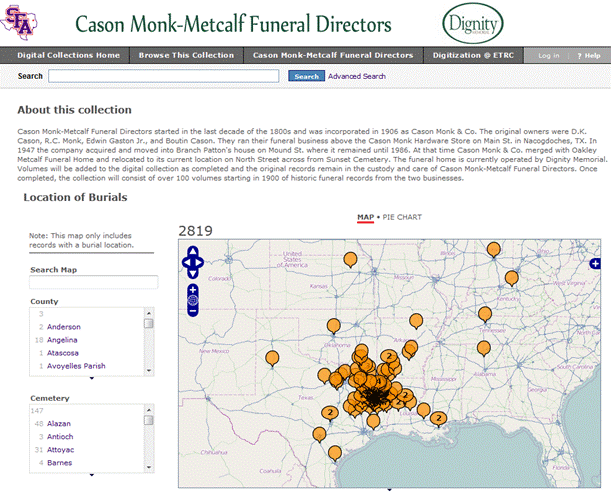
Embeded View on the Collection Homepage
Trevor: I noticed that you embeded your view into the collection’s homepage. Have you received much reaction to the interface?
Jennifer: Yes! And all good. Sometimes it takes awhile to load but I don’t see that as a huge issue. It is a lot of data to load. Also if it does not load users do not even realize something is missing. However, a link is provided for them to “See the original Exhibit” at the Viewshare site.
Trevor: Are there any future plans for this particular view? It strikes me that there is some real potential to incorporate some more numerical data driven views, like scatterplots and widgets, like histograms. The data was so fascinating that I took a few minutes exploring what one could do with it in this exploratory view. Do you think some of these more numerical views would be valuable? Or, are there other things you are thinking about doing with the collection?
Jennifer: There is a lot of potential for views based on numerical data and I love the views you created. Honestly I am not a numbers person so I did not see that potential at first. Fortunately my aversion to numbers does not limit researchers because anyone can download the data set and manipulate it for their needs.
As for other things with the collection, I would like to see occupation and cause of death as pie chart options. I would also like to do something with cost of funeral. Seeing the change in costs and purchases over time would be interesting. However that information was not originally transcribed so it will take a little longer to complete.
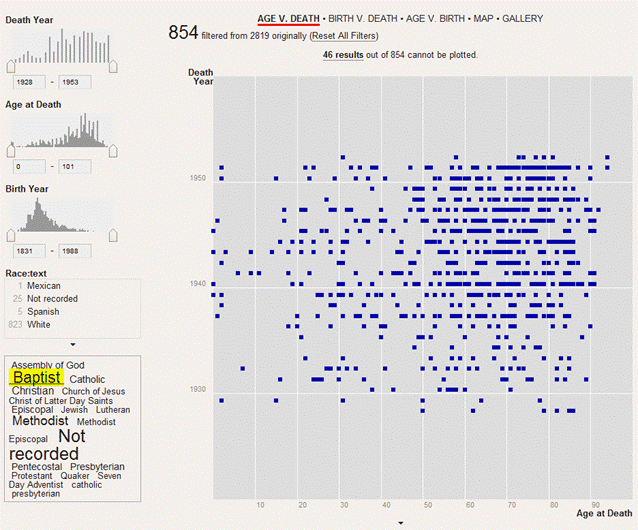
Exploratory Data Visualization Collection View
Trevor: Do you have any future ideas and plans for views of other collections?
Jennifer: A common question from students is, “I’m researching [fill in the blank] during the [fill in time period]. What collections should I look at?” So I put our finding aids on a timeline. While it is technically not a digital collection I felt a timeline would make it easier to see which physical collections fall within a particular time frame. I recently completed a view based on the Tyler Museum of Art digital collection. Currently I am working on creating views of digitized letters from collections housed at the East Texas Research Center. I am also hoping to introduce the software to history professors for their classes and our partners so they can create views and projects of their own.
Trevor: Now that you have used Viewshare from start to finish (imported data, built a view and embedded the view on an external site) what do you think about the software? What kind of role does it fit into in your system? What kind of need is it filling?
Jennifer: I love Viewshare! It is free and easy to use. No programming skills are required and there is no need to involve your IT staff. I think this tool is something any institution – small, large, museum, library, archive – could easily and quickly put into action. Viewshare made it possible to accomplish our goal of presenting our digital collections in a more dynamic and visual way.
Trevor: We are always working on improving the software. Do you have any thoughts on what kind of additional features you would like to see?
Jennifer: At this time I can only think of two major improvements. I would like the ability to make changes to metadata without having to re-import. Importing a large data set can take a while so making changes directly would save time. Also it would be great to have the option to import a TXT file and/or a Dublin Core XML file. But other than that I can’t think of anything else. I think Viewshare is a wonderful tool that does exactly what it claims and any improvements would only be icing on the cake!
Tika Batch File Identification
Malformed TIFF images solution
IS13 wmv to Video Format-X Migration Results in Out-of-sync Sound and Video
Page edited by Bolette Ammitzbøll Jurik – “updated evaluation”
View Online Bolette Ammitzbøll Jurik 2012-04-18T12:13:48ZIS13 wmv to Video Format-X Migration Results in Out-of-sync Sound and Video
Page edited by Bolette Ammitzbøll Jurik – “updated evaluation”
View Online Bolette Ammitzbøll Jurik 2012-04-18T12:13:48Z