

The Signal: Digital Preservation

Those 1’s and 0’s are Heavier than You Think!
The following is a guest post by Laura Graham, a Digital Media Project Coordinator at the Library of Congress.
Bit preservation activities for the Web Archiving team include acquiring content, copying it to multiple storage systems, verifying it, and maintaining information current about the content. But even these minimal steps, which do not include managing the storage systems and instituting statistical auditing, can be labor intensive.
We all know that bit preservation takes a lot of time and people. We factor it into our strategies and calculations-even if our conversations are more about large-scale storage management systems, the most reliable but cost-effective combinations of disk and tape, new cloud platform technologies, and current best practices.
So, how do we manage this very intensive labor? Here on the Web Archiving team, we have been acquiring content and managing it in storage and on access servers since 2008.
A key issue in our efforts has been, how do we know where everything is, what its current status is, and most important, where we are, in its processes. Inventorying and tracking have been necessities in human undertakings for centuries, long before the advent of the “bit.” And yet, it can still be a surprise to find out just how demanding these tasks can be.
In 2008, we had accumulated approximately 80 terabytes (TBs) of Web archive content at the Internet Archive (IA), our crawling contractor in California. This content was growing continuously. We needed to transfer it here to make it publicly accessible onsite, and also to create an additional storage replica.
When we began, we assumed network transfer over Internet2 from California to Washington, DC, would be the all-consuming process. We soon discovered that moving and processing the content after it had landed on our ingest server was far more laborious.
The steps had seemed deceptively simple: pull the content from IA’s servers to the ingest server and verify it; copy it to our tape storage system and verify it; copy it to disk on our access server and verify it there. But to make progress, we needed to carry out these tasks in overlapping multiple streams of transfer, verification, copying and re-verification. And at this stage, all these processes were done “manually” on the unix command-line. A lot of work!
Our initial tools comprised parallel.py, a network transfer script written in python that ran multiple threads on a single content transfer target. And, for inventorying and tracking? Of course, the ubiquitous spreadsheet.
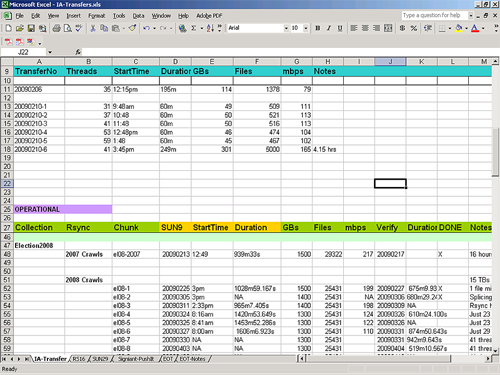 The spreadsheet told us how much content we had transferred and how much of it was in storage and on our access server. Empty cells told us what steps were outstanding on any single day.
But there are customization limits to any desktop software. We could not query and manipulate the accumulating mass of data as we wanted to. And the spreadsheet, while on a shared drive, was not easily accessible to everyone who needed to know what we were doing.
Fortunately, by the time we approached the 80 TB mark in our transfer of content from IA, the Library’s repository development team had reached some milestones of its own in development of a system-wide Content Transfer Service (CTS) with an easily accessible Web interface.
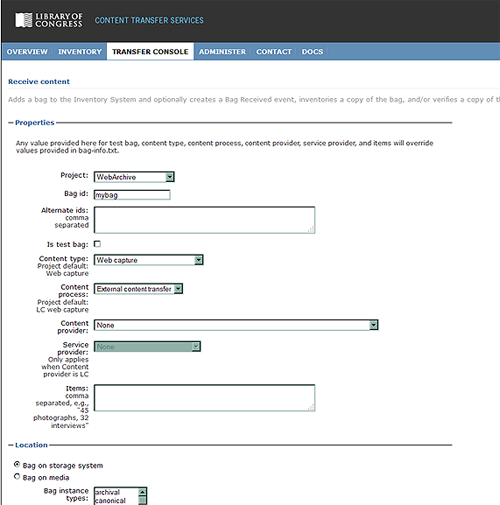 The CTS is complex and could easily be a blog topic all its own. Briefly, it provides a set of services for digital content that has arrived at the Library, the most important of which are receiving and inventorying the content and then copying it to other locations, such as tape storage, or access servers, where it then verifies and inventories the content in those locations as well.
Most importantly, the CTS moves the copying and verifying steps off the command-line and automates them for us. While we still have to initiate processes, the CTS queues, monitors, and reports back to us on those processes via the interface and email. It automatically verifies content that has been copied to any new location. Inventory reports are easily generated by project, location, and date range.
You might think that we then let go of our spreadsheet. Not so! It found new life in the Bag Tracking Tool (BTT). (Our suite of bit preservation tools is modeled on the “bag” (PDF, 62 Kb) as a straightforward and efficient way to package content for storage and access. Hence the name.)
While CTS performs inventorying, copying and verifying services for us, the BTT still tells us where we are in our work processes. Most importantly, it tracks content acquisition processes that fall outside the CTS, such as external transfer from IA, and more recently, onsite crawling projects.
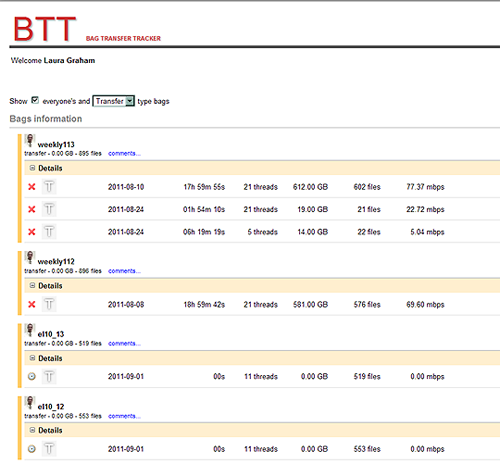 (We use our staff identification photos to indicate the owner of a bag in the BTT, which makes it very important, of course, to get that photo done right!)
The BTT also provides a team-oriented view of our workflow. It is a component of our Web archiving software developed here at the Library for managing the Web archiving lifecycle from nomination of Web sites to crawling and quality review of the captured content.
Eventually, we will integrate the BTT with the CTS, making a seamless inventorying and copying service and tracking system.
As a cumulative record, all of these tools tell us about that “labor intensive” component in bit preservation. They also tell us where we can best automate our efforts.
For we know, there are not just limits on storage, bandwidth and system performance. There are also limits to that other component, staff, time, and effort!
C is for Collections
This is part of a series that explores the topic of digital preservation in an alphabetical way. Each post will use a word or phrase as a device to explore a concept and point to a useful resource for understanding specific aspects of the practice of digital preservation.
Almost every week, I encounter some comments or discussions about the appropriateness of the word “collection” when applied to various bodies of digital content. Some say a collection must have more than one thing or others state that items in a collection must share the same provenance. I always think, they are right BUT….
Advantages for digital stewardship. The basic definition of a collection is a group of items gathered by a person or an organization (and maybe even a machine!). In cultural heritage practice, collections have an organizing principle. In digital preservation, the collection is usually the target of preservation actions. Collections offer stewards an organizing principle for managing large volumes of digital content. For example, decisions about description, storage, and migration can be made on a collection by collection basis rather than on the item level.

Brochures describing NDIIPP projects
Throughout the NDIIPP program, our partners have described their work as collection based. However, those collections were diverse. Each project took advantage of the grouping concept to tackle specific areas of exploration and development. The Program looked at digital content through a technical lens in four groups—text and image, audio and video, geospatial and web sites. When grouped in this manner, the projects were able to share expertise about digital content forms. But this was not the only organizing principle at work.
Flexible concept. The collection concept is elastic and can allow for many organizing principles. One group of partners worked with social science datasets, a type of collection not familiar to many libraries but of growing interest in the expanding information environment. These collections were often grouped around a specific set of survey questions or study. The resulting data from the responses become a collection. Another project worked with political web sites. The organizing principle was a topic and a distribution source. The project primarily dealt with the identification, selection, collection, preservation and access to web sites created by government or citizen advocacy groups.

Map of NDIIPP content collections
Sometimes a single web site may constitute a collection, especially if it links to many other websites of the same topic. Geospatial collections are organized around geographic locations or the organization collecting and collating the data. One of the digital television projects was organized around international sources and another was organized around specific public broadcasting outlets. A single movie with all its production files could be a collection. The production list of a music studio could be a collection or all the recordings of a single artist or all jazz recordings…. You get the point.
Collection concept and access. As useful as collections are for stewardship organizations, the concept is not particularly helpful to users. Collections named for very well-known personages, such George Washington, are understandable. Collections named for philanthropists may not be so apparent. A finding aid may provide wonderful context for the collection, but the user may bypass that description just to see an image or read a specific text. In the digital realm, a single item can be part of many collections because it does not need to occupy specific shelf space. The technical approach which helps us plan for management of the data is not meaningful to a student looking for information to complete her homework.
In this time of social media, many people want to form their own collections from content available across the web and share them with their friends. We have seen the rise of journalists, bloggers and website producers as curators of content, aggregating selections from the vast array available to tell a story. At the same time, there is a growing interest in data mining, using collections as data rather than as a set of single browseable objects.
The objective of digital preservation is to enable access over the long-term to digital content. How are we bridging from conventions that aid our preservation practices to reach the interests of students, scholars, life-long learners and any curious person?
Family History and Digital Preservation, part 2
In part 1 of this article, I wrote that relational databases are the engines that drive digital genealogy. Databases make it possible to quickly search through enormous quantities of records, find the person you’re looking for and discover related people and events. And when institutions collaborate and share databases, statistical information becomes enriched.

The Lineage of Herzog Ludwig
For example, the Centre for Migration Studies in Northern Ireland collaborated with the Irish Family History Foundation, linking the Centre for Migration Studies’ database of ships’ passenger lists with Irish Family History Foundation’s database of Irish church registries. So, from one conjoined resource you can find birth and marriage information about an individual and the ship he or she emigrated on.
The Centre for Migration Studies also collaborated with Queen’s University Belfast to join three databases of differing content to create Documenting Ireland: Parliament, People and Migration. While most genealogical databases contain only text and maybe image scans of paper documents, some are beginning to enhance records with audio and video recordings. On Documenting Ireland, for example, you can listen to people talk about their lives and experiences. Similarly, you can enjoy audio and video oral history interviews on the Minnesota Historical Society website. And if you are related to any of these people, just download and add all the juicy photos and recordings to your genealogy collection. Audio and video breathe life into genealogical data.

President Warren G. Harding recording his voice
The collaborative LDS Church project Community Trees also includes some audio recordings but the LDS Church uses audio selectively. David Rencher of the LDS Church is cautious about adding multimedia. He said, “Multimedia is going to become expensive to store and preserve. We would rather come up with ways that we can help you preserve it.”
There are many more types of data and files — aside from scans, photos, audio and video — that we can associate with genealogical records. For example, GPS information, accessible from most smartphones and digital cameras, can be used to mark significant places related to a person, such as former residences or the location of his or her tombstone.
With genetic genealogy, you could link a DNA profile to a record. And when relatives add their DNA profiles to a familial database, it can reveal genetic patterns. Reagan Moore is RENCI chief scientist for the DICE center at the University of North Carolina Chapel Hill; he is also a lifelong genealogist. He said, “If you get a genealogy map of the entire family you can see who’s at risk for certain inherited problem traits.” According to Moore, such work is going on in Scotland but naturally the practice requires discretion and data security.

S. V. Helander, "The Emigrants"
So why would modern genealogists want to gather all this data? Brian Lambkin, director of the Centre for Migration Studies, said that adding multimedia, geospatial data and more, enriches the biographical information about a person. “Potentially there’s a biography to be written about every single individual,” said Lambkin.
Amassing a collection of digital files raises the issue of how to store and preserve that collection. Digital genealogy could result in a heap of text files (such as GEDCom files), image scans (most sites enable you to save an image in either JPEG, TIFF or PDF formats), audio files and video files. It’s best to follow the Library of Congress’s personal archiving advice, which is basically to: 1) organize everything within one collection folder, 2) backup your collection onto several storage media in several different places and 3) migrate your collection every five years or so to new storage media.
Don’t trust that a third-party genealogy service will always remain in business and keep your stuff safe forever. You should have your own copy handy and another copy backed up somewhere else.
For its part, the LDS church is committed to ongoing preservation and access of its records. It expects to store more than 100 PB of data on tape in its Granite Mountain records vault, with a copy replicated somewhere else.
Online genealogical data will continue to grow exponentially as more and more people – lured by the ease and personal reward of discovering family history – get involved and add to the information pool. There will be more history to savor and more content to fill out our collections.
It helps that genealogical researchers and family historians are being invited to contribute information, not just by genealogical institutions but also by collaborative community sites like Glenelly, Our Home, which encourages people to contribute their memories and photos of a place and identify unknown people in other photos (which can then be downloaded and added to genealogy collections).
Randy Olsen, director of libraries in the LDS Church history department, is encouraged by this emergence of citizen archivists. He said, “If we allow members of the community to build and populate their own databases they will feel a sense of ownership. And the degree to which people participate and build (genealogical) databases will pay great dividends down the road.”
Library of Congress To Launch New Corps of Digital Preservation Trainers
The following is a guest post from Ellen O’Donnell, Senior Technical Writer, on assignment to the Office of Strategic Initiatives from the National Institutes of Health.
The Digital Preservation Outreach and Education program at the Library of Congress will hold its first national train-the-trainer workshop on September 20-23, 2011, in Washington, DC.

a-digital train, by Cea., on Flickr
The DPOE Baseline Workshop will produce a corps of trainers who are equipped to teach others, in their home regions across the U.S., the basic principles and practices of preserving digital materials. Examples of such materials include websites; emails; digital photos, music, and videos; and official records.
The 24 students in the workshop (first in a projected series) are professionals from a variety of backgrounds who were selected from a nationwide applicant pool to represent their home regions, and who have at least some familiarity with community-based training and with digital preservation. They will be instructed by the following subject matter experts:
- Nancy McGovern, Inter-university Consortium for Political and Social Research, University of Michigan
- Robin Dale, LYRASIS
- Mary Molinaro, University of Kentucky Libraries
- Katherine Skinner, Educopia Institute and MetaArchive Cooperative
- Michael Thuman, Tessella
- Helen Tibbo, School of Information and Library Science, University of North Carolina at Chapel Hill, and Society of American Archivists.
The curriculum has been developed by the DPOE staff and expert volunteer advisors and informed by DPOE-conducted research―including a nationwide needs-assessment survey and a review of curricula in existing training programs. An outcome of the September workshop will be for each participant to, in turn, hold at least one basic-level digital-preservation workshop in his or her home U.S. region by mid-2012.
The intent of the workshop is to share high-quality training in digital preservation, based upon a standardized set of core principles, across the nation. In time, the goal is to make the training available and affordable to virtually any interested organization or individual.
The Library’s September 2011 workshop is invitation-only, but informational and media inquiries are welcome to George Coulbourne, at [email protected].
The Library created DPOE in 2010. Its mission is to foster national outreach and education to encourage individuals and organizations to actively preserve their digital content, building on a collaborative network of instructors, contributors and institutional partners. The DPOE website is www.loc.gov/dpoe.
Lessons Learned for Sustainable Open Source Software for Libraries, Archives and Museums
We are excited to share this guest post from MacKenzie Smith, Research Director at the MIT Libraries. At the joint NDIIPP/NDSA meeting this summer MacKenzie gave a talk titled “Exhibit3@MIT: Lessons learned from 10 years of the Simile Project for building library open source software” in our session on open source tools and communities. The talk sparked valuable discussions at the meeting, so we asked her to reprise her talk a guest post.
How is good open source software designed for the Library, Archives and Museum community to be sustained over time? Our community doesn’t much resemble those that created flagship open source software products. Those products have millions of users and hundreds of developers, so managing their evolution over time is more a problem of which developers to let in than it is about attracting enough of them in the first place. The latter situation is true of a lot of important software for the LAM market, e.g., software to manage digital archive workflows or digital collections. Institutional Repositories have come the closest to ongoing sustainability with two of the earliest – EPrints and DSpace – approaching their second decade of use, but we have plenty of other important software needs to worry about.
 Of course there are exceptions, and one of them hails from an MIT Libraries project called Simile. The project started in 2003 so it’s seen the ebb and flow of funding, but managed to create software that is both popular and sustainable. Part of that success was due to ruthlessness. Of the ninety-odd software products that the Simile team created over the years, only a small number were allow to survive to adulthood and “graduate”, as we put it when they moved out of the house and took up separate residence. That moving out process required (and still occasionally requires) careful shepherding to create a culture for success independent from the original team.
First, build tools for the largest community you can imagine. Building software for your own group, library, organization, or niche community is a great way to get input and feedback from real users but can limit the pool of people and organizations that care about the code. We’re often left with too few developers to maintain the product without ongoing funding from the original source. Tools that solve both your problem and those of people from many other communities have a better chance of survival.
Second, it’s not enough to post your open source code on a well-known platform like GitHub or Sourceforge and tell friends. To gain adoption and support from other developers requires social engineering and good processes for getting them involved and making them feel needed and welcome. It’s also important to have teams involved that include not only developers but prototypers (innovators), socializers (writers), quality control geeks, and advocates among the managers who will fund the work. In other words, all the roles you’d expect from software companies, just not all working in one place. And all of this needs to be built into the project from the beginning.
Third, software maintenance can get tedious over the years, but in distributed open source development environments it’s a critical part of the software’s long-term usefulness. Having an active software management plan in place, and a continuous integration environment, helps avoid the code disintegrating over time.
Fourth, think about the run-time environment of the product. Web applications can be very popular and useful, but keeping them working in the plethora of Web browsers over time is a lot of work.

Image of interface created from the open source Simile Exhibit software.
Over time, the Simile project recognized a pattern in its successful software efforts like Exhibit (a key component of the Library of Congress’s new open source Recollection platform). It’s a formula that you can apply to software that helps identify where open source has a change of long-term sustainability:
It’s a combination of the size of the potential adopter community and its diversity, the degree of proven need for the software, the technical sophistication of the adopters for product, their level of investment in it, and good timing (also called dumb luck). While you can’t predict that last factor, the others should be more measurable. If you have good scores for several of them then there’s hope. If you don’t, maybe a small change of plans would help build them up. And if you still don’t, make sure your original funder is prepared for continuing to invest in the software for as long as you need it.
Archivists: What’s on Your Mind?
What’s on the minds of archivists these days?
 Well, lots of things, judging from the program from the 75th Annual Meeting of the Society of American Archivists, held at the end of August in Chicago. The theme of this year’s conference was “Archives 360°,” and the 75th anniversary providing a convenient milestone for the profession to “assess the development and promulgation of our existing and desired capacities and competencies for all or portions of the archives life cycle.”
Archiving encompasses professionals with widely varying backgrounds and interests, situated in even more widely varying organizational settings. The day-to-day work experience of, say, archivists of the World Wide Web and those who process traditional paper collections (PDF, 519 Kb) can be very, very different.

Buckingham Fountain in Grant Park. Photo credit: Butch Lazorchak
So the conference presents a little something for everyone, though that makes it difficult to discern a professional zeitgeist amongst the diversity of opinions and presentations.
Still, I get a sense that the community is turning the corner in its engagement with born-digital materials and more openly embracing its responsibilities regarding digitization, preservation, copyright, privacy and creative long-term access.
Every content domain (finance, medicine and government, for example) is generating significant quantities of digital information, but most lack the perspective to address the long-term preservation of their own materials with confidence. There is a tremendous opportunity for the archival profession to take the lead on these issues, but it will take professional energy and commitment to embrace these opportunities while (radically?) reimagining traditional archival roles and responsibilities.
NDIIPP recognizes these opportunities, so I’m hopefully inclined to see evidence of an equal embrace by my professional colleagues. It was cautiously present at SAA in the sessions I attended and in an analysis of the overall program of activities. My (admittedly unscientific) review of the SAA program counts at least 28 out of the 70 session with a digital component touching on some aspect of the issues mentioned above that are of great concern to NDIIPP.
These sessions ranged from “Skeletons in the Closet: Addressing Privacy and Confidentiality Issues for Born-Digital Materials” to “Acquiring Organizational Records in a Social Media World: Documentation Strategies in the Facebook Era.” Most of these sessions were manned by thoughtful presenters with reasonable approaches to thorny problems, offering models and guidance that others might follow.
I moderated the panel “Geospatial Preservation: The State of the Landscape” with a stellar group of participants including Steve Morris, the head of Digital Library Initiatives at the North Carolina State University libraries; John L. Faundeen, an Archivist at the U.S. Geological Survey’s Earth Resources Observation and Science Center; and Andrew Turner, the Chief Technical Officer of GeoIQ, and the author of several publications on the newest geographic technologies (Andrew also did his own blog post on our session).

Marina City in downtown Chicago. Photo credit: Butch Lazorchak
We had good attendance and got great questions, though I was surprised that a pre-presentation query found not a single attendee at our session with “map” or “geo-something” in their job titles. Still, while geospatial is most obviously about “maps,” it also provides an excellent testbed to address many major digital preservation issues such as the lifecycle of information, organizational responsibility, cross-community collaboration and technological complexity. If we can “solve” these issues for geospatial we’ll solve them for many other content domains.
All in all, I’m optimistic, even while I’d like to see the profession as a whole move even more aggressively into addressing digital preservation issues.
If you want to influence the conversation, keep in mind that the call for the proposals for next year’s conference closes on Oct. 3, 2011, barely a month after the end of the Chicago meeting. This doesn’t give you much time to ruminate and reflect on what you heard at this year’s conference, but you’ve been thinking about these issues for a while…right?
So, what’s on your mind?
Remember when we had photographs?
On a recent trip I visited a funky vintage store to see if anything caught my eye. While I was easily able to keep myself from buying any jewelry or taxidermy, I came across a number of displays of family photographs available for sale.

Family History for Sale. Photo by Leslie J0hnston
Not only were there bowls of loose photos, there was a dis-bound photo album from an African-American family that seemed to be from the 1920s and 1930s, where everyone and every place was identified.
This saddened me. And led me to think about my own experiences in trying to make family photos more preservable.
I have recently undertaken an effort to deal with the archive of photos that I have in my possession. Some are older family photos from the nineteenth and early twentieth century. I have my father’s baby book from the 1920s. Some are from my parents, and include slides taken by my father in Asia in the 1940s-50s. I have my photo albums from my teenage years when I had my first camera. Most — except the slides — are labeled with names and dates.
When I switched to digital, I put my images on flickr, and tagged them with some degree of regularity. Dates from file headers, some places, some names.
Then there are my own photo albums from the 1980s through the 2000s. They are chronological, but not labeled. I have discovered that I have no idea where some were taken, or who they depict. Last year I digitized a number of photos and slides for a friend who had lost her photo collections. The digitization was easy. The metadata was hard. Keeping the metadata with the files was even harder. I resorted to file naming conventions (event_details_year) where I could, and created a spreadsheet with as much metadata as I could supply, such as people or places, and more granular dates such as birthdays or holidays.
So, getting back to those photos in a bowl at a vintage store. There are two topics to consider:
What will your friends and family do with photographs that have no accompanying labels, written on the back or in albums? Will they be of enough value to retain, or will they end up at a garage sale or antique store?
What will your friends and family do with digital image files with no metadata?
So the advice is:
Record what you can about photos or digital images as soon as you can.
Keep the metadata and descriptions with the files and photos. Name the files with understandable names, and label the backs of photos with soft lead pencil (not ink). If you have photo albums, write out captions. If you upload to online services, caption and tag them. (For reference, see this blog post on saving digital photos.)
If I can’t remember who is in a photo that I took only a few years ago, it’s likely that no one else will, either. If no one knows what the photos are, no one will value them enough to preserve them.
How would you save your photos and images for posterity?
Family History and Digital Preservation, part 1
The popularity of genealogy websites and TV shows is rapidly growing, mainly because the Internet has made it so convenient to access family history information. Almost everything can be done through the computer now. Before the digital age, genealogical research was not only laborious and time consuming, it also resulted in boxes of documents: photos, charts, letters, copies of records and more. Online genealogy has replaced all that paper with digital files. But the trade-off for the ease of finding and gathering the stuff is the challenge of preserving it.

"Cesky Sternberk Castle CZ family tree" by takato marui on Wiki Commons
The current spike in genealogical activity is significant. David Rencher, chief genealogical officer of the Church of Jesus Christ of the Latter-day Saints, acknowledged the increase but said that the appeal of family history research itself is not new. Rencher said, “Genealogy represents the interconnectivity of human relationships. It also helps us understand the heritage we came from and that many of our ancestors went through similar trials and tribulations that we go through. It can add an element of meaning to our lives.”
Brian Lambkin, founding director of the Centre for Migration Studies at the Ulster-American Folk Park in Northern Ireland, interprets part of the modern genealogy phenomenon – from his professional standpoint – as a continuation of the Irish Diaspora. Lambkin, co-author of Migration in Irish History 1607-2007, said that emigration is part of a larger, ongoing family story. “There are branches of families that have become separated,” he said. “But now the people doing the family history are making connections, coming back to Ireland and knocking on doors, saying, ‘I’m possibly related to you. Do you mind if I come in and have a cup of tea?’ Relationships are being re-established.”
And “relationships” is the key word in digital genealogy because relational databases are its engines.

Genealogy database schema by Ed Geis
Databases are programmed to find and display relations within a mass of data, which in digital genealogy, of course, means familial relations. Increasingly, census and registry information is loaded into databases and made available online where users can search birth and death records, marriage records, social security information and more in seconds, and follow branching information related to their initial search. And often they can download a genealogy database file — which may contain accumulated research that someone else has done — and add that information to their own personal database.
Any story about genealogy has to include the Mormons…the LDS Church. They have been gathering genealogical information since 1894, microfilming international family history records since 1938 and digitizing the microfilmed records since 1999. They estimate they have records for over 5 billion people, a lot of which is available online from their familysearch.org site.
In 1984, the LDS church developed the GEDCom (pronounced “jed-com”) specification as a means of exchanging genealogical data. Though different genealogy programs have their own databases, GEDCom is now the international standard format. David Rencher said, “That means I can download my file electronically, send it to you and it doesn’t matter what your program is. You can upload the file and add the data to the data in your file.”
This standardization enables some exciting possibilities for genealogical research, especially when different organizations collaborate and configure their databases to interact with other databases.
Part 2: Database collaborations, enhanced genealogical data and biography
The Library: One Place for Publications and Data
Scientific data management has some buzz going. As a longtime data archivist/advocate this is a dream come true for me. I’ve pinched myself a couple of times to make sure it’s really happening.
 For decades, scientific practice focused attention on the published results of research. A substantial infrastructure supports this literature, including an article citation system to share learning and credit authors. The research data underlying the articles, however, have been treated as poor relations. Data sets often were haphazardly managed, and preserving them was a challenging and uncertain prospect. The principal issue was one of respect: articles had it and data didn’t.
I recall when, working for another agency in the previous century, I pitched a modest plan to a high-ranking government official-a scientist by training-to collect and preserve data for use in public health studies. In this case, I was confident of holding a winning hand for data preservation. Surely this was a proposition brimming with self-evident beneficence, yes?
Guess again. “I don’t care about that old data,” was the brusque reply.
But the elixir of time has worked its magic, and there is now a coalescing sense among researchers and policy makers that ongoing access to data is needed to replicate scientific results and spur new learning though secondary use.
There has been a steady stream of big, serious reports from big, serious organizations about the importance of data to drive economic and technological innovation. The White House National Science and Technology Council, for example, issued Harnessing the Power of Digital Data for Science and Society in 2009. The report presented a vision for preserving federally funded research data and making it broadly accessible. Earlier this year McKinsey & Company issued Big data: The next frontier for innovation, competition, and productivity. The report placed high importance on enabling data access, noting that finding and using multiple data sources is increasing critical in all research fields.

"Citation needed" by futureatlas.com, on Flickr
Perhaps most significantly, the National Science Foundation recently declared that all funding proposals must include a data management plan to encourage dissemination and sharing of data sets that underlie formal research results. Given the vast scientific work that NSF supports, this edict will have far-reaching impact.
The key to making-and keeping-data accessible is an infrastructure at least as effective as the one in place for publications. For some libraries and other collecting institutions this is a great opportunity to extend their expertise in collection building and bibliographic control to a critical new type of material. Several institutions have, in fact, moved briskly to do just that. The University Curation Center at the California Digital Library now provides extensive assistance to researchers in connection with data management, as does the University of Minnesota Libraries and the Inter-University Consortium for Political and Social Science Research at the University of Michigan. The Managing Research Data project in the UK is also doing fine work to extend practices to cite, link and preserve data sets.
It’s true that, despite the shift in favor of data management, most libraries are still working to understand how they can best play a role. And there is a multiplicity of roles to choose from: become a data repository; provide assistance to data creators; help researchers find existing data sets. One possible role is especially intriguing: data citation. Bibliographic control is, after all, something that libraries have successfully extended into the digital landscape. Researchers expect to use library resources to find and use published articles. Why not build on this to help people find and use data? The key to doing this is developing a methodology to uniquely identify individual data sets and point users to where the data can be found.

Tweet from Jeroen Rombouts @jprombouts
On that score, I had the pleasure of attending the 2011 Annual Summer Meeting of DataCite in Berkeley, CA. The gathering drew about 200 attendees from around the world to discuss advancing the mission of the DataCite organization: creating a global citation framework for data. One of the most popular tweets from the meeting proclaimed that “you can have articles and data at one place and that place is the library.” I’ll recap the meeting in a future post, but that quote serves quite well to frame a library strategy in connection with data sets.
Corrected web links, 9/15/2011
Ask the Recommending Officer: The September 11, 2001 Web Archive
The following is a guest post by Abbie Grotke, Web Archiving Team Lead.
The second in my series of “ask the Recommending Officer” posts features a conversation with Cassy Ammen, who shares her experience in helping to build the September 11 Web Archive.
Who are you, and what’s your job at the Library of Congress?
Cassy Ammen, Reference Specialist in the Main Reading Room, Humanities and Social Sciences Division.
What is the September 11, 2001 Web Archive?

NY.com’s World Trade Center Survivor Database, archived September 14, 2001.
The archive preserves the web expressions of individuals, groups, the press and other institutions in the aftermath of the attacks in the United States on September 11, 2001. Content was archived between September 11 and December 1, 2001. There are over 2,200 sites that have been cataloged and are available by browsing a drill search interface, and an estimated 30,000 sites in the archive that have been archived but not cataloged. The archive was expanded in 2002 to include sites marking the one-year anniversary of the attacks.
How did the archive come about?
In the early days of the Library’s web archiving program, I was a member of the MINERVA team formed in 2000 to study various policy and selection issues related to web archiving. We were in the midst of working with WebArchivist.org (University of Washington/SUNY Institute of Technology) and the Internet Archive, planning a 2002 election archive, when the terrorist attacks on September 11 happened. When we returned to work on Wednesday, I received a call from Diane Kresh, then Director of Public Services Collections, with instructions to start archiving immediately. “Whatever it takes, whatever it costs, do it,” she said. I immediately placed a call to our partners at the Internet Archive to initiate an archive, and also contacted the staff at WebArchivist.org to seek their collaboration on this collection, since we were already working together.
How were sites selected?
Since we were evacuated on September 11, it was fortunate that the Internet Archive began collecting that afternoon, soon after the attacks. I put out a call to the Library’s 300+ Recommending Officers for them to look for sites in their subject areas. National Digital Library staff volunteered to help find URLs. And we asked the public to help; a form was put on WebArchivist.org for people to submit nominations to the archive.
At LC, we focused on difficult to find sites that spontaneously appeared as immediate reactions to the events – sites that
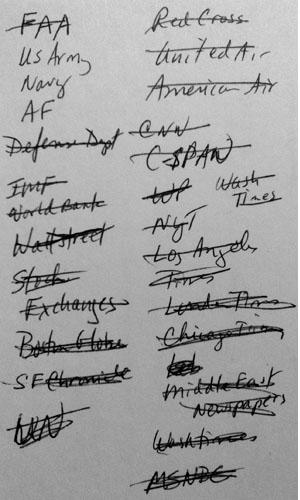
Index card used by Ammen to record ideas for the archive.
were not easily found by search engines (too new to be indexed) but that were being share in emails, linked from other sites, or in news articles at that time. My own approach was to sit down every night with a stack of index cards and scour the newspaper for ideas. I would jot down notes about specific organizations mentioned, or categories that might have a web presence. I’d bring these cards back to the office and my colleagues would take my notes and start looking for websites.
This was not an easy task for any of us. The imagery on some of the sites was often difficult to look at, and some staff had concerns about accessing certain types of content. Even though very difficult, we remained focused because we knew the importance of documenting what was happening on the web, realizing the potential fleeting nature of the types of content being posted immediately after the events. We had to act quickly. As of September 27th, 2,000 URLs had been identified and were being crawled daily.
Ten years have passed. What has been the reaction to the archive?
With support from Pew Internet and American Life Project, the collection first launched in October 2001. The Library and the project received a fair amount of press coverage at the time. The archive was named Yahoo! Internet Life “Site of the Year” in April, 2002. There has been a lot of public interest in the archive as well; not surprisingly around the first-year anniversary. Even though it’s primitive in some ways (archiving technology has improved greatly since then), it is by far our most highly-accessed web archive.

After Ammen jotted down ideas, URLS were researched and added to the archive.
What Diane Kresh wrote in an Information Bulletin article in 2002 is still true today: “Educators and researchers can learn what the official organizations of the day were thinking and reporting about the attacks on America; and they can read the unofficial, ‘online diaries’ of those who lived through the experience…Web sites provide dynamic, firsthand accounts and reflect a range of sentiments and points of view, functioning much as the morning and evening newspapers of the past.”
Minor edits for style. September 9, 2011