


SCAPE Blog Posts

Update on jpylyzer
In this blog post I will give a brief update of the latest jpylyzer developments. Jpylyzer is a validation and feature extraction tool for the JP2 (JPEG 2000 Part 1) still image format.
History of jpylyzerAround mid-summer 2011, the KB started initial preparations for migrating 146 TB of TIFF images from the Dutch Metamorfoze program to JP2. We realised that the possibility of hardware failure (e.g. short network interruptions) during the migration process would imply a major risk for the creation of malformed and damaged files. Around the same time, we received some rather worrying reports from the British Library, who were confronted with JP2 images that contained damage that couldn’t be detected with existing tools such as JHOVE.
This prompted me to have a go at writing a rudimentary software tool that was able to detect some simple forms of file corruption in JP2. A blog post I wrote on this resulted in quite a bit of feedback, and several people asked about the possibility to extend the tool’s functionality to a full-fledged JP2 validator and feature extractor. Since this fitted in nicely with some SCAPE work that was envisaged on quality assurance in imaging workflows, I started work on a first prototype of jpylyzer, which saw the light of day in December.
In the remainder of this blog post I will outline the main developments that have happened since then.
Refactoring of existing codeShortly after the release of the first prototype, my KB colleague René van der Ark spontaneously offered to do a refactoring job on my original code, which was clumsy and unnecessarily lengthy in places. This has resulted in a code that is more modular, and which adheres more closely to established programming practices. As a result, the refactored code is significantly more maintainable than the original one, which makes it easier for other programmers to contribute to jpylyzer. This should also contribute to the long-term sustainability of the software.
New featuresSince the first prototype the following functionality was added to jpylyzer:
- New validator functions were added for XML boxes, UUID boxes, UUID Info boxes, Palette boxes and Component Mapping boxes.
- A check was added that verifies whether the number of tiles in an image matches the image- and tile size information in the codestream header.
- Another check was added that verifies whether all tile-parts within each tile exist.
- The ICC profile feature extraction function has been given an overhaul, and it now extracts all ICC header items. In addition, the output is now reported in a more user-friendly format.
- For codestream comments, all characters from the Latin character set are now supported.
- The reporting of the validation results has been made more concise. By default, jpylyzer now only reports the results of validation tests that failed (previously all test results were reported). This behaviour can be overruled with a new –verbose switch.
In addition to the above, various bugs and minor issues have been addressed as well.
Debian packagesDuring the SCAPE Braga meeting in February, work started on the creation of Debian packages for jpylyzer. The availability of Debian packages greatly simplifies jpylyzer‘s installation on Linux-based systems. This work was done by Dave Tarrant (University of Southampton), Miguel Ferreira, Rui Castro, Hélder Silva (KEEP Solutions) and Rainer Schmidt (AIT).
Jpylyzer now hosted by OPFIn order to make a tool sustainable, it is important that its maintenance and development are not solely dependent on one single institution or person. Because of this, jpylyzer is now hosted by the Open Planets Foundation, which ensures the involvement of a wider community. Jpylyzer also has its own home page on the OPF site. It contains links to the source code, Windows executables, Debian packages and the User Manual.
Jpylyzer home pagehttp://www.openplanetsfoundation.org/software/jpylyzer
Johan van der Knijff
KB / National Library of the Netherlands
SPRUCE Mashup: Batch File Identification using Apache Tika
My last post discussed the benefits of collabaration, centred around a SCAPE hackathon. I argued that, in general, it was the collaborative, collocated nature of the developers working together that made demo development quicker; more people staring at the same problem results in multiple and varied viewpoints, ideas, and solutions. Developers can easily and quickly learn from one another, sharing information in an ad-hoc manner, and avoid reinventing the wheel. This communication is important and needs to be encouraged, but it needs to include practioners as well – they are, after all, the target audience for the tools developed. This communication and collaboration is exactly what the SPRUCE project is trying to do.
Spruce MashupOver the last 3 days I attended the first SPRUCE Digital Preservation Mashup in Glasgow; a mix of practioners and techies thrown together to discuss digital content management and preservation, identify real-world challenges and prototype solutions. Everything is free (you just have to get there and commit to the 3 days), so you don’t have to worry about anything other than digital preservation; as a techie this is especially useful when, on the second day, you realise a few extra hours coding will make all the difference and you couldn’t possibly go out for dinner – instead, food is brought to you!
The agenda was very well organised, starting with the usual lightening talks. In particular, practioners highlighted the sample data set they brought with them and the challenges they have with them, whereas developers discussed their background and digital preservation interests. Devs were then paired with practioners based on matches in challenges and interests. As there were slightly more practioners than techies, I was paired with 3 practioners, Rebecca Nielson from the Bodleian Library, Hannah Green from Seven Stories and Richard Freeston from the University of Sheffield, who all had similar challenges of identifying content within their collections.
Scenario and RequirementsInitial brainstorms with this sub-group generated a lot of discussion about their collections, and in particular what challenges they faced with them. The common theme that seemed to arise was the challenge in manually working out exactly what content they had in their collections. This was hindered by access issues, such as content contained in ISO files, and problems such as strangely named file extensions (.doc’s renamed as .tree). One particular directory in a sample set had a number of oddly named files which had manually (through a lot of hard work of trying various applications to open the files with!) been determined to be Photoshop files. DROID apparently had problems identifying these files, so I was keeping a close eye on how well Tika performed in identifying them!
There was also an interest in gathering additional metadata about the files, content authors, creation dates, etc., and summarising this information. Relatedly, being able to pull out keywords to summarise the content of a document was also of interest, but not considered the priority.
So with these requirements in mind…
Let the Hacking Begin!Knowing the promising results shown by Apache Tika™ in file identification, and having good development experience with it, I chose this tool to develop a prototype solution with.
I broke the problem down into several chunks/steps:
- Batch identification and metadata extraction of a directory of files using Tika
- Aggregation of identification/metadata information into a CSV file (for importing into Excel)
- Summarisation of the aggregated CSV file, e.g. #’s of each type of file format
- Automated mounting of ISO files on a Windows platform to enable the above steps to operate on ISO contents
- Extracting the top N highest frequency words from each text document (for semantically classifying documents)
I knew it may be tough to get through everything on that list in the alloted time, but it’s good to have a plan at least. It’s also worth mentioning that although Tika is Java based, for speed and simplicity I chose to script everything in Python. Python is more than capable of instantiating a Java program, so this wasn’t really an issue.
Batch processing of the files in a directory was reasonably trivial. Just a simple routine to walk a user-specified directory, pull out all file paths, and run Tika over each. To keep the solution modular, I ended up creating a user-specified output directory which contained one JSON formatted output file per input file (also maintaining the same sub-directory structure as the input directory). The output file was simply the output supplied by Tika (it has an option to return metadata in JSON format).
Next was to run through the output directory, reading in each output file and aggregating all the information into one CSV. Again, reasonably straightforward, although it did require some fiddling to make sure the file path specified in the CSV reflected the actual input file (rather than the output file). I’d initially just picked a subset of metadata information to return, creation dates, authors, application, number pages, word count, etc., but after showing it to the practioners, agreement was that it would be useful to output everything possible. This goes to highlight that these tools are being developed for practioners to use, and their input is vital to the development process in order to provide them with the tools they need!
The following table gives an idea of the aggregated output generated. These results have been anonymised. The number and variety of headings is much larger than shown here, and depends on the types of files being parsed, for example image files often present data on width and height, emails give subject, from and to fields.
Filename Content-Length Application Author title Last-Author Creation-Date Page-Count Revision-Number Last-Save-Date Last-Printed Content-Type C:\SPRUCE\input\file1.DOC 295424 Microsoft Word 6.0 Author A. title A Author A. 1997-09-28T21:56:00Z 74 27 1999-08-27T17:05:00Z 1998-02-12T18:31:00Z application/msword C:\SPRUCE\input\file2.doc 297472 Microsoft Word 6.0 Author A. some text Author A.1997-10-04T14:25:00Z
73 5 1997-11-26T17:28:00Z 1601-01-01T00:00:00Z application/msword C:\SPRUCE\input\file3 12544 text/plain C:\SPRUCE\input\file4 11392 application/octet-stream C:\SPRUCE\input\prob_ps1 image/vnd.adobe.photoshop C:\SPRUCE\input\prob_ps12.psd image/vnd.adobe.photoshopThe final step, which I started somewhere around 9/9.30pm on the penultimate day, was to summarise all those results into a small summary CSV, outputing the number of files per format type, the creation date ranges, and contributing authors. This summary list was based on a practioner’s requirements, but it wouldn’t be challenging to adjust it to summarise other information.
That was it, pretty much. A modular solution resulting in three python scripts for automated batch file identification, metadata aggregation and summarising. There was no time to consider keyword extraction, although through talking to other techies I did get some useful tool suggestions to look into (Apache Solr and elasticsearch). Nor was there really any time to focus on accessing the ISO images, although I did manage to find a bit of time after all the presentations on Wednesday to find a tool (WinCDEmu) which had a command line interface to mount an ISO file to a drive letter (enabling automated ISO access on Windows); thankfully my scripts seem to work fine using this mounted drive letter.
PerformanceI was particularly interested in how well Tika would perform on identifying the problematic Photoshop files. I’m pleased to say it managed to get them all right, indicating them as image/vnd.adobe.photoshop formats.
Overall, for the sample set I tested on (primarily word documents), it was taking just over 1 second to evaluate each file on an old Dell Latitude laptop sporting a Core 2 Duo 1.8GHz processor with 1GB RAM; and roughly 4 minutes to complete the sample as a whole. As such I modified the script to provide an indication of expected duration to the user. Running over an CD ISO file took 30-40 minutes to complete.
Aggregating the results and summarising was extremely quick by comparison, taking mere seconds for the original sample, and slightly longer for the CD ISO.
Problems Encountered and Next StepsA few notable problems were encountered during development, and investigating workarounds exhausted some of the development time.
- Some input files caused Tika to crash during parsing.
- This resulted in no output from Tika at all (not even identification information)
- Workaround was to reuse a Tika API wrapper, with slight modification, to enable a 2 phase identification approach; the first phase tries to run Tika normally, if that fails, it uses the wrapper just to do identification.
- Needs thorough investigation to work out why Tika crashes.
- Output from some files could not be processed.
- This seems to relate to the character encoding used in the file and returned by Tika.
- Some approaches were tried to solve this, but no adequate solution was found.
- Currently, some lines in the aggregated CSV are empty (except for filename), although the metadata itself should exist in the JSON output files.
- Again, needs investigation to work out a good solution.
- Some files were only identified as application/octet-stream
- This is the Tika default when it doesn’t know what the file is
- These files need further investigation as to why they’re not identified
Beyond these problems, another area for improvement would be performance. A command line call to run Tika is made to evaluate every file, suffering a JVM initialisation performance hit every time. Perhaps translating the tool to Java and making use of the Tika API wrapper would be a better approach (single JVM instantiation) as well as creating a more consolidated tool (that only depends on Java). Another approach would be parallelisation, making use of multi-core processors to evaluate multiple files at the same time.
ConclusionIt was fantastic to get a chance to talk with practioners, find out the real-world challenges they face, and help develop practical solutions for them. In particular it was useful to be able to go back to them after only a few hours of development, show them the progress, get their feedback, come up with new ideas, and really focus the tool on something they need. Without their scenarios and feedback, tools which we develop could easily miss the mark, having no real-world value.
At the same time, through this development, I have found problems that will feed back into the work I am doing on the SCAPE project. In particular, the test set I operated on highlights some robustness issues in Tika that need addressing (parsing crashes and output formatting), and some areas where its detection capabilities could be improved (application/octet-stream results). Solving these problems will improve Tika and ultimately increase robustness and performance of the tool I created here.
Ultimately, attending this event has been a win-win situation! Practioners have got prototypes of useful tools and, from my perspective at least, I have new insights into areas of improvement for SCAPE project tools based on real-world scenarios and data sets. As such, this event has proved invaluable, and I would encourage anyone with an interest in digital preservation to attend.
Hopefully I’ll see you at the next mashup!
Preservation Topics: IdentificationCharacterisationSCAPESPRUCEIdentification tools, an evaluation
 Format distribution in Govdocs17.48 KB
Tool precision19.12 KB
The long tail17.43 KB
Tool speed7.17 KB
The Scape Characterisation Tool Testing Suite
Format distribution in Govdocs17.48 KB
Tool precision19.12 KB
The long tail17.43 KB
Tool speed7.17 KB
The Scape Characterisation Tool Testing Suite
This information have also been published in the Scape Deliverable D9.1.
We have created a testing framework based on the Govdocs1 digital Corpora (http://digitalcorpora.org/corpora/files), and are using the characterisation results from Forensic Innovations, Inc. ((http://www.forensicinnovations.com/), as ground truths.
The framework we used for this evaluation can be found on
https://github.com/openplanetsfoundation/Scape-Tool-Tester
All the tested tools use a different identification scheme for formats of files. As a common denominator, we have decided to use Mime Types. Mimetypes are not detailed enough to contain all the relevant information about a file format, but all the tested tools are capable of reducing their more complete results to mimetypes. This thus ensures a level playing field.
The ground truths and the corpusThe govdocs1 corpus is a set of about 1 million files, freely available (http://digitalcorpora.org/corpora/files). Forensic Innovations, Inc. (http://www.forensicinnovations.com/) have kindly provided the ground truths for this testing framework, in the form of http://digitalcorpora.org/corp/files/govdocs1/groundtruth-fitools.zip. Unfortunately, they do not list mimetypes for each file, but rather a numeric ID, which seems to be vendor specific. They do provide this mapping, however, http://www.forensicinnovations.com/formats-mime.html, which allows us to match IDs to mimetypes. The list is not complete, as they have not provided mimetypes for certain formats (which they claim do not have mimetypes). For the testing suite, we have chosen to disregard files that Forensic Innovations, Inc. do not provide mimetypes for, as they make up a very small part of the collection. The remaining files number 977885.
The reduced govdocs1 corpus contains files of 87 different formats. These are not evenly distributed, however. Some formats are only represented by a single file, while others make up close to 25% of the corpus.
To display the results, we have chosen to focus on the 20 most common file formats in the corpus, and to list the remainding 67 as the long tail, as these only make up 0.56% of the total number of files in the corpus.
One interesting characteristic of the ID-to-mime table from Forensic Innovations, Inc. is that each format only have one mimetype. Now, in the real world, this is patently untrue. Many formats have several mimetypes, the best known example probably being text/xml and application/xml. To solve this problem, we have introduced the mimetype-equivalent list, which ammends the ground truths with additional mimetypes for certain formats. It should be noted that this list have been constructed by hand, simply by looking at the result of the characterisation tools. Any result that do not match the ground truth is recorded as an error, but inspection of the logs later have allowed us to pick up the results that should not have been errors, but rather alias results.
The test iteratorWe have endeavoured to use the tools in a production-like way for benchmarking purposes. This means that we have attempted to use the tools’ own built-in recursion features, to avoid redundant program startups (most relevant for the java based tools). Likewise, we have, if possible, disabled those parts of the tools, that are not needed for format identification (most relevant for Tika). We have hidden the filenames from the tools (by simple renaming the data files), in order to test their format identification capabilities, without recursion to file extension.
VersionsTika: 1.0 release
Droid: 6.0 release, Signature version 45
Fido: 0.9.6 release
Tika – a special noteFor this test, Tika have been used as a java library, and have been wrapped in a specialised Java program (https://github.com/blekinge/Tika-identification-Wrapper). This way, we can ensure that only the relevant parts of Tika is being invoked (ie. identification) and not the considerably slower metadata extraction parts. By letting java, rather than the test framework handle the iteration over the files in the archve, we have also been able to measure the performance in a real massprocessing situation, rather than the large overhead in starting the JVM for each file.
ResultsWe have tested how precisely the tools have been able to produce results to match the ground truths. As stated, we have focused on the 20 most common formats in the corpus, and bundled the remainder into a bar called the Long Tail.
As can be seen from this graph, Tika generally performs best for all the 20 most common formats. Especially for text files (text/plain), it is the only tested tool that correctly identifies the files. For office files, especially excel and powerpoint, droid seems to be more precise. Tika is almost as precise, but Fido loses greatly here. Given that Fido is based on the Droid signatures, it might be surprising why it seems to outperform Droid for certain formats, but this is clear for pdf, postscript and rich text format. The authors will not speculate on why this is so.
Comma/tab separated files are fairly common in the corpus. Tika cannot detect this feature of the files, and recognize them as text/plain files. Fido and Droid fails to identify the files, just as they do for text/plain files.
The dBase files, a somewhat important feature of the corpus is not detected by any of the tools.
Only Tika identifies any files as rfc2822, and even then it misses a lot. All three tools are equally bad at identifing sgml files.
Interestingly, Droid and Fido seems to work much better than Fido on the long tail of formats.
The Long tailWe feel that the long tail of formats is worth looking more closely at.
In this table, we have removed any format where none of the tools managed to identify any files. So, this table is to show the different coverage of the tools. We see that it is not just different levels of precision that matter, but which formats are supported by which tools.
Droid and fido support the Fits image format. Tika does not. Tika however, supports the openxml document format, which Fido and Droid does not.
Application pdf and application xml are some rather odd files (otherwise the ground truths would have marked them as normal pdfs or xmls). Here Tika is worse than the other tools. Tika, however, is able to recognize RDF, as shown by the application/rdf+xml format.
It is clear that while the overall precision in the long tail is almost equivalent for the three tools, the coverage differs greatly. If Tika, for example, gained support for the fits image format, it would outperform Droid and Fido on the long tail. Droid and Fido, however, would score much higher, if they gained Tikas support for Microsoft openxml documents.
The speed of the toolsFor production use of these tools, not just the precision, but also the performance of the tools are critical. For each tool, we timed the execution, to show us the absolute time, in which the tool is able to parse the archive. Of course, getting precise numbers here is difficult, as keeping an execution totally free of delays is almost impossible on modern computer systems.
We ran each of the tools on a dell poweredge m160 blade server, with two Intel(R) Xeon(R) CPU X5670 @ 2.93GHz. The server had 70 GB RAM, in the form of 1333MHz Dual Ranked LV RDIMMs.
The corpus was mounted on file server accessed through a mounted Network File System via Gigabit network interface.
Each of the tools were allowed to run as the only significant process on the given machine, but we could not ensure that no delayes were caused by the network, as this was shared with other processes in the organisation.
To establish baselines, we have added two additional ”tools”, the unix File tool and the md5 tool.
The Unix File tool check the file headers against a database of signatures. Being significantly faster than the File tool indicates that the tool was able to identify the file without reading the contents. To do so, it would probably have to rely on filenames. Tika seems to be faster, but such small differences are covered by the uncertainties in the system.
Md5 is not a characterisation tool. Rather, it is a checksumming tool. To checksum a file, the tool needs to read the entire file. For the system in question the actual checksum calculation in neglible, so Md5 gives a baseline for reading the entire archive.
As can be seen, Tika is the fastests of the tools, and Fido is the slowest. That the showdown was to be between Tika and Droid was expected. Python does not have a Just In Time compiler, and will not be able to compete with java for such long running processes. That Fido was even slower than Md5 came as a surprise, but again, Md5 is written in very optimised C, and Fido is still python.
Preservation Topics: IdentificationWeb ArchivingCorporaSCAPEFidoBenefits of Collaboration
Being relatively new to SCAPE and these “hackathons”, I wasn’t entirely sure what to expect. In theory, I could see the benefits of the group collectively sitting together, jointly discussing and working on project issues, but in practice I wasn’t sure exactly how it would work. How prescriptive would the agenda be (or need to be)? Would there be enough time? Would people actually sit working together, or just sit next to each other working? Would there be that frank exchanging of ideas and knowledge that would make the outcome a success and bring the team closer together with everyone having learnt something – who they can go to for help on Tika, who knows about image anaylsis, etc.? It seems however, that many members have had good experiences with similar events in the past, even expressing positive comments about them, so perhaps the theory might translate into practice…
After a brief overview of the meeting’s aims, the agenda called for an initial 1 minute lightening talk from every participant, giving great insight into who was in the room, what perspective they were approaching SCAPE from, and what they have been up to. This could just have easily been done over skype, but actually being in the same room helps (me, at least) associate thoughts, tasks, activities etc. with the people whose thoughts, tasks and activities they are. Moreover, it lets you build up a rapport, something that is vitally important with such a geographically distributed team, and something which can’t easily be achieved over the phone (but is useful to have when using the phone). It also provides a good starting point for “coffee machine” conversations, “You mentioned about such-and-such…“, which invariably helps you learn contextual information, gain invaluable advice, or start discussing problems and potential solutions – all of which are a lot harder to casually chance upon if you’re not collocated in the same physical place.
Next, we split into 4 smaller groups to work on potential demo ideas for the 1st year review, mixing “techies” and “non-techies” alike. After some discussion time and group feedback, the developers split off into groups to work on creating these, with a view to having something demonstatable by day 3. I helped work on a demo to visualise mime-type counts of web-archive content generated from Markus Raditsch’s Taverna workflow, in particular creating a gnuplot script to generate a PDF barchart. The next morning, Per Møldrup-Dalum came with the idea to replace gnuplot with a (much more impressive) browser based bar chart, so as to avoid the necessary installation of gnuplot (and cygwin on windows). He suggested using JavaScript InfoVis Toolkit (JIT), a library I have previously used to visualise data and so I was able to quickly demonstrate how I had linked my program’s data output to the HTML visualisation (JSON object in an included javascript file) and we had an end-to-end solution. Not bad for day 2.
Whilst this demo could have been created by a single developer on their own (and large parts of some demos were, for example, Markus’ Taverna workflow), it was the collaborative, collocated nature of the development that made it happen quicker. More people looking at the same problem presents more viewpoints on potential solutions; Per saw the drawback of gnuplot and suggested an alternative, a library which I had previously used to similar effect and could quickly describe a workable approach. Furthermore, having learnt this approach it was easy to find other people at the event who were looking for similar solutions to their own problems, for example Carl Wilson, who wanted to show comparative outputs from Jpylyzer and other tools.
By working closely with others and drawing on their skills and experience, time and effort can be saved by not “reinventing the wheel”. This translates to code recycling, as much as it does from knowledge re-use. Erica Yang, for example, also participated in our development group and was interested in visualising data relating to various experiments using different scientific instruments. It seemed a close fit to what we had done so far, so we made a start by taking the original gnuplot script and adapting it for Erica’s data, with some initial results just before close of day 3. There’s still more work to be done though, and it is at this time, I think, where the benefits of these collaborative events really show their worth, but also when they will be tested; can the teams continue to work together, building upon this great start, to deliver great results? I’m sure we can, but it’s up to everyone to keep collaborating.
Preservation Topics: SCAPEHow SCAPE will contribute to us, how SCAPE can benefit from us and why others should follow SCAPE
We are part of SCAPE for already a year. We joined the project as a ‘Digital Preservation Commercial Company’ (actually – the only one among the partners – off course that commercial companies are in, but not companies that produce a full scale Digital Preservation solution).
Well, I have to admit that participating in this kind of project is an unusual activity for us. We are a commercial company which means that we sell products, we are not a research institution that performs research ‘not for profit’ or a national library that has a government mandate to preserve digital materials. So having discussions, sessions and more activities with institutions which are not our customers but our partners makes us feel differently in a way – we are trying to create here something together for the benefit of all of us and for the benefit of the community and not trying to solve problems alone as a vendor.
Since this post is not intended to be a Rosetta or Exlibris advertisement, before writing about the benefits of partnering with SCAPE I will quickly describe our Digital Preservation activities. We developed Rosetta together with the National Library of New Zealand. Rosetta has quickly become one of the leading Digital Preservation solutions out there. We have customers all over the world: Asia, New Zealand, Europe and The United States. Some of these customers are already working with very large scale repositories.
Now to the point.
Last week we had a very productive session at Braga, Portugal. This session was part of SCAPE Testbed Sub Project which we are part of. From this session I learned on other work packages (which we are not part of), I met other developers for the first time and got an almost complete picture of the partners, their problems and the solutions they currently have or looking for. After this session we can start drawing solutions for the partners most burning problems. Now, how SCAPE can benefit from us? Well, if I’ll write down all the benefits – this post will be very long, so I’ll try to list three highlights.
First of all, we have experience. We have customers that are archiving the web, we have customers that are scanning and preserving old books, we have customers that are preserving research data and more and more. This experience is valuable for such projects – I don’t think I need to explain more. Second, we will disseminate the project outcomes, as already mentioned – our customers are spread worldwide and already know that we are part of SCAPE, I’m sure that when time will come and the project outputs will be disseminated – our customers will use them. Third and last but not least, we will try to advice our customers to join some of SCAPE initiatives, for example, sharing preservation risks which is one the best examples of how the community knowledge is very important to each and every individual.
So how we can benefit from SCAPE? It’s easy, we are part of a global community. We (at Exlibris) know and agree with the fact that the Digital Preservation challenge is global, much the same as global warming (not from the damage aspect off course). This means that we must face it together! and SCAPE is helping us in doing so. Last week at Braga meeting, it was the first time I saw all SCAPE community in action:
- I saw how data owners are learning about other data owners problems and explaining their owns, how tools developers will solve their problems and how repositories can integrate these tools.
- I saw how developers are thrilling to understand the problems in order to create better solutions and how they can integrate their solutions with the platform
- And finally, I saw how repositories are thinking about the overall platform integration and how they can interact with each and every SCAPE component
I really believe that the next similar session will be even more powerful and productive.
If you are part of the Digital Preservation community or just having the problem, follow SCAPE! I’m sure you’ll get some valuable knowledge and solutions.
Preservation Topics: SCAPESoftwareSCAPE Planning and Watch: The first year
In my previous post, I tried to give a quick overview on Planning and Watch in SCAPE. Here I will shortly outline our main streams of work and summarise some of the achievements to report.
Our key goal is scalability, but one title we sometimes use for this subproject is “Context-aware planning and watch”. It points to the obvious truth that planning should never operate in a vacuum, but instead operates in the context of evolving drivers, constraints, ends and means: Content, users, technologies, policies, legal obligations, format risks… everything can change over time. This means we need awareness of the organisation’s context and policies.
The work package “Policy Representation” will develop ways to represent such context so that planning and monitoring activities can reason on contextual factors. Examples that will directly drive planning and watch processes include (for example!) access requirements, format risks, and significant property specifications.
The work package Automated Watch has the primary goal of developing a monitoring system that continuously gathers information from a variety of information sources. It will allow other systems and persons to sign up for notification events when certain conditions are met. For example, it will collect content profiles and monitor how they evolve, and allow an organisation to receive a notification when the organisation is the last known organisation holding content in a certain format. But it will allow quite a bit more of sophisticated monitoring. If you are interested, please take a look at the report on Watch component design. The work package also develops a simulation environment that can be used to make predictions and simulate the effects of operations over time.
Finally, the work package Automated Planning is working towards increasing the automation available for preservation planning by integrating automated features and services and making the planning process policy-aware. As discussed, planning now is complex and effort-intensive; this work package will change this quite substantially.
Where are we now in these work streams? To know it all, you will have to read the reports and stay tuned… but I will try to make your choice of reading a bit easier here 😉 so here are some of our most interesting results so far:
1. Lessons learned in Preservation Planning
A number of serious preservation planning case studies have been conducted during and after the PLANETS project, with and without support from the core Plato team. In SCAPE, we took a close look and spent quite a while analysing the data of these studies and the experiences gained. Some of the key conclusions of this analysis are outlined in our JCDL article.
2. Decision factors in planning
In planning, you have to evaluate potential preservation actions against your requirements. That includes defining a number of specific decision criteria that are driving the evaluation. We analysed hundreds of decision criteria from more than a dozen case studies, categorised them, mapped them to established quality models and discussed how to measure the different kinds of criteria so that evaluation and decision making is based on real measures instead of vague judgements or industry averages. Our article in JASIST discusses the measurement side of things and the distribution of criteria across different groups.
Now this is quite interesting in itself, but does not tell us how important decision criteria are: If I have created a plan using 35 critera that I considered in my decision, which of these were actually the critical ones? What if I evaluated this one incorrectly? What are the most critical aspects across multiple organisations? How much of a decision about image migration is typically driven by considerations about the target formats?
To answer questions like these, Markus built a tool that he calls the “Knowledge Browser”. It quantifies the impact of decision criteria and can show you what effect different measures have in the real world: It computes impact factors for criteria such as “Average relative filesize resulting from a migration” or “Compound impact of all format-related decision criteria in case studies on images”, all based on real-world case studies from Plato’s knowledge base. In his IPRES article and the SCAPE deliverable D14.1, he discusses the methods and techniques behind this and summarises results. The knowledge browser itself will be part of the new release of Plato, version 4, which we are currently developing. That means that soon you will be able to analyse the importance of decision criteria in real-time, based on (anonymised) decisions taken within the community.
3. A fully automated planning experiment
Trustworthy Planning means that we have to verify every aspect of preservation actions against dozens of criteria using controlled experimentation on sample content. This is not easy if done manually, so of course we want to automate the experimentation to achieve scalability. The preservation components sub project is developing key components for this purpose, in particular Quality Assurance components that verify the results of migration actions.
One preservation planning experiment consists of a number of components put together: For migration, for example, we need to analyse the properties of the sample content (Characterisation), carry out the preservation action we want to evaluate and measure its performance, analyse the output (Characterisation), compare the original and the output (Quality Assurance) and document the results. The resulting measures can then be fed back into planning for analysis and decisions.
From the side of planning, we put together an experiment where every important decision criterion that has to be validated in an experiment is in fact measured automatically. The experiment design focuses on born-digital raw photographs, which present quite a challenge: Each photograph combines raw sensor data with development settings that work much like an analog negative film that is chemically developed to yield a photographic print. A change in the development parameters produces completely different outputs. The main challenge is Quality Assurance for converting proprietary raw photograph formats to the standard Adobe Digital Negative (DNG). Our preliminary results are discussed in this paper published at ICADL 2011, and we have since then worked on combining all these elements using a Taverna workflow that can be called from Plato. More on this soon!
4. Decision making and governance
Scalable control requires standardised governance processes. In collaboration with the SHAMAN project, we have looked at decision making and governance processes and suggested a path to integrating preservation planning and operations into the leading IT Governance framework COBIT. We also developed a simple Capability Maturity Model for Preservation Planning and Operations that shows how operations, control and monitoring fit together and how an organisation can assess and improve their capabilities systematically. These are discussed in articles at ASIST-AM 2011 and IPRES 2011.
5. Automated Monitoring: The Preservation Watch component
Since many factors can change over time in a preservation environment, we need a mechanism to gather information, monitor changes, and react to them in time. These means we need internal and external monitoring capabilities: Internal Monitoring is the ability to monitor operations for certain properties of interest, which include operations specified by plans and operational attributes of the system. External Monitoring is the ability to monitor external influencers of interest. The key goals of the Watch component are:
1. Enable the planning component to automatically monitor entities and properties of interest
2. Enable human users and software components to pose questions about entities and properties of interest
3. Collect information from different sources through adaptors
4. Act as a central place for collecting relevant knowledge that could be used to preserve an object or a collection
5. Enable human users to add specific knowledge
6. Notify interested agents when an important event occurs
7. Act as an extensible component. This last item is particularly important: The Watch component is intended to function as a platform where additional information sources can be connected easily.
All these goals and concepts are detailed and illustrated in much more detail in the latest report on the Watch component architecture, together with a high-level design of the system as we are starting to develop it. The first release of the Watch component is scheduled for this year (2012).
It seems I failed one goal with this post: to “shortly” outline the results… apologies, there’s just too much to report! 😉
Happy planning,
Christoph
Preservation Topics: SCAPESustainability and adoption of preservation tools
Early in the SCAPE project we have been looking at how to make the project results more sustainable overtime. One way of achieving this is to increase software adoption. A critical mass of users will most likely provide valuable feedback to developers to make the software better and help sustain the software as some of these users will be developers themselves.
During the Braga meeting we have been dealing with the specifics of creating .deb packages to easly install software in Debian and Ubuntu servers. The main goal of this exercise was to create a template (a hello world of packaging if you would like) to aid SCAPE developers to create their own deployment packages.
The exercise consisted in forking Jpylyzer (https://github.com/openplanets/jpylyzer) and adding the necessary files for creating a .deb package that is publicly available in OPF’s apt repository (http://deb.openplanetsfoundation.org/).
A wiki has been created that logs this results – http://wiki.opf-labs.org/display/SP/Tool+packaging+procedure
More information on this subject will be published soon.
Preservation Topics: ToolsSCAPELet the imagination work!
During the event in Braga (see Pauls blog) many nice examples were gi ven of technical solutions that are currently under development in SCAPE, showing that an intelligent combination of existing technical features (sometimes developed in other domains) can be transformed into tools that support digital preservation in the broadest sense. Broad because not only focused on stuff that is already in the digital archive. But very much on the preparatory phase. Here digital preservation people are faced with new materials that they need to judge on several aspects (what is it, does it contain risks etc.). By carefully analysing the material, they take care that only the best will be ingested in the digital archive. Take for example a tool that helps to discover duplicates, missing images and corrupted images in a large collection of digitized material by making a visual comparison. The reported results will help the organisation to do a quality control and only preserve the best. The need for these tools was fed by real life stories of digital archives that were faced by receiving digital duplicates from different sources . But it might well be that this tool could also be used for other issues, for example related to “authenticity”. To let the imagination get to work and to find more situations to apply these tools, we need more stories. User stories that tell about the problems the archives are faced with in the preparatory phase and how they think to solve them. Basic activities. Combining these stories with advanced technologies can contribute to practical digital preservation, based on ” the best of both worlds”.
Preservation Topics: SCAPEHow does lossy JP2 image compression influence OCR?
Many institutions have been doing large scale digitisation projects during the last decade, and the question how to store the digital master images in a cost effective way made the JPEG2000 image format more popular in the library, museums, and archives community. Especially the lossy JP2 encoding of page image masters turned out to provide a good balance between reducing the file size and preserving the visible properties of a master image. Lossy JP2 encoding of digital images means that it might not be possible to restore the original file at the bit level, even if there are no distinguishable differences to the human eye. More importantly in this context, the absence of visual changes does not imply at all that there would be no influence on the computational processing of the images.
Generally, the question arises what consequences the lossy JP2 encoding have for the processes that are build around the digital master files. One of the processes that are directly related to digital master images representing text, like book or newspaper pages, is the optical character recognition (OCR), and the subordinated question therefore is how the lossy JP2 encoding influences text recognition.
Sure, there are recommendations on which profile to use for a certain collection type, so we could simply rely on a typical profile that is recommended by institutions with many years of experience in digitisation projects. Still, I would say, additional evidence can avoid surprises and help to better understand what the impact on the very own collection items actually is.
I will answer this question in a practical way, developing an experiment that allows flexibility in modifying the main variables that have an influence in this regard:
- TIFF images data sample
- JP2 codec (Kakadu, OpenJPEG)
- JP2 compression parameter alternatives and parameter value ranges
- OCR engine
Assuming that the plan is to migrate a TIFF image collection to JPEG2000, the input is a sample of TIFF image files of a certain bit depth (e.g. 8 bit, grayscale, images of book pages with standard book layout). For one experiment, the main variables is a list of TIFF images and the list of increasing of decreasing compression parameter values. The experiment then performes the encoding of the TIFF images to JP2 with each each compression parameter value, decodes the images back to TIFF and subsequently applies OCR. The difference of the OCR result is then evaluated against the OCR result of the original TIFF image. The overall result of the experiments can be compared to recommendations for JPEG2000 profiles and provide reliable evidence and verification of their validity for the own collection.
Concrete results of these experiments will be presented shortly in June at the Archiving 2012 conference in Copenhagen. The experiments will be published in a way to allow reproducing the results using other image samples, codecs, compression parameters or parameter values, and OCR engines.
Preservation Topics: Preservation ActionsMigrationToolsSCAPETaxonomy upgrade extras: SCAPEMigrationJPEG2000OCRPlanning and Watch in SCAPE
So here it comes, the SCAPE Planning-and-Watch blog. I am having the pleasure of leading this subproject for one year now and think there has been some fabulous progress made! In this blog, I will more or less regularly try to update the interested reader on our key goals and milestones, the progress made towards the goals, the major obstacles we see ahead and, of course, exciting results achieved. I will also try to point to further documents as we make them available, put forward our perspectives on integrating other results within and outside of SCAPE, and discuss how to leverage the results of Planning and Watch in organisations.
So what are our goals, then?
The key goal for our subproject is to support large-scale monitoring and control of core preservation processes by improving the information gathering and decision making capabilities so that preservation plans can be created and monitored over time for large collections of diverse types of content.
A key result of the PLANETS project, the preservation planning method and tool Plato, provides a well-founded, validated and solid approach to creating preservation plans for well-defined sets of objects:
“A preservation plan defines a series of preservation actions to be taken by a responsible institution due to an identified risk for a given set of digital objects or records (called collection).The Preservation Plan takes into account the preservation policies, legal obligations, organisational and technical constraints, user requirements and preservation goals and describes the preservation context, the evaluated preservation strategies and the resulting decision for one strategy, including the reasoning for the decision. It also specifies a series of steps or actions (called preservation action plan) along with responsibilities and rules and conditions for execution on the collection. Provided that the actions and their deployment as well as the technical environment allow it, this action plan is an executable workflow definition.” [IJDL 2009]
This framework and method is a powerful starting point, proven to work and widely welcomed. But creating such a plan is complex and effort-intensive, and monitoring changes over time that require a change in plans is currently, at best, a manual activity. Finally, the context of such plans is complex too: The policies, drivers, constraints and goals of an organisation have to be related intellectually, manually, to specific preservation objectives and plans. Hence, until now, large-scale planning of operations is difficult.
On the other hand, simply relying on general guidelines instead of taking specific decisions may appear scalable, but is hardly adequate to achieve trustworthy preservation. And of course, it is certainly inadequate to optimise achievement of goals within organisations. So when we talk about “Automated” Planning and Watch in SCAPE, the idea is not to take decision making away from people. The goal is to enable preservation planners to focus on those things that are decisions, to relieve planners of tedious tasks as far as possible in order to support scalable control:
“SCAPE will support institutions in identifying the optimal actions to take for preserving their content, within the constraints of their institutional policies… The project will evolve preservation planning from one-off decision-making procedures into a continuous, and continuously optimising, management activity. We will move from semi-manual tool-supported decision-making towards largely automated, policy-driven preservation planning and watch. The resulting SCAPE preservation planning framework will allow us to manage preservation processes better and more cost-effectively through improved automation.” [SCAPE]
To this end, we are developing a set of methods and tools in three work packages:
1. Automated Watch
2. Policy Representation
3. Automated Planning
For more about these, how they relate, where they stand and what they have produced, please stay tuned for the next post – or start reading some of the articles that we published or the deliverables we released in the last year!
Happy planning,
Christoph
Preservation Decisions: Terms and Conditions apply. Challenges, Misperceptions and Lessons Learned in Preservation Planning. In: ACM/IEEE Joint Conference on Digital Libraries (JCDL 2011). June 13-17, 2011, Ottawa, Canada.
Decision criteria in digital preservation: What to measure and how. Journal of the American Society for Information Science and Technology (JASIST), Volume 62, Issue 6, 1009-1028, June 2011. DOI: 10.1002/asi.21527
Impact Assessment of Decision Criteria in Preservation Planning. In: 8th International Conference on Preservation of Digital Objects (IPRES 2011), 1st -4th Nov 2011, Singapore
Automated Preservation: The Case of Digital Raw Photographs. In: International Conference on Asia-Pacific Digital Libraries (ICADL’11). October 2011, Beijing, China
Control Objectives for DP: Digital Preservation as an Integrated Part of IT Governance. In: 74th Annual Meeting of the American Society for Information Science and Technology (ASIST). October 2011, New Orleans, Louisiana, USA
Deliverable D14.1: Report on decision factors and their influence on planning (November 2011)
Deliverable D12.1: Preservation watch component architecture (January 2012)
Preservation Topics: SCAPEBehind the scenes at a SCAPE Project workshop
IMG_0031a.jpg49.2 KB
I’ve just spent 3 days in Portugal working with colleagues from the EU funded SCAPE Project. We’re part of a large Integrated Project that is developing an array of new solutions to preservation challenges. Some of these solutions, at the atomic level, may be just simple command line tools that implement tightly defined functions (eg. identify the format of a file). At the macro level we’re coordinating what you might call these micro services using Taverna workflows, integrating with our data stores so we can apply these services to our data, running the services on parrallel computing clusters so we can run them quickly and at scale, and deciding when, where and how to do all this using automated preservation planning and watch services. Sounds complicated? Lots of interfaces and dependencies? Oh yes.
A whole variety of communication and coordination channels exist to help us turn these challenging goals into a set of integrated and useful results. The project has a structure of sub projects and workpackages, each with an associated management and coordination role. A technical coordination committee exists to ensure join up and consistency of the technical approaches that are pursued. We have mailing lists, regular skype calls and use a wiki to coordinate datasets, preservation issues and the solutions we develop. We’re also beginning to use the social networking style communication channels available in the Taverna workflow system (which I’m sure will become an important communication channel by the end of the project).
Despite all these comms channels, sometimes you just need to get everyone in the same room and hack through the issues you’re facing. By working through some group exercises its possible to break down some of the communication barriers and get our project collective (who on a usual working day are in organisations spread across Europe) working together as a team. And thats what we’ve been up to in Portugal over the last few days. Along with colleagues from my team at the British Library, and colleagues from the OPF we had the responsibility for organising and facilitating the first of a series of cross project technical workshops. As well as the technical focus we’ve also brought in a handful of practitioners from our content holding partners, enabling us to look at the business focus of our solution development and think about how we will apply our new developments to collections and real preservation problems in our institutions in order to evaluate them. As we approach the end of the first year of the project, we’re beginning to consider how we will show what we’ve been working on to our funders. So we’ve focused minds on how we could turn the great work we’ve been doing during the first year of the project into punchy demos that show how we’re beginning to solve real digital preservation challenges.
As often happens with these kinds of events our initial planning quickly went out of the window and we did some rather agile changes to the schedule in order to tailor our activities to the audience and to try and encourage more of the some of the great interactions and group work we saw on the first day.
So what did we do? We began with a quick demonstration from Carl Wilson on some work we’ve been doing in applying new SCAPE solution (in this case a JPEG2000 characterisation tool) to a problematic collection at the British Library. The complete story, as told by Carl, was an embryonic version of how we might communicate SCAPE’s work in this area to the outside world. We then had 1 minute lightning talks from all the participants, introducing themselves and describing what they’ve been working on. From this information we selected 4 quite fully realised developments from the first year of SCAPE that we could turn into demos. We then split up into groups and did some brainstorming around how we could shape these demos. We thought about the specific examples we would use (datasets, issues and workflows), we considered the value or benefits of the work and how it will advance the state of the art, and we looked at what we would actually show in the formal demo for our funders (live demo, visualization, case study, taverna workflow, results, analysis (eg. performance), statistics and so on). The four areas we explored were: deep JPEG2000 validation, web archive characterisation, quality assurance of image collections and tool packaging and installation.
After reporting back, selected individuals went off to work on the demos. The rest of us did some brainstorming on gaps that we currently have in our Scenarios, as well as any other integration or coordination issues that have cropped up. We resolved quite a lot of these issues on the fly and in some follow up discussions and captured the rest of the issues on an etherpad page. We’ll be following up on these over the next few weeks. We then set in motion a couple of more groups, one focused on preservation watch and another refining some existing work from a previous event. This is developing a set of workflows that generate a variety of lossily compressed images from a test dataset, OCRs the resulting images, and then collates the OCR accuracy rates. In other words, it provides a handy analysis tool for getting your compression levels right, without impacting on future use (such as re-OCR with better, future OCR engines).
At the end of the event our groups ran through their demos and we had a chance to discuss the results and look for any gaps in what we covered. We also got everyone blogging about the work that they’ve done, and these posts should be appearing here on the OPF site over the next few days and weeks. I’m really excited by the great work that the project has delivered in just the first year of the project.
As well as coming up with some great demos and resolving various challenges we had with the project, we’ve hopefully got to know each other better, got better at working together as a team, and have the foundation to keep this increased team working going once we get home from Portugal and are once again separated by geography and time zones. We’ll be running further workshop events over the next two and half years of the project. We’re expecting these to gradually move from development focused internal events to outwardly focused training events, where we will invite along practitioners from outside of the project and help them apply SCAPE solutions to their digital preservation challenges.
Preservation Topics: SCAPEA prototype image comparison tool for QA tasks in SCAPE project
During the SCAPE Scenario Workshop we (AIT) have presernted and discussed the current state of the image comparison tool. The tool facilitates solutions for the following QA problems:
- Assembling collections
- Avoiding duplicates
- Checking collections
- Missing images
- Make a selection of objects that need to be looked at (duplicates, old/new versions)
- Analyze accuracy of collection (possible duplicates, broken files, files with translations, wrong cropping, rotation)
- Compare 2 images independent from format in different complexity level (histogram, pixel wise)
Digital Preservation issues associated with image comparison tools are:
- Make a selection of objects that need to be looked at (duplicates, old/new versions))
- Analyze accuracy of collection (possible duplicates, broken files, files with translations, wrong croppings, rotation)
- Compare 2 images independent from format in different complexity level (histogram, pixel wise)
- Detect files in question (possibly broken) on one collection & analyze them using impact tools for correction
- Using CUDA for parallelisation of collection analysis
Jpylyzer documentation
This will be my shortest blog post ever. Following up on my previous blog post on a prototype JP2 validator and properties extractor (jpylyzer), there is now a comprehensive User Manual of the tool. Just follow the link below:
https://github.com/downloads/bitsgalore/jpylyzer/jpylyzerUserManual10012012.pdf
Link to jpylyzer Github repository:
https://github.com/bitsgalore/jpylyzer
Meanwhile work on jpylyzer remains ongoing, so watch this space for any updates on this.
Johan van der Knijff (KB / National Library of the Netherlands)
Preservation Topics: IdentificationCharacterisationPreservation RisksRepresentation InformationToolsSCAPESoftwareA catalogue of policy elements
In the Scape project, policies for digital preservation play an important role. The sub project Planning and Watch is especially interested in integrating institutional policies into automated watch and automated planning. But most of the preservation policies are formulated on a very high and often strategic level. They are too general to be used in automated processes. A literature investigation and studying existing policies led to a three level distinction of preservation policies:
High level policies or guidance policies, defined as “written statement […] that describes the approach to be taken by the repository for the preservation of objects accessioned into the repository” (according to RAC).Example: “The organisation will ensure that the preserved material is authentic”
Preservation Procedure Policies, working definition “a translation of the high level policies into a strategies describing in which ways the goals and intentions of the high level policies will be achieved”. Example: “Authenticity will be achieved by integrity checking and provenance trails.” “Integrity checking will be performed by taking and comparing checksums”
Control Policies Working definition: “a translation of the preservation procedure policies into actual situations whereby the characteristics of the digital materials, actions and tools [etc.] are incorporated“. Example: after each preservation action a checksum control will be performed according to method X and creating metadata Y about the result.
The aim of this work package is to create a catalogue of policy elements, that will play a role in digital preservation and will be used in the automated watch and planning activities. The scenarios of the Scape project are an interesting area to test the catalogue.
The catalogue should also show how the lower level policies are related to the higher level and as such, will support organizations to create their own set of policies.
Preservation Topics: SCAPEA prototype JP2 validator and properties extractor
jp2Boxes.png49.2 KB
exampleOutput.png100.41 KB
A few months ago I wrote a blog post on a simple JP2 file structure checker. This led to some interesting online discussions on JP2 validation. Some people asked me about the feasibility of expanding the tool to a full-fledged JP2 validator. Despite some initial reservations, I eventually decided to dedicate a couple of weeks to writing a rough prototype. The first results of this work are now ready in the form of the jpylyzer tool. Although I initially intended to limit its functionality to validation (i.e. verification against the format specifications), I quickly realised that since validation would require the tool to extract and verify all header properties anyway, it would make little sense not to include this information in its output. As a result, jpylyzer is both a validator and a properties extractor.
Validation in a nutshellIt is beyond the scope of this blog post to provide an in-depth description of how jpylyzer validates a JP2 file. This will all be covered in detail by a comprehensive user manual, which I will try to write over the following weeks. For now I will restrict myself to a very brief overview. First of all, it is helpful here to know that internally a JP2 file is made up of a number of building blocks that are called ‘boxes’. This is ilustrated by the figure below:
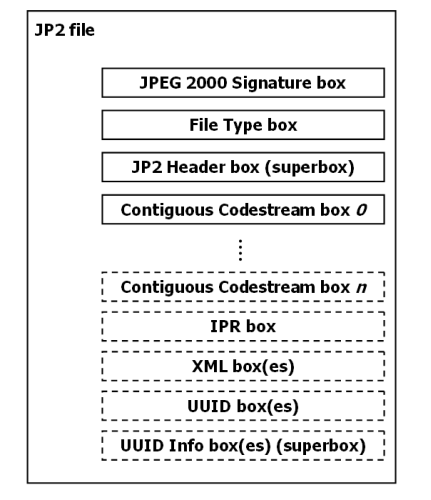
Some of these boxes are required (indicated by solid lines in the figure), whereas others (depicted with dashed lines) are optional. Some boxes are ‘superboxes’ that contain other boxes. A number of boxes can have multiple instances, whereas others are always unique. In addition, the order in which the boxes may appear in a JP2 file is subject to certain restrictions. This is all defined by the standard. At the highest level, jpylyzer parses the box structure of a file and checks whether it follows the standard. At a lower level, the information that is contained within the boxes is often subject to restrictions as well. For instance, the header field that defines how the colour space of an image is specified only has two legal values; any other value is meaningless and would therefore invalidate the file. Finally, there are a number of interdependencies between property values. For instance, if the value of the ‘Bits Per Component’ field of an image equals 255, this implies that the JP2 Header box contains a ‘Bits Per Component’ box. There are numerous other examples; the important thing here is that I have tried to make jpylyzer as exhaustive as possible in this regard.
It is also worth pointing out that jpylyzer checks whether any embedded ICC profiles are actually allowed, as JP2 has a number of restrictions in this regard. There is a slight (intentional) deviation from the standard here, as an amendment to the standard is currently in preparation that will allow the use of “display device” profiles in JP2. The current version of jpylyzer is already anticipating this change, and will consider JP2s that contain such ICC profiles valid (provided that they do not contain any other errors of course).
What’s not included yetAs this is a first prototype, jpylyzer is still a work in progress. Although most aspects of the JP2 file format are covered, a few things are still missing at this stage:
- Support of the Palette and Component Mapping boxes (which are optional sub-boxes in the JP2 Header Box) is not included yet. The current version of jpylyzer recognises these boxes, but doesn’t perform any analyses on them. This will change in upcoming versions.
- The IPR, XML, UUID and UUID Info boxes are not yet supported either.
- The analysis and validation of the image codestream is still somewhat limited. Currently jpylyzer reads and validates the required parts of the main codestream header (for those who are in the know on this: the SIZ, COD and QCD markers). It also checks if the information in the codestream header is consistent with the JP2 image header (the information in both headers is partially redundant). Finally, it loops through all tile parts in an image, and checks if the length (in bytes) of each tile-part is consistent with the markers that delineate the start and end of each tile-part in the codestream. This is particularly useful for detecting certain types of image corruption where one or more bytes are missing from the codestream (either at the end or in the middle).
- For now only codestream comments that consist solely of ASCII characters are reported. As the standard permits the use of non-ASCII characters of the Latin (ISO/IEC 8859-15) character set, this means that codestream comments that contain e.g. accent characters are currently not reported by jpylyzer. This will change in upcoming versions.
You can download the source code of jpylyzer from the following location:
https://github.com/bitsgalore/jpylyzer/
This requires Python 2.7, or Python 3.2 or more recent. A word of warning though: due to a number of reasons the source code ended up somewhat clumsy and unnecessarily verbose (one colleague even remarked that looking at it induced nostalgic memories of good old GW-BASIC!). With some major refactoring the overall length of the code could probably be reduced to half its current size, and I may have a go at this at some later point. For now it’ll have to do as it is!
I also created some Windows binaries for those who do not want to install Python. Just follow the link below and download the ZIP file (the one called ‘jpylyzermmddyyyyWin32.zip’ listed under ‘Download Packages’, not the one under the ‘download as ZIP’ button which will get you the source code!).
https://github.com/bitsgalore/jpylyzer/downloads
Extract its contents to an empty directory, and then simply use ‘jpylyzer.exe’ directly on the command line.
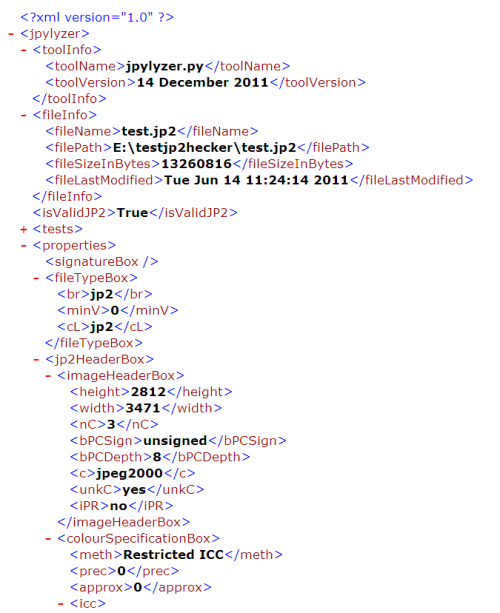
Note on jpylyzer’s output filesFrom the first responses I received it appears that jpylyzer‘s output format, and in particular the fields under the ‘tests’ element may create some confusion. The ‘test’ element contains the outcome of every single test that jpylyzer performs. A file is considered ‘valid’ if it passes (i.e. returns ‘true’ for) each test. However, the ‘isValidJP2’ element at the root of the XML tree will tell you straightaway whether a file is valid or not. The ‘tests’ element is mainly included for illustrative purposes, and the reporting of individual test outcomes will most likely change in future versions (e.g. by reporting only which tests failed, if any).
See also the screenshot below (this shows the first part of an output file, with the ‘tests’ element collapsed):
A final word
Keep in mind that the current version of jpylyzer is still a prototype. There may (and probably will) be unresolved bugs, and it really shouldn’t be used in any operational workflows at this stage. So far I have tested it with a range of JPEG 2000 images (mostly JP2, but also some JPX), including some images that I deliberately corrupted. No matter how corrupt an image is, this should never cause jpylyzer to crash. Therefore, it would be extremely useful if people could test the tool on their worst and weirdest images, and report back in case of any unexpected results. For early 2012 I’m also planning to write a comprehensive user guide that gives some more details on the validation process, as well as an explanation on the reported properties. Support of the JP2 boxes that are currently missing will also follow around that time. Meanwhile, any feedback on the current prototype is highly appreciated!
Johan van der Knijff
KB / National Library of the Netherlands
Preservation Topics: IdentificationBit rotOpen Planets FoundationCharacterisationRepresentation InformationSCAPEToolsPreservation RisksSCAPE Project: Request for examples of working and best practice documentation
The OPF is a consortium member of the SCAPE (Scalable Preservation Environments) project, co-funded by the EU. http://www.scape-project.eu/.
The project will enhance the state of the art of digital preservation in three ways: by developing infrastructure and tools for scalable preservation actions; by providing a framework for automated, quality-assured preservation workflows and by integrating these components with a policy-based preservation planning and watch system. These concrete project results will be validated within three large-scale Testbeds from diverse application areas: Digital Repositories from the library community, Web Content from the web archiving community, and Research Data Sets from the scientific community. Each Testbed has been selected because it highlights unique challenges.
One of the work-packages in which the OPF is participating is undertaking a task to carry out a survey of working and existing best practices documentation.
1. We are currently collecting examples of institutional guidelines, reports and documentation of working and best practice on Repository Migration.
If your institution has experience in, or if you aware of existing literature in this area, we would be very grateful if you would be willing to send us examples of documentation for our survey. The examples will be used to write a report on working and best practices to which we will add SCAPE experience. Any examples that we cite in the reports will be anonymised.
2. We are also collecting examples of institutional guidelines, reports and documentation of working and best practice on the Preservation of Scientific Datasets.
As above, if your institution has experience in, or if you aware of existing literature in either of these areas, we would be very grateful if you would be willing to send us examples of documentation for our surveyand report.
If your examples can be publicly available, please add them to the wiki pages: http://wiki.opf-labs.org/display/SP/Examples+of+working+and+best+practice. Alternatively, please send examples to [email protected] with the topic of your examples in the subject.
Thank you.
Taverna 2.3.1 Update
The Taverna Team have released the 2.3.1 update to Taverna 2.3 to fix a problem with installation of third-party plugins.
This update does not include any new functionally or other bug fixes, and you only need to install this update if you are installing any third-party plugins in Taverna 2.3.0.
Please see http://www.mygrid.org.uk/dev/wiki/display/taverna/T2-1989+plugin+install+fails for details about this update and how to install it.
Preservation Topics: SCAPEEvaluation of identification tools: first results from SCAPE
 SCAPE_PC_WP1_identification21092011.pdf1.15 MB
As I already briefly mentioned in a previous blog post, one of the objectives of the SCAPE project is to develop an architecture that will enable large scale characterisation of digital file objects. As a first step, we are evaluating existing characterisation tools. The overall aim of this work is twofold. First, we want to establish which tools are suitable candidates for inclusion in the SCAPE architecture. As the enhancement of existing tools is another goal of SCAPE, the evaluation is also aimed at getting a better idea of the specific strengths and weaknesses of each individual tool. The outcome of this will be helpful for deciding what modifications and improvements are needed. Also, many of these tools are widely used outside of the SCAPE project, which means that the results will most likely be relevant to a wider audience (including the original tool developers).
Evaluation of identification toolsOver the last months, work on this has focused on format identification tools. This has resulted in a report which is attached with this blog post. We have evaluated the following tools:
- DROID 6.0
- FIDO 0.9
- Unix File Utility
- FITS 0.5
- JHOVE2
All tools were evaluated against a set of 22 criteria. Extensive testing using real data has been a key part of the work. One area which, I think, we haven’t been able to tackle sufficiently so far is the accuracy of the tools. This is problematic, since it would require a test corpus where the format of each file object is known a priori. In most large data sets this information will be derived from the very same tools that we are trying to test, so we need to see if we can say anything meaningful about this in a follow-up.
Involvement of tool developersOver the previous months we’ve been sending out earlier drafts of this document to the developers of DROID, FIDO, FITS and JHOVE2, and we have received a lot of feedback to this. In the case of FIDO, a new version is underway, and this should correct most (if not all) of the problems that are mentioned in the report. For the other tools we have also received confirmation that some of the found issues will be fixed in upcoming releases.
Status of the report and future workThe attached report should be seen as a living document. There will probably be one or more updates at some later point, and we may decide to include more tests using additional data. Meanwhile, as always, we appreciate any of your feedback on this!
Link to reportEvaluation of characterisation tools – Part 1: Identification
Johan van der Knijff
KB / National Library of the Netherlands
Preservation Topics: IdentificationCharacterisationFormat RegistryRepresentation InformationCorporaToolsAQuAOpen Planets FoundationSCAPEA simple JP2 file structure checker
Over the last few weeks I’ve been working on the design of a workflow that the KB is planning to use for the migration of a collection of (mostly old) TIFF images to JP2. One major risk of such a migration is that hardware failures during the migration process may result in corrupted images. For instance, one could imagine a brief network or power interruption that occurs while an image is being written to disk. In that case data may be missing from the written file. Ideally we would be able to detect such errors using format validation tools such as JHOVE. Some time ago Paul Wheatley reported that the BL at some point were dealing with corrupted, incomplete JP2 files that were nevertheless deemed “well-formed and valid” by JHOVE. So I started doing some experiments in which I deliberately butchered up some images, and subsequently checked to what extent existing tools would detect this.
I started out with removing some trailing bytes from a lossily compressed JP2 image. As it turned out, I could remove most of the image code stream (reducing the original 2 MB image to a mere 4 kilobytes!), but JHOVE would still say the file was “well-formed and valid”. I was also able to open and render these files with viewer applications such as Adobe Photoshop, Kakadu’s viewer and Irfanview. The behaviour of the viewer apps isn’t really a surprise, since the ability to render an image without having to load the entire code stream is actually one of the features that make JPEG 2000 so interesting for many access applications. JHOVE’s behaviour was a bit more surprising, and perhaps slightly worrying.
jp2StructCheck toolThis made me wonder about a way to detect incomplete code streams in JP2 files. A quick glance at the standard revealed that image code streams should always be terminated by a two-byte ‘end of codestream marker’. As this is something that is straightforward to check, I fired up Python and ended up writing a very simple JP2 file structure checker. Since the image code stream in JP2 does not have to be located at the end of the file (even though it usually is), it is necessary to do a superficial parsing of JP2’s ‘box’ structure (which is documented here). So I thought I might as well include an additional check that verifies if the JP2 contains all required boxes.
In brief, when jp2StructCheck analyses a file, it first parses the top-level box structure, and collects the unique identifiers (or marker codes) of all boxes. If it encounters the box that contains the code stream, it checks if the code stream is terminated by a valid end-of-codestream marker. Finally, it checks if the file contains all the compulsory/required top-level boxes. These are:
- JPEG 2000 signature box
- File Type box
- JP2 Header box
- Contiguous Codestream box
In order to test the box checking mechanism I did some additional image butchering, where I deliberately changed the tags of existing boxes so that they wouldn’t be recognised. When I subsequently ran these images through JHOVE, this revealed some additional surprises. For instance, after changing the markers of the Contiguous Codestream box or even the JP2 Header box (which effectively makes them unrecognisable), JHOVE would still report these images as “well-formed and valid” (although in the case of the missing JP2 Header box JHOVE did report an error).
Limitations of jp2StructCheckIt is important to note here that jp2StructCheck only checks the top-level boxes. In case of a superbox (which is a box that contains child boxes), it does not recurse into its child boxes. For example, it does not check if a JP2 Header box (which is a superbox) contains a Colour Specification box (which is required by the standard). So the scope of the tool is limited to a rather superficial check of the general file structure. It is not a JP2 validator, and it is certainly not a replacement for JHOVE (which performs a more in-depth analysis)! The main scope is to be able to detect certain types of file corruption that may occur as a result of hardware failure (e.g. network interruptions) during the creation of an image.
In addition, the fact that a code stream is terminated by and end-of-codestream marker is no guarantee that the code stream is complete. For instance, if due to some hardware failure some part of the middle of the codestream is not written, jp2StructCheck will not detect this! It may be possible to improve the level of error detection by including additional codestream markers. This is something I might have a look at at some later point.
DownloadsI created a Github repository that contains the source code of jp2StructCheck, some documentation, and a small data set with some test images.
As some people may not want to install Python on their system, I also created a binary distribution that should work on most Windows systems.
The documentation (in PDF format) is here.
Finally, use this link to download the test images.
Final notesI’m curious to hear if anyone finds jp2StructCheck useful at all, so please feel free to use the comment fields below for your feedback (including reports on any bugs that may exist).
Johan van der Knijff
KB / National Library of the Netherlands
Preservation Topics: Preservation ActionsAQuAOpen Planets FoundationCharacterisationSCAPEMigrationToolsPreservation RisksA Format Registry for SCAPE
In my previous post on formats, I ended up leaning towards a wait-and-see approach to format registry design. Unfortunately, I don’t really have that luxury. The SCAPE project needs to collect more format information to assist preservation planning and other processes. We even have some effort available to help build and/or fill a registry. But which registry should we try fill? Or should we go it alone and make a new one?
I don’t really want to recommend that SCAPE makes a new format registry if we can contribute efficiently to an existing one instead. But which registry? There are so many to choose from…
- PRONOM & Linked-Data PRONOM
- P2
- GDFR & UDFR
- Library of Congress Format Registry
- The CASPAR/DCC Representation Information Repository
- My Drupal Prototype
- Portions of The Software Ontology
…and that’s just the ones developed by our own community! Some of the most well-used ones belong to the wider world, and contain almost exactly the same information…
- MIME Media Types
- Wikipedia
- The File command ‘magic registry’ a.k.a. libmagic.
- Freebase
- W3C’s Ontology for Media Resources
While our registries do contain a reasonable amount of good data, we know we don’t have enough. Why are our own repositories not brimming with the information we need? Is it uncertainty about what the right information is? Are we unsure where best to invest our efforts, leading to a kind of well-meaning deadlock? Or are we simply failing to assign enough time and effort to this task?
The OPF’s proposed solution is to remove any publication bottlenecks via an entirely de-centralised ‘ecosystem’ approach. This implies that SCAPE should go ahead and do it’s own thing, but publish the information as linked data so it can be merged with the other sources. But given we already have an ecosystem of incompatible registries, I’m not convinced this really the best way forward. Perhaps it would make more sense to try and bridge the gaps between them?
Preservation Topics: Format RegistryRepresentation InformationSCAPE