


Feed aggregator
IS 42 Detecting Encryption and DRM in Digital Content
Page edited by Carl Wilson
View Online Carl Wilson 2012-04-25T13:23:12ZHome
Page edited by Paul Wheatley
View Online Paul Wheatley 2012-04-25T10:16:19Z2012-05-21 OPF Hackathon – A Practical Approach to Preservation Systems
Page edited by Becky McGuinness
View Online Becky McGuinness 2012-04-25T09:15:20ZAgenda – OPF Hackathon – A Practical Approach to Preservation Systems
Page edited by Becky McGuinness
View Online Becky McGuinness 2012-04-25T08:01:05ZThe OPF Data Endpoint
Page edited by David Tarrant
View Online David Tarrant 2012-04-24T14:41:20ZOPF blog posts
Page edited by Martin Schenck
View Online Martin Schenck 2012-04-24T14:07:24ZOPF blog posts
Page edited by Martin Schenck
View Online Martin Schenck 2012-04-24T14:07:24ZSeeking Miraculous and Lossless Victories: An Update on the FADGI Still Image Working Group
The following is a guest post by Carla Miller, Administrative Specialist for the Office of Strategic Initiatives.
 On March 23, 2012, the Still Image and Audio Visual Working Groups of the Federal Agencies Digitization Guidelines Initiative (FADGI) held a joint meeting hosted at the National Archives and Records Administration’s (NARA) College Park campus. This is part one of a two-part post; part one covers the Still Image Working Group meeting, and part two will cover the Audio Visual Working Group meeting.
The Still Image Working Group, led by Steve Puglia of the Library of Congress, discussed ongoing work (meeting slides are here), including the work of two sub-groups: File Format and Embedded Metadata. Currently, the File Format Sub-group is assessing five raster image formats the members consider acceptable for master image files for the cultural heritage community: TIFF, JPEG 2000, JPEG, PNG, and PDF. For many years, the trend has been to use uncompressed TIFF files, but the files are large and thus are burdensome in networks and in requirements for storage. These factors have motivated a new look at file formats and at options for compression. The group is looking at more than just sustainability factors for these formats, including costs (storage, network, ongoing, tools/start-up, access, and preservation) and implementation considerations. Stay tuned!! Meanwhile, the Embedded Metadata Sub-group has adopted a set of guidelines from the Smithsonian as a recommendation.
The preceding should not suggest that image quality is not important! Although lossless compression will be best for certain categories of materials, Steve discussed ongoing research at LC on evaluation methods and the effects of lossy compression on raster images. How to determine the effects of compression is a tricky business, though, because one wants to strike a balance between objective and subjective analyses. With this in mind, the approaches being considered fall into three categories: visual/subjective evaluation, metric/objective evaluation (e.g. mean squared error [MSE], peak signal to noise ratio [PSNR], structural similarity index (SSIM), etc.), and task accuracy (e.g. optical character recognition [OCR]).
Dr. Lei He at LC has been conducting an interesting analysis that looks at the correlation between objective measurements of the changes effected by image compression and the subjective reaction to those changes as noted by human observers. This is a work in progress, but the idea is that objective measures can be used to anticipate the likely subjective reactions. So far, the results are comparable to similar work done by other organizations. Preliminary findings indicate at low to moderate lossy compression, the brightness and color values of a majority of pixels are altered to a very minor degree and the changes are well within a subjectively acceptable range. Also, the effect of compression varies for different collection types: cartoon drawings show the most effect, followed by fine prints and black & white negatives; color photos show the least effect.
Members of the Still Image Working Group are also undertaking a CIE Color Accuracy Study. The targets and samples being imaged for the study have been sent to and imaged by a second group of labs in the United States, including Harvard University, Stanford University, the Art Institute of Chicago and the National Gallery of Art in Washington, DC. The next step is to analyze the data collected from all seven North American labs, and a second phase of imaging by European labs has started. An update on the study findings will be presented at the IS&T Archiving Conference in Copenhagen, Denmark, this summer.
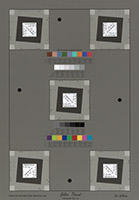
Digital Image Conformance Environment (DICE) target
One challenge for institutions with collections of historic photographic negatives is deciding on what scanning resolution is appropriate for digitization. Steve talked about how the Library of Congress and other institutions are analyzing the spatial frequency response (SFR) of negatives from different collections using an SFR analysis described by Don Williams. Sample negatives from a collection are scanned at higher-than-expected resolution (verified with a target), and selected features in the digital images are analyzed to determine appropriate resolution for capturing all the scene detail.
The Library and other institutions are also using similar techniques to monitor production scanning of negatives using an SFR target and M-Scan/ImCheck software. This is accomplished by scanning the target on a daily basis (for larger targets, scan all four corners and the center) and then plotting over time to monitor the change and variability.
Of interest to many in the community is the announcement that a new working group has been formed within ISO. WG26 of ISO TC42 plans to develop standards relating to digitization tools such as targets.
Tika Batch File Identification
Tika Batch File Identification > ISOWorkFlow.jpg
File attached by Peter May
JPEG File ISOWorkFlow.jpg (86 kB)
Tika Batch File Identification > BasicWorkflow.jpg
File attached by Peter May
JPEG File BasicWorkflow.jpg (40 kB)
Jpylyzer
Page edited by Johan van der Knijff
View Online Johan van der Knijff 2012-04-24T11:57:34ZHome
Home
Preservation Week
I was in Canada this past weekend, so this Tuesday’s post is just a link to a Library of Congress video on “Why digital preservation is important for you”, in honor of Preservation Week.
Migrating a Windows 2000 Database Server to Virtualized and Emulated hardware
We have recently started some research at Archives New Zealand to investigate the best approaches for appraising, transferring (where relevant) and preserving databases.
As part of this research we will be undertaking case studies of a number of databases. The case studies will involve a number of aspects including where possible testing one or more preservation approaches on each database. We hope to publish the results of this research at the end of the project.
As part of one of the case studies we recently migrated an entire Windows 2000 Server machine to virtualized hardware and onto emulated hardware. The motherboard and other components failed during transport so the process proved particularly challenging but was ultimately successful.
The machine held an MSSQL database with a custom HTML front-end. The database consisted of a digital index to some paper records. The paper records had been transferred to us earlier from the agency (LINZ) that gave us the database to do research on. The migrated and virtualised (or emulated) database may now be used in our reading room(s) to aid users in discovering and accessing the transferred paper records.
Attached to this post is some relatively brief documentation of the process. This version has had the passwords that were recovered from the machine removed from it.
This example will be included in the case study for this database with a discussion of the value of the process versus the resources required etc. Those aspects are possibly the most interesting for this community but hopefully there is some value in this process documentation also.
Preservation Topics: EmulationMigrationPreservation StrategiesDatabase Archiving AttachmentSize Database Migration Process Documentation1.02 MB
It’s Preservation Week! How are you celebrating it?
It’s Preservation Week! How are you celebrating it?
Attending an event at your local library?
Holding an event?
Thinking about some of your own personal collections that may need preservation treatment to pass on?
Even though our blog focuses on the preservation of digital materials, we are about raising awareness and promoting preservation-related activities.

Still image from 1980’s film "Preservation: An Investment in the Future"
That’s why this afternoon, I attended the first Preservation Week event here at the Library of Congress. Our Library’s Preservation Directorate, which works to ensure the long-term care and access to collections in original or reformatted form, screened a 1980’s film about the history of the Library’s preservation activities at that time.
The film highlighted the innovative methods and best practices used 30 years ago to care, restore and preserve the Library’s collections, such as the binding methods for library materials, the detailed steps involved in microfilming collections, and the deacidification process to protect books. Whether nostalgic to some or vintage to others, it literally showed our organization has come a long-way while maintaining our core mission.
The Library is holding more educational and informational events this week, including seminars and webinars.
If you’re looking for events or activities in your area, ALA’s Preservation Week event map is a fantastic resource.
And if you’re awareness has been raised, you can learn to care for you personal collections at home. Here are some good “starting-out” informational resources, whether you are caring for physical objects, digitizing photos, or saving your personal digital materials.
- Library of Congress, Preservation Directorate: Caring for Your Family Treasures: Learn about the importance of caring and protecting everyday family treasures, as well information and links to other resources.
- Beginning Digitization Principles for Restoring Old Photographs: A blog post from Familysearch.org discussing considerations when scanning old photographs.
- Personal Digital Archiving: This site provides some tips to help make your personal “born digital” information last.