File Formats Blog


RDFa 1.1
Lately I’ve been looking at RDFa 1.1. Previous versions of RDF and RDFa had been hampered by not being usable in ordinary HTML. RDFa 1.0 could be used only with XHTML. With version 1.1’s usability in HTML5 as well as XML, a lot more possibilities for embedding metadata in documents arise. It’s invisible in the browser but can be extracted more easily and reliably than data can be mined from ordinary Web pages. Dublin Core metadata, for example, is often expressed in RDFa.
The quick explanation, in case you aren’t familiar with it: RDF is an extensible way of expressing arbitrary data relationships by triples, which consist of a subject, a predicate (property type), and object (property value). It makes heavy use of IRIs, which are like URIs but allow the full Unicode character set; IRIs are used rather than simple names to avoid ambiguity. “Title,” for instance, means one thing when talking about books and something else when talking about British nobility; different IRIs can distinguish between them. To create a new RDF vocabulary, you just have to create new IRIs. RDFa is a way of expressing RDF in XML or HTML5 syntax. You’ll often run into the term “linked data” in connection with RDF.
I’ve started work on a possible tool to take advantage of RDFa data in HTML. I start a lot more projects than I ever bring to completion, so for the present I won’t say more about it.
Tagged: metadata, RDF


Open Planets Foundation is now Open Preservation Foundation
The Open Planets Foundation is now the Open Preservation Foundation. This name change reflects its function; the old name grew out of the Planets project and never really made sense.
For the present, it’s still found on the Internet as openplanetsfoundation.org.
Tagged: Open Planets Foundation, Open Preservation Foundation, preservation


The return of music DRM?
U2, already the most hated band in the world thanks to its invading millions of iOS devices with unsolicited files, isn’t stopping. An article on Time‘s website tells us, in vague terms, that
Bono, Edge, Adam Clayton and Larry Mullen Jr believe so strongly that artists should be compensated for their work that they have embarked on a secret project with Apple to try to make that happen, no easy task when free-to-access music is everywhere (no) thanks to piracy and legitimate websites such as YouTube. Bono tells TIME he hopes that a new digital music format in the works will prove so irresistibly exciting to music fans that it will tempt them again into buying music—whole albums as well as individual tracks.
It’s hard to read this as anything but an attempt to bring digital rights management (DRM) back to online music distribution. Users emphatically rejected it years ago, and Apple was among the first to drop it. You haven’t really “bought” anything with DRM on it; you’ve merely leased it for as long as the vendor chooses to support it. People will continue to break DRM, if only to avoid the risk of loss. The illegal copies will offer greater value than legal ones.
It would be nice to think that what U2 and Apple really mean is just that the new format will offer so much better quality that people will gladly pay for it, but that’s unlikely. Higher-quality formats such as AAC have been around for a long time, and they haven’t pushed the old standby MP3 out of the picture. Existing levels of quality are good enough for most buyers, and vendors know it.
Time implies that YouTube doesn’t compensate artists for their work. This is false. They often don’t bother with small independent musicians, though they will if they’re reminded hard enough (as Heather Dale found out), but it’s hard to believe that groups with powerful lawyers, such as U2, aren’t being compensated for every view.
DRM and force-feeding of albums are two sides of the same coin of vendor control over our choices. This new move shouldn’t be a surprise.
Tagged: Apple, audio, DRM
Best viewed with a big-name browser
A few websites refuse to present content if you use a browser other than one of the four or so big-name ones.
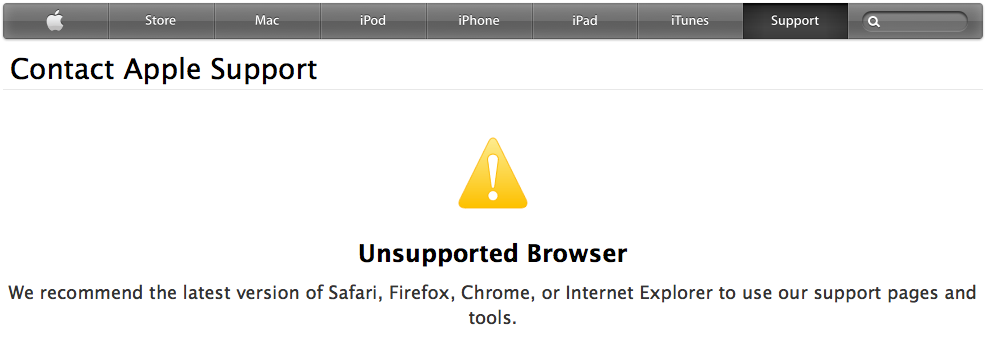
The example shown is what I got when I accessed Apple’s support site with iCab, a relatively obscure browser which I often use. Many of Google’s pages also refuse to deliver content to iCab.
There is a real problem that JavaScript isn’t standardized, and it’s necessary to test with each browser to be confident that a page will work properly. However, if a page sticks with the basics of JavaScript and isn’t trying to do animations, video, or other cutting-edge effects, then any reasonably up-to-date implementation of JavaScript should be able to handle it. It’s reasonable to display a warning if the browser is an untested one, but there’s no reason to block it.
Browsers can impersonate other browsers by setting the User-Agent header, and small-name browsers usually provide that option for getting around these problems. After a couple of tries with iCab, I was able to get through by impersonating Safari. Doing this also has an advantage for privacy; identifying yourself with a little-used browser can greatly contribute to unique identification when you may want anonymity. From the standpoint of good website practices, though, a site shouldn’t be locking browsers out unless there’s an unusual need. Web pages should follow standards so that they’re as widely readable as possible. This is especially important with a “contact support” page.
Apple and Google both are browser vendors. Might we look at this as a way to make entry by new browsers more difficult?
Tagged: HTML, standards
The animated GIF is the new blink tag
In the early days of HTML, the most hated tag was the <blink> tag, which made text under it blink. There were hardly any sensible uses for it, and a lot of browsers now disable it. I just tested it in this post, and WordPress actually deleted the tag from my draft when I tried to save it. (I approve!)
Today, though, the <blink> tag isn’t annoying enough. Now we have the animated GIF. It’s been around since the eighties, but for some reason it’s become much more prevalent recently. It’s the equivalent of waving a picture in your face while you’re trying to read something.
I can halfway understand it when it’s done in ads. Advertisers want to get your attention away from the page you’re reading and click on the link to theirs. What I don’t understand is why people use it in their own pages and user icons. It must be a desire to yell “Look how clever I am!!!” over and over again as the animation cycles.
Fortunately, some browsers provide an option to disable it. Firefox used to let you stop it with the ESC key, but last year removed this feature.
If you think that your web page is boring and adding some animated GIFs is just what’s needed to bring back the excitement — Don’t. Just don’t.
Update: I just discovered that a page that was driving me crazy because even disabling animated GIFs wouldn’t stop it was actually using the <marquee> tag. I believe that tag is banned by the Geneva Convention.
Tagged: GIF, HTML, rant
Canvas fingerprinting, the technical stuff
The ability of websites to bypass privacy settings with “canvas fingerprinting” has caused quite a bit of concern, and it’s become a hot topic on the Code4lib mailing list. Let’s take a quick look at it from a technical standpoint. It is genuinely disturbing, but it’s not the unstoppable form of scrutiny some people are hyping it as.
The best article to learn about it from is “Pixel Perfect: Fingerprinting Canvas in HTML5,” by Keaton Mowery and Hovav Shacham at UCSD. It describes the basic technique and some implementation details.
Canvas fingerprinting is based on the <canvas> HTML element. It’s been around for a decade but was standardized for HTML5. In itself, <canvas> does nothing but define a blank drawing area with a specified width and height. It isn’t even like the <div> element, which you can put interesting stuff inside; if all you use is unscripted HTML, all you get is some blank space. To draw anything on it, you have to use JavaScript. There are two APIs available for this: the DOM Canvas API and the WebGL API. The DOM API is part of the HTML5 specification; WebGL relies on hardware acceleration and is less widely supported.
Either API lets you draw objects, not just pixels, to a browser. These include geometric shapes, color gradients, and text. The details of drawing are left to the client, so they will be drawn slightly differently depending on the browser, operating system, and hardware. This wouldn’t be too exciting, except that the API can read the pixels back. The getImageData method of the 2D context returns an ImageData object, which is a pixel map. This can be serialized (e.g., as a PNG image) and sent back to the server from which the page originated. For a given set of drawing commands and hardware and software configuration, the pixels are consistent.
Drawing text is one way to use a canvas fingerprint. Modern browsers use a programmatic description of a font rather than a bitmap, so that characters will scale nicely. The fine details of how edges are smoothed and pixels interpolated will vary, perhaps not enough for any user to notice, but enough so that reading back the pixels will show a difference.
However, the technique isn’t as frightening as the worst hype suggests. First, it doesn’t uniquely identify a computer. Two machines that have the same model and come from the same shipment, if their preinstalled software hasn’t been modified, should have the same fingerprint. It has to be used together with other identifying markers to narrow down to one machine. There are several ways for software to stop it, including blocking JavaScript from offending domains and disabling part or all of the Canvas API. What gets people upset is that neither blocking cookies nor using a proxy will stop it.
Was including getImageData in the spec a mistake? This can be argued both ways. Its obvious use is to draw a complex canvas once and then rubber-stamp it if you want it to appear multiple times; this can be faster than repeatedly drawing from scratch. It’s unlikely, though, that the designers of the spec thought about its privacy implications.
Tagged: DOM, HTML, html5, JavaScript, W3C
Cookbooks vs. learning books
A contract lead got me to try learning more about a technology which the client needs. Working from an e-book which I already had, I soon was thinking that it’s a really confused, ad hoc library. But then I remembered having this feeling before, when the problem was really the book. I looked for websites on the software and found one that explained it much better. The e-book had a lot of errors, using JavaScript terminology incorrectly and its own terminology inconsistently.
A feeling came over me, the same horrified realization the translator of To Serve Man had: “It’s a cookbook!” It wasn’t designed to let you learn how the software works, but to get you turning out code as quickly as possible. There are too many of these books, designed for developers who think that understanding the concepts is a waste of time. Or maybe the fault belongs less to the developers than to managers who want results immediately.
A book that introduces a programming language or API needs to start with the lay of the land. What are its basic concepts? How is it different from other approaches? It has to get the terminology straight. If it has functions, objects, classes, properties, and attributes, make it clear what each one is. There should be examples from the start, so you aren’t teaching arid theory, but you need to follow up with an explanation.
If you’re writing an introduction to Java, your “Hello world” example probably has a class, a main() function, and some code to write to System.out. You should at least introduce the concepts of classes, functions, and importing. That’s not the place to give all the details; the best way to teach a new idea is to give a simple version at first, then come back in more depth later. But if all you say is “Compile and run this code, and look, you’ve got output!” then you aren’t doing your job. You need to present the basic ideas simply and clearly, promise more information later, and keep the promise.
Don’t jump into complicated boilerplate before you’ve covered the elements it’s made of. The point of the examples should be to teach the reader how to use the technology, not to provide recipes for specific problems. The problem the developer has to solve is rarely going to be the one in the book. They can tinker with the examples until they fit their own problem, not really understanding them, but that usually results in complicated, inefficient, unmaintainable code.
Expert developers “steal” code too, but we know how it works, so we can take it apart and put it back together in a way that really suits the problem. The books we can learn from are the ones that put the “how it works” first. Cookbooks are useful too, but we need them after we’ve learned the tech, not when we’re trying to figure it out.
Tagged: books, writing
Song identification on GitHub
The code for my song identification “nichesourcing” web application is now available on GitHub. It’s currently aimed at one project, as I’d mentioned in my earlier post, but has potential for wide use. It allows the following:
- Users can register as editors or contributors. Only registered users have access.
- Editors can post recording clips with short descriptions.
- Contributors can view the list of clips and enter reports on them.
- Reports specify type of sound, participants, song titles, and instruments. Contributors can enter as much or as little information as they’re able to.
- Editors can modify clip metadata, delete clips, and delete reports.
- Contributors and editors can view reports.
- More features are planned, including an administrator role.
This is my first PHP coding project of any substance, so I’m willing to accept comments about my overall coding approach. It’s inevitable that, to some degree, I’m writing PHP as if it’s Java. If there are any standard practices or patterns I’m overlooking, let me know.
Tagged: music, software, songid
Archiving video
Suppose you see a cop beating someone up for jaywalking, or you’re stopped at one of the Border Patrol’s internal checkpoints. You’ve got your camera, phone, or tablet, so you make a video record of the incident. What do you do next? The Activists’ Guide to Archiving Video has some solid advice. Its purpose is to help you “make sure that the video documentation you have created or collected can be used for advocacy, as evidence, for education or historical memory – not just now but into the future.” The advice is solid, and most of it applies to any video recording that has long-term importance. In essence, it’s the same advice you’d get from Files that Last or from the Library of Congress. It includes considerations that especially apply to sensitive video, such as encryption and information that might put people at risk, but it’s a valuable addition to anyone’s digital preservation library.
There’s a PDF version of the guide for people who don’t like hopping around web pages. Versions in Spanish and Arabic are also provided.
Tagged: metadata, preservation, video
Crowdsourcing song identification
Some friends of mine are pulling together a project for crowdsourcing identification of a large collection of music clips. At least a couple of us are professional software developers, but I’m the one with the most free time right now, and it fits with my library background, so I’ve become lead developer. In talking about it, we’ve realized it can be useful to librarians, archivists, and researchers, so we’re looking into making it a crowdfunded open source project.
A little background: “Filk music” is songs created and sung by science fiction and fantasy fans, mostly at conventions and in homes. I’ve offered a definition of filk on my website. There are some shoestring filk publishers; technically they’re in business, but it’s a labor of love rather than a source of income. Some of them have a large backlog of recordings from past conventions. Just identifying the songs and who’s singing them is a big task.
This project is, initially, for one of these filk publishers, who has the biggest backlog of anyone. The approach we’re looking at is making short clips available to registered crowdsource contributors, and letting them identify as much as they can of the song, the author, the performer(s), the original tune (many of these songs are parodies), etc. Reports would be delivered to editors for evaluation. There could be multiple reports on the same clip; editors would use their judgment on how to combine them. I’ve started on a prototype, using PHP and MySQL.
There’s a huge amount of enthusiasm among the people already involved, which makes me confident that at least the niche project will happen. The question is whether there may be broader interest. I can see this as a very useful tool for professionals dealing with archives of unidentified recordings: folk music, old jazz, transcribed wax cylinder collections, whatever. There’s very little in the current design that’s specific to one corner of the musical world.
The first question: Has anyone already done it? Please let me know if something like this already exists.
If not, how interesting does it sound? Would you like it to happen? What features would you like to see in it?
Update: On the Code4lib mailing list, Jodi Schneider pointed out that nichesourcing is a more precise word for what this project is about.
Tagged: archiving, crowdsourcing, filk, music
HTML and fuzzy validity
Andy Jackson wrote an interesting post on the question of HTML validity. Only registered Typepad users can comment, so it’s easier for me to add something to the discussion here.
When I worked on JHOVE, I had to address the question of valid HTML. A few issues are straightforward; the angle brackets for tags have to be closed, and so do quoted strings. Beyond that, everything seems optional. There are no required elements in HTML, not even html, head, or body; a blank file or a plain text file with no tags can be a valid HTML document. The rules of HTML are designed to be forgiving, which just makes it harder to tell if a document is valid or not. I’ve recommended that JHOVE users not use the HTML module; it’s time-consuming and doesn’t give you much useful information.
There are things in XHTML which aren’t legal in HTML. The “self-closing” tag (<tag/>) is good XHTML, but not always legal HTML. In HTML5, <input … /> is legal, but <span … /> isn’t, because input doesn’t require a closing tag but span does. (In other words, it’s legal only when it’s superfluous.) However, any recent browser will accept both of them.
The set of HTML documents which are de facto acceptable and unambiguous is much bigger than the set which is de jure correct. Unfortunately, the former is a fuzzy set. How far can you push the rules before you’ve got unsafe, ambiguous HTML? It depends on which browsers and versions you’re looking at, and how strenuous your test cases are.
The problem goes beyond HTML proper. Most browsers deal with improper tag nesting, but JavaScript and CSS can raise bigger issues. These are very apt to have vendor-specific features, and they may have major rendering problems in browsers for which they weren’t tested. A document with broken JavaScript can be perfectly valid, as far as the HTML spec is concerned.
It’s common for JavaScript to be included by an external reference, often on a completely different website. These scripts may themselves have external dependencies. Following the dependency chain is a pain, but without them all the page may not work properly. I don’t have data, but my feeling is that far more web pages are broken because of bad scripts and external references than because of bad HTML syntax.
So what do you do when validating web pages? Thinking of it as “validating HTML” pulls you into a messy area without addressing some major issues. If you insist on documents that are fully compliant with the specs, you’ll probably throw out more than you accept, without any good reason. But at the same time, unless you validate the JavaScript and archive all external dependencies, you’ll accept some documents that have significant preservation issues.
It’s a mess, and I don’t think anyone has a good solution.
Professional update
Just to keep everyone up to date on what I’m doing professionally:
Currently I’m back in consulting mode, offering my services for software development and consultations. Those of you who’ve been following this blog regularly know I’ve been working with libraries for a long time and I’m familiar with the technology. I’ve updated my business home page at garymcgath.com and moved it to new hosting, which will allow me to put demos and other materials of interest on the site.
The key to success is, of course, networking. so if you happen to hear of a situation where my skills could be put to good use, please let me know.
Tagged: business
OOXML: The good and the bad
An article by Markus Feilner presents a very critical view of Microsoft’s Open Office XML as it currently stands. There are three versions of OOXML — ECMA, Transitional, and Strict. All of them use the same extensions, and there’s no easy way for the casual user to tell which variant a document is. If a Word document is created on one computer in the Strict format, then edited on another machine with an older version of Word, it may be silently downgraded to Transitional, with resulting loss of metadata or other features.
On the positive side, Microsoft has released the Open XML SDK as open source on Github. This is at least a partial answer to Feilner’s complaint that “there are no free and open source solutions that fully support OOXML.”
Incidentally, I continue to hate Microsoft’s use of the deliberately confusing term “Open XML” for OOXML.
Thanks to @willpdp for tweeting the links referenced here.
Tagged: Microsoft, standards, XML
Library of Congress format recommendations
The Library of Congress has issued a set of recommendations for formats for both physical and digital documents. The LoC’s digital preservation blog has an interview with Ted Westervelt of the LoC on their development. They’re not just for the library’s own staff, he explains, but for “all stakeholders in the creative process.”
The guidelines repeatedly state: “Files must contain no measures that control access to or use of the digital work (such as digital rights management or encryption).” That’s pushback that can’t be ignored. In some cases, though, the message is mixed. For theatrically released films, standard or recordable Blu-Ray is accepted, but the boilerplate against DRM is included. I don’t know where they expect to get DRM-free Blu-Ray, but DRM-free options are few when it comes to big-name movies.
It’s also interesting that software, specifically games and learning materials, is included. This has been a growing area of interest in recent years. Rather than relying on emulation, the recommendations call for source code, documentation, and a specification of the exact compiler used to build the application.
There’s material here to fuel constructive debate and expansion for years.
Tagged: libraries, preservation, standards
Update on JHOVE
I’ve updated the UTF-8 module in the JHOVE source on Github to include the new code blocks for Unicode 7.0.0. Also, I’ve recently fixed the pom.xml file so it will put both the command line and the GUI JAR files into the local repository.
I need more input before I’m comfortable with creating a release 1.12 of JHOVE. I don’t have any prior experience with creating a public, open-source project that’s built with Maven, and I don’t know how much of the baggage of the SourceForge project really needs to be kept. There are some specialty JARs in the old project, but I don’t know if anyone uses them. Most importantly, there still needs to be a distribution in Zip and Tar formats. New features would be interesting, but the first thing is to make a JHOVE that was as useful as it was before.
Comments, suggestions, and code contributions are welcome, as always.
Tagged: JHOVE, preservation, software, Unicode
New blocks in Unicode 7
Unicode 7.0.0 has been released, with 2.834 new character codes. It’s been fascinating looking into some of the blocks that have been added; here’s a sampling.
Bassa Vah is a really obscure script from what is now Liberia, possibly predating the country. Old Permic is supposed to be a close relative of Cyrillic, but any visual resemblance is lost on me.
Some of the writing systems came from a religious impulse. Mende Kikakui was devised by an Islamic scholar and was once widely used for the Mende language in Africa. It’s been mostly displaced by the Latin alphabet. Shong Lue Yang introduced the Pahawh Hmong writing system for the Hmong language in southeast Asia, claiming to have received it from God. Pau Cin Hau, named after its creator, was a 20th century system used for religious writings in Burma. Its original version had over a thousand characters, but the Unicode block is based on the 57-character alphabetic system. The Manichaean alphabet is fascinating just because of its name, recalling the conflicts in early Christianity. According to tradition, Mani, the founder of Manichaeanism, created the alphabet.
Finally, one of the oldest writing systems in the world, Linear A, is new in Unicode 7. It’s from ancient Crete, and no one knows how to read its texts. Now you can create computer documents in it, if you’re a scholar of old languages or just like confusing people.
Still no Klingon, though.
Now the JHOVE UTF-8 module needs to be updated for all these new blocks.
Tagged: standards, Unicode